cURL is a command-line tool for retrieving or sending data using URL syntax.
If you work as a developer or in a support department, you need to know how to use cURL commands to troubleshoot web applications. cURL is a cross-platform utility available for Windows, MAC, and UNIX.
Below are some of the most commonly used syntaxes and helpful examples.

Check if you can connect to the URL
If you are working on a UNIX system and are trying to connect to an external URL, the first thing to do is to check whether the URL is accessible via curl.
curl yoururl.com
No output is thrown. However, if the server cannot be contacted, you will receive an error such as host could not be resolved.
 [root@gf-lab tmp]# curl helloitdoesntexist.com
curl: (6) Could not resolve host: helloitdoesntexist.com; Unknown error
[root@gf-lab tmp]# Save URL/URI output to file
If you need to save the contents of a URL or URI to a specific file, you can use the following syntax:
curl https://yoururl.com > yoururl.htmlOriginal:
 [root@gf-lab tmp]# curl https://gf.dev > /tmp/gfhtml
  % Total    % Received % Xferd  Average Speed   Time    Time     Time  Current
                                 Dload  Upload   Total   Spent    Left  Speed
100 18557    0 18557    0     0  72565      0 --:--:-- --:--:-- --:--:-- 72772
[root@gf-lab tmp]#
In the above example, all contents of gf.dev will be saved to /tmp/gf.html.
View request and response headers
If you run into a problem and want to verify, you’ll get the request and response headers as expected.
curl -v yoururl.comOriginal:
 [root@gf-lab tmp]# curl -v https://.com
* About to connect() to .com port 443 (#0)
*   Trying 104.25.134.107...
* Connected to .com (104.25.134.107) port 443 (#0)
* Initializing NSS with certpath: sql:/etc/pki/nssdb
*   CAfile: /etc/pki/tls/certs/ca-bundle.crt
  CApath: none
* SSL connection using TLS_ECDHE_ECDSA_WITH_AES_128_GCM_SHA256
* Server certificate:
* 	subject: CN=ssl371609.cloudflaressl.com,OU=PositiveSSL Multi-Domain,OU=Domain Control Validated
* 	start date: Nov 07 00:00:00 2019 GMT
* 	expire date: May 15 23:59:59 2020 GMT
* 	common name: ssl371609.cloudflaressl.com
* 	issuer: CN=COMODO ECC Domain Validation Secure Server CA 2,O=COMODO CA Limited,L=Salford,ST=Greater Manchester,C=GB
> GET / HTTP/1.1
> User-Agent: curl/7.29.0
> Host: .com
> Accept: */*
>
< HTTP/1.1 200 OK
< Date: Sat, 09 Nov 2019 19:41:37 GMT
< Content-Type: text/html; charset=UTF-8
< Transfer-Encoding: chunked
< Connection: keep-alive
< Set-Cookie: __cfduid=d2ce6cd359ebc0b6eb5ff3a454ed042021573328497; expires=Sun, 08-Nov-20 19:41:37 GMT; path=/; domain=..com; HttpOnly; Secure
< Vary: Accept-Encoding
< Link: <https://.com/wp-json/>; rel="https://api.w.org/"
< Link: <https://.com/>; rel=shortlink
< X-SRCache-Fetch-Status: HIT
< X-SRCache-Store-Status: BYPASS
< X-Frame-Options: SAMEORIGIN
< X-Powered-By: EasyEngine v4.0.12
< Via: 1.1 google
< CF-Cache-Status: DYNAMIC
< Strict-Transport-Security: max-age=15552000; preload
< X-Content-Type-Options: nosniff
< Alt-Svc: h3-23=":443"; ma=86400
< Expect-CT: max-age=604800, report-uri="https://report-uri.cloudflare.com/cdn-cgi/beacon/expect-ct"
< Server: cloudflare
< CF-RAY: 533243e4bcd4bbf4-LHR
< 
Download at speed limit
If you’re working on optimization and want to see how long it takes to download at a certain speed, you can:
curl –-limit-rate 2000BOriginal:
curl –-limit-rate 2000B https://gf.devConnect using a proxy
Very useful if you are working with a DMZ server that needs to connect to the outside world using a proxy.
curl --proxy yourproxy:port https://yoururl.comInsert headers and test URLs
By inserting headers into your data, you can use curl to test or troubleshoot specific issues. Let’s take a look at the following example of making a request using Content-Type.
curl --header 'Content-Type: application/json' http://yoururl.comRunning the above will ask curl to pass the Content-Type as application/json in the request header.
Show response headers only
If you are troubleshooting and want to quickly see response headers, you can use the following syntax:
curl --head http://yoururl.comOriginal:
 [root@gf-lab tmp]# curl --head https://chandan.io
HTTP/1.1 200 OK
Date: Sat, 09 Nov 2019 19:51:23 GMT
Content-Type: text/html
Connection: keep-alive
Set-Cookie: __cfduid=d3cb2c7b8e566ad99c870b0af12b0f1eb1573329083; expires=Sun, 08-Nov-20 19:51:23 GMT; path=/; domain=.chandan.io; HttpOnly
X-GUploader-UploadID: AEnB2Uo96JhvJmR2zYUL-Ndh2ta3UD_ykQAB5C7O8cjZQhCf-GxHQ0MsodSzRnl3guSN3ywAYNjtWcPXfwDXjLg3bQ-P5vQMOA
Expires: Sat, 09 Nov 2019 20:51:23 GMT
Cache-Control: public, max-age=3600
Last-Modified: Mon, 06 Aug 2018 10:45:47 GMT
x-goog-generation: 1533552347482034
x-goog-metageneration: 1
x-goog-stored-content-encoding: identity
x-goog-stored-content-length: 24620
x-goog-hash: crc32c=DpDPAQ==
x-goog-hash: md5=cIP/3rusdUx12Zla1kf1yA==
x-goog-storage-class: MULTI_REGIONAL
Accept-Ranges: bytes
CF-Cache-Status: DYNAMIC
Expect-CT: max-age=604800, report-uri="https://report-uri.cloudflare.com/cdn-cgi/beacon/expect-ct"
Server: cloudflare
CF-RAY: 53325234dc2fbb9a-LHR

[root@gf-lab tmp]#
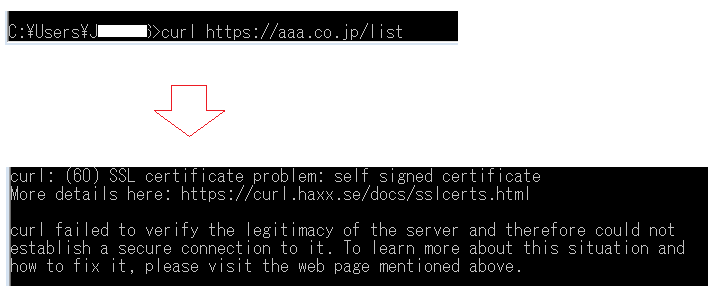
Connect to HTTPS/SSL URLs and ignore SSL certificate errors.
When you try to access a URL protected by an SSL/TLS certificate, if the certificate is incorrect or the CN does not match, you will receive the following error:
curl: (51) Unable to communicate securely with peer: requested domain name does not match the server's certificate. Good news. You can tell cURL to ignore certificate errors using the --insecure flag.
curl --insecure https://yoururl.comConnect using a specific protocol (SSL/TLS)
Very useful for testing whether a particular URL can handshake over a particular SSL/TLS protocol.
To connect using SSL v3
curl --sslv3 https://yoururl.comFor different TLS versions
 curl --tlsv1 https://example.com
curl --tlsv1.0 https://example.com
curl --tlsv1.1 https://example.com
curl --tlsv1.2 https://example.com
curl --tlsv1.3 https://example.com
Download file from FTP server
You can also use curl to download files by specifying a username and password.
curl -u user:password -O ftp://ftpurl/style.cssYou can always use ‘ -v ‘ with any syntax to print in verbose mode.
Using host headers
Host headers are useful for testing target URLs over IP when the requested content is available only if the host header matches. Or if you want to test your application using a load balancer IP/URL.
curl --header 'Host: targetapplication.com' https://192.0.0.1:8080/Want to try using cURL online?
Yes, it is possible using the tools below. You can run cURL remotely.
Online CURL – A lightweight tool to retrieve URLs online, with additional options:
 --connect-timeout
--cookie
--data
--header
--head
--location
--max-time
--proxy
--request
--user
--url
--user-agent
cURL Command Line Builder – This is different. This helps you build curl commands that allow you to enter information in a nice UI, and displays cURL commands at the bottom.
cURL is a utility that helps troubleshoot real-time connectivity issues. I hope the above information is helpful. If you want to learn more, we recommend the Linux Command Line Basics online course.


![How to set up a Raspberry Pi web server in 2021 [Guide]](https://i0.wp.com/pcmanabu.com/wp-content/uploads/2019/10/web-server-02-309x198.png?w=1200&resize=1200,0&ssl=1)


