As the number of online gamers increases, online gaming has become one of the fastest growing industries in the world. However, the proliferation of online gaming fraud is having a major impact on gamers and developers.
Therefore, it is inevitable that game developers will develop anti-cheat solutions aimed at restoring fairness to online gaming communities.
In this article, we will see how anti-cheat downloads can effectively fight back against cheaters and their hacking activities.
Not only that, you will also find simple instructions to install Easy Anti Cheat software before playing the game.

How anti-fair behavior is rampant in online gaming communities
Over 86% of mobile games are directly affected by cheating. And this hurt gaming companies.
That’s because over 77% of online players who have been matchmade with a cheater have stopped playing the game altogether.
Anti-fair behavior within the online gaming community refers to gaining an unfair advantage against other players by ignoring the rules of the game. Cheating is rampant in multiplayer online games, but it can be difficult to spot.
However, as anti-fair practices in online gaming progress, game developers have announced anti-cheat solutions to protect their games from the prying eyes of hackers.
But why do players cheat?

There are two main motivations for cheating in online games:
- social acceptability
- maintaining self-esteem
Everyone is happy with the win. This will make the player do everything possible to win the game, which will increase their self-esteem and make them feel good about themselves.
Next, let’s discuss the causes and effects of cheating.
Cheating occurs by exploiting various vulnerabilities in the game system. Vulnerabilities in game systems are caused by design flaws in the game itself.
Furthermore, if these vulnerabilities are exposed to fraudulent activity, the security of the game is seriously threatened.
The three pillars of game code are confidentiality, integrity, and availability.
- Confidentiality relates to data privacy.
- Integrity ensures that user data remains untampered with
- Availability refers to being able to easily access your data when you need it.
If one of them goes down, it gives cheaters a backdoor to exploit the game.
Moreover, cheating in online games breaks the social contract between players.
When two players agree to play a game together, they agree on some rules for achieving an outcome.
But game designer Holly Gramazio says the social contract becomes invalid when one of them indulges in unfair hacking to increase their chances of winning.
Various types of cheating in online games are often carried out with the aid of third-party software that transforms the results in an unfair manner.
Let’s take a look at how these software give fraudsters an advantage.
#1.Aimbot
Aimbot goes head-to-head with the strongest pros and streamers! ! Show off your solo moves / Tournament highlights [with Japanese subtitles]
Aimbot, as the name suggests, is a computer game bot used by cheaters to achieve high levels of accuracy while shooting in first-person perspective (FPP) shooter games. It can automatically lock onto the target and shoot with incredible accuracy.
#2.World Hacking (
World Hacking)
In real-time games, objects and units have limited visual range. You cannot see beyond that range, which is called the fog of war.
World hacking software allows fraudsters to bypass this mechanism and clearly visualize things beyond visual range.
This provides a clear advantage for those who use this hack to subvert game mechanics.
#3. Lag Switch
Latency is a common phenomenon in peer-to-peer games. This occurs when the data stream between players is interrupted, causing a lag in the game.
However, with artificial lag switches, players can easily cause such stuttering and gain an unfair advantage over their opponents.
#4. Look Ahead
Look-ahead cheating refers to when someone in a P2P game delays their actions in order to learn the other person’s intentions. In this way, they gain an unfair advantage over their opponents and can interfere with the intended outcome of the game.
Nevertheless, game developers have always tried to implement certain solutions that reduce hacking attempts and result in more enjoyable games. Here we will explain the features and installation methods of Easy Anti Cheat, a reliable anti-cheat software.
Easy Anti Cheat – Overview
Easy Anti Cheat is an anti-cheat tool developed by Kamu that prohibits players from playing games in which they have been involved in cheating.
Since its official release in 2006, it has constantly evolved on both the client and server sides.
First, if a potentially unwanted program is detected, users will not be able to play the game. We will then ban the player’s account for a certain period of time according to our rules.
Easy Anti Cheat follows a unique model to provide a safe gaming environment.
Bypassing traditional mass penalty approaches works into a prevention model, preventing players from playing with cheating hacks in the first place.
With that said, let’s take a look at how the EAC works to give you a premium gaming experience.

What does Easy Anti Cheat do?
Cheating ruins the game. That’s why game developers are always striving to find new ways to deal with hackers and cheaters.
Easy Anti Cheat (EAC) is a high-tech software developed by Epic games that attempts to prevent such cheating and ban players who use it.
It is a leading anti-cheat service that runs in the background and tracks and counters hacks in multiplayer games through a hybrid anti-cheat mechanism.
Overall, Easy Anti Cheat allows you to enjoy your games without cheaters.
Easy anti-cheat feature
- The classic tool GIMP Prime95 helps with hardware tests to check the stability of the system.
- Successfully manage high-quality games
- Allow-listed by major antivirus software, so it’s safe to use on your computer
- Led by industry-class experts developing anti-malware technology
- Supports over 400 games
Easy anti-cheat support for popular games
Easy Anti Cheats is widely used in many popular multiplayer games such as 7 Days to Die, Apex Legends, Battlefield 2042, and the list goes on.
Some of the most popular games supported by EAC are:
- (7 days to die) 7 days left until I die
- (Apex Legends) Apex Legends
- (Battalion 1944) Battalion 1944
- (Beyond the Wire) The other side of the wire
- (Code 2040) Code 2040
- (Dragon Ball Fighter Z) Dragon Ball Fighter Z
- (Far Cry 5) Far Cry 5
- (Reign of Kings)
This site has a comprehensive list of all games supported by Easy Anti Cheats.
Note : Easy Anti Cheats cannot be installed on unsupported games.
Can I install and uninstall Easy Anti Cheat Solution separately?
The Easy Anti Cheat solution is automatically installed with supported games and automatically uninstalled when the last game that supports Easy Anti Cheat is removed.
You can also install it manually.
Navigate to the Easy Anti Cheat folder in your game’s installation folder and find EasyAntiCheat_Setup.exe. Launch as administrator and select install.

You can also choose to uninstall the service manually.
Navigate to EasyAntiCheat_Setup.exe in your game’s installation folder and double-click it. You will see an uninstall option at the bottom left of the screen.
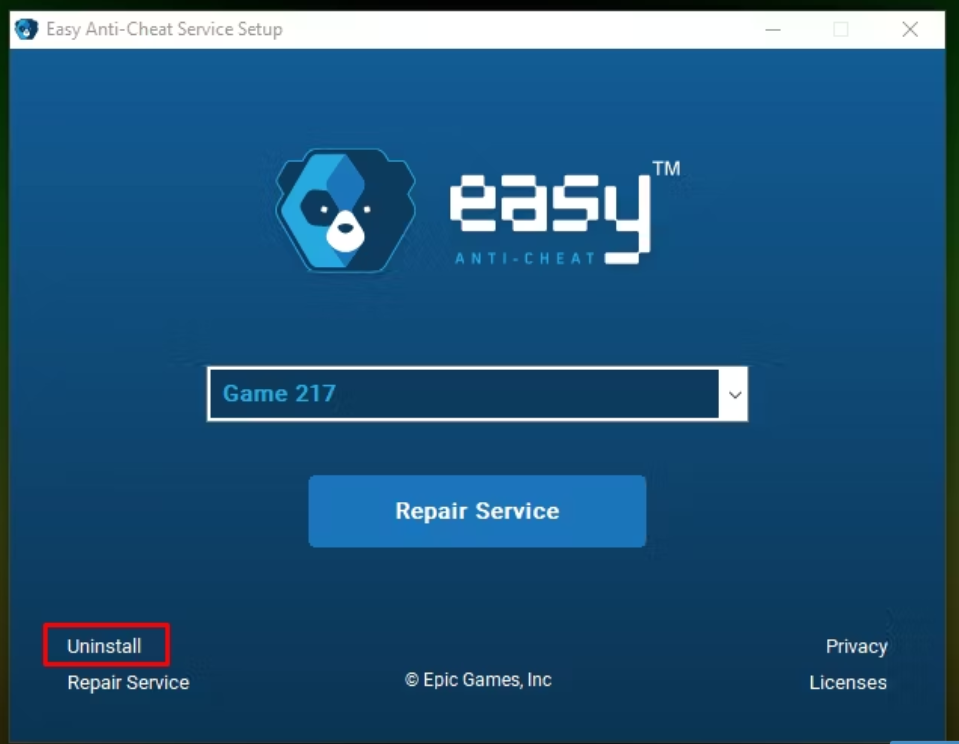
However, as soon as you download the game, the EAC will be automatically installed.
To answer your question, yes, you can install and uninstall the EAC separately.
What to do if you accidentally click No when asked to install Easy Anti Cheat (EAC) with your game
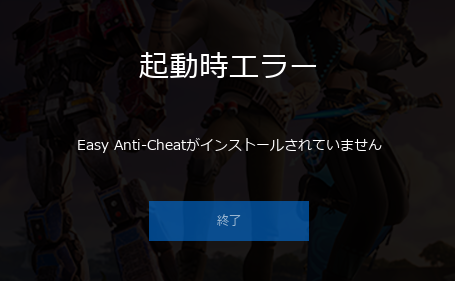
If you accidentally click “No” when asked to install Easy Anti Cheat and a game that supports it, the game will not launch. You cannot play the game without installing it.
To install the solution, follow these steps:
- Close the Easy Anti Cheat launcher
- start the game again
- When the EAC prompt window appears, click Yes to begin.
If you don’t see the prompt, follow these steps:
- Locate the EasyAntiCheat_Setup.exe file in the game’s installation folder.
- Double click on the file
- Click the “Install Easy Anti Cheat” button.
- Enjoy the game safely
Steps to locate the EasyAntiCheat_Setup.exe file
If you have difficulty installing the EAC solution for your game, follow these simple steps to locate the EasyAntiCheat_Setup.exe file.
Step 1: Install games supported by Easy Anti-Cheat. For example, open a Rust game.

Step 2: Right-click on it and select “Manage” and finally click to browse local files.
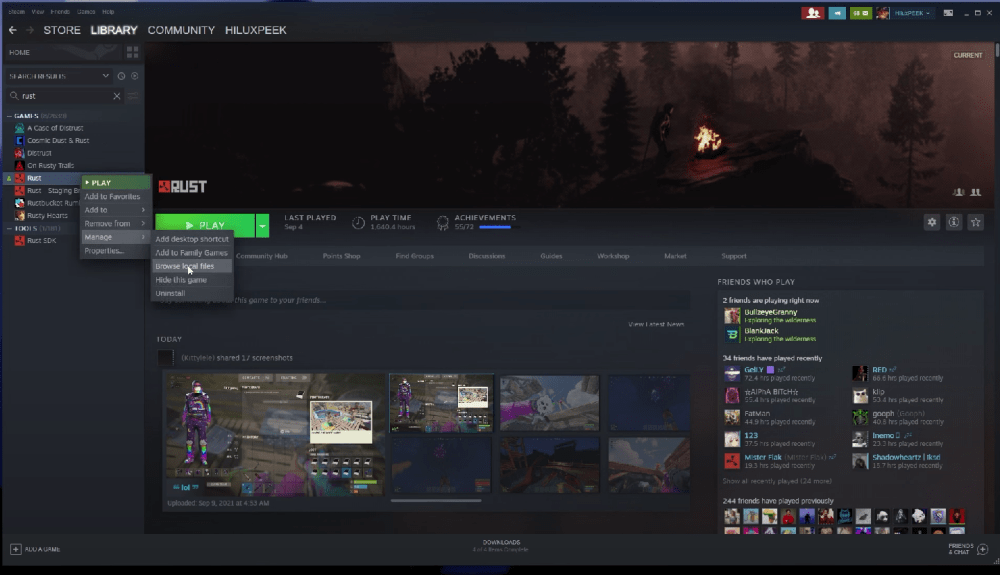
Step 3: Once you reach the game’s local files, double-click the Easy Anti Cheat file. If you can’t find the file, try searching for it in the search bar. It may be buried under some files.
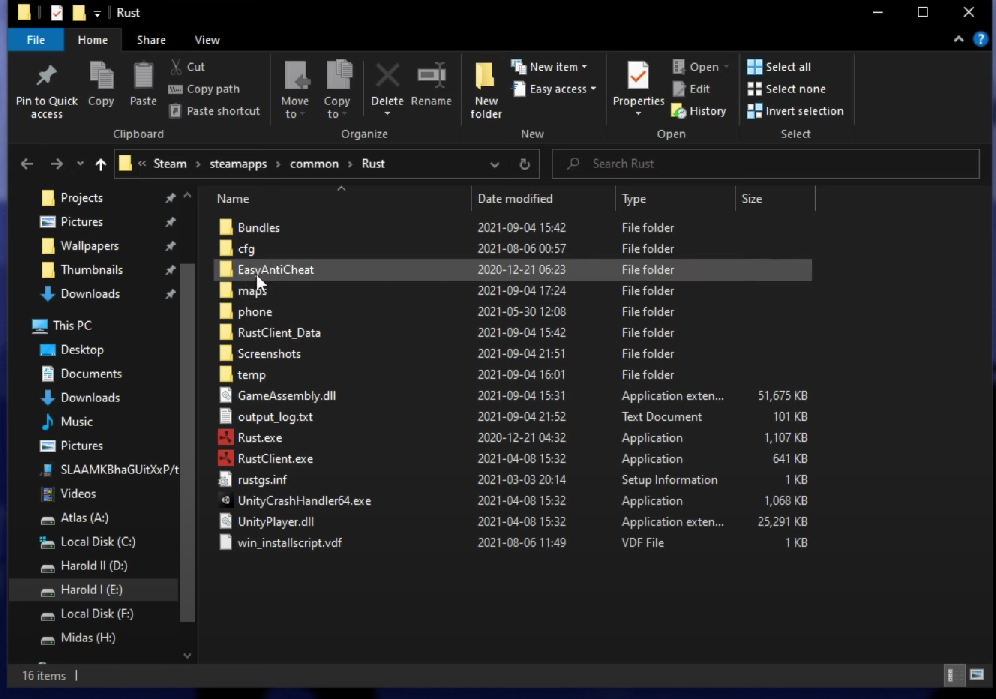
Step 4: After clicking on the Easy Anti Cheat file, search until you find the EasyAntiCheat_Setup.exe file.
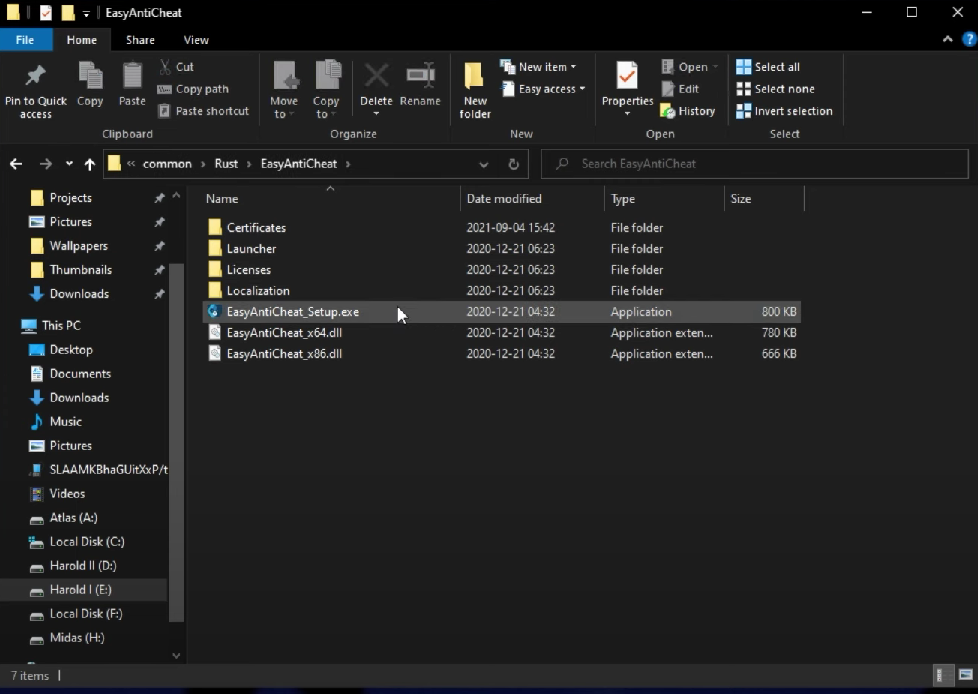
Step 5: Once opened, the current game code will be displayed on the screen. From here you can manually install the EAC solution.

summary
Cheating can ruin your online gaming experience. Cheating in online games has many facets, but anti-cheat solutions have evolved to offer pioneering security features to help you enjoy the perfect gaming experience.
Similarly, Easy Anti Cheat is your best bet to protect yourself from hackers who try to disrupt the game mechanics with dirty tricks. This is a solution designed by gamers, for gamers.
This makes Easy Anti Cheat a must-have software for your computer if you are an avid gamer.
If you are a professional gamer, you may want to consider purchasing a good gaming desk.


![How to set up a Raspberry Pi web server in 2021 [Guide]](https://i0.wp.com/pcmanabu.com/wp-content/uploads/2019/10/web-server-02-309x198.png?w=1200&resize=1200,0&ssl=1)


