Call center scripts allow you to provide accurate and engaging customer service at every customer touchpoint.
With the service industry adding trillions of dollars to global GDP, call centers are a booming business. According to the World Bank , in 2020 it will be 65.70%. Similarly, the call center market size should grow from $340 billion in 2020 to $496 billion in 2027, according to a report from Statista .
Call centers are fast-paced workplaces. Every second counts here. Therefore, call center managers utilize call center scripts to coach new and trainee call center agents. Properly written and used scripts can save time, effort, and avoid mistakes.
However, writing such scripts can be a difficult task, whether you are starting a new call center or already own one.
If you feel confused, don’t worry anymore. In this article, we will explain call center scripts from a 360 degree perspective. You’ll also learn tips and tools for starting a call center business.

What is a call center script?
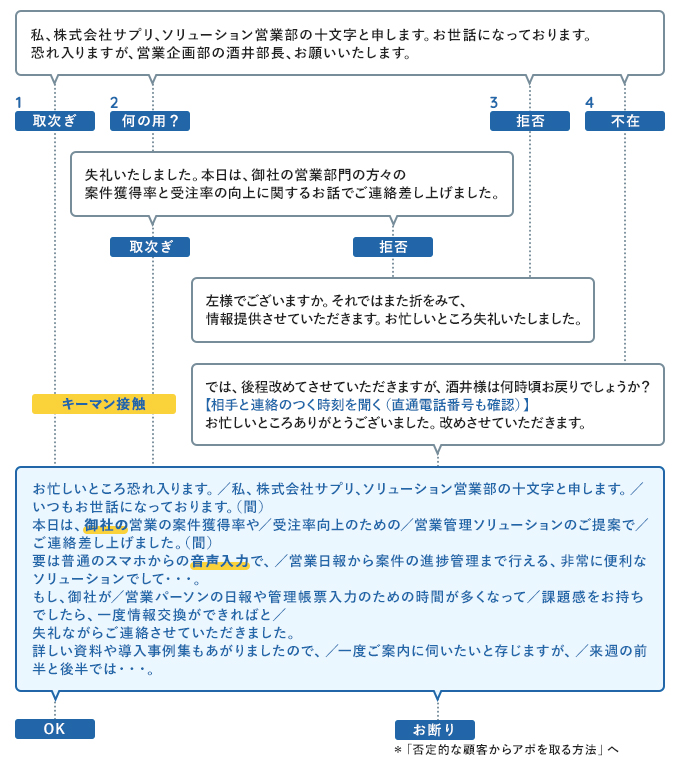
A call center script is a document that contains various conversations between a customer support agent and a fictitious customer in a real-world scenario. It usually outlines the following etiquette or workflow when calling customer service.
- Greetings to customers
- Paraphrasing consumer-reported issues
- If the representative is on a cold call, explain the purpose of the call
- Customer information collection for call center CRM
- How to request a hold for a customer
- Return to call with solution and how to resolve it
- Confirm that the results are satisfactory to the customer
- Upsell or upgrade service
- end the call
Apart from the above, a call center script can contain a lot of other information.
Think of yourself as supporting a US bank or credit card company. If so, you must use the following compliance language during calls to comply with the legal regulations in that country.
- mini miranda
- Fair Debt Collection Act
Most call center scripts may contain business-sensitive information. Therefore, call center companies must apply appropriate business data security guidelines to protect their documents.
New or trainee customer support agents typically practice written conversations many times before answering actual calls.

How can scripts help beginners?

Provides call workflow
Most newcomers to customer care centers have no idea what to do on a live call. Therefore, call center trainers use scripts to train new participants. From call start to call end, scripts contain everything an agent needs to successfully end a call.
Professional language and tone
New hires can learn business speaking, vocabulary, and tone from call center scripts. These are usually highly standardized scripts. If call center agents follow the script diligently, they won’t make mistakes.
Streamline all agents
When all teams in a call center business follow the same script, calls are initiated, explained, troubleshooted, and ended in the same way across teams. This creates a harmonized and organized customer care call handling flow.
Avoid errors when making calls
If agents follow scripted language, there is no need to use non-standard language during calls. Therefore, call centers can avoid errors in language, grammar, business workflow, troubleshooting, etc.
Faster problem resolution
Call center scripts train agents to follow a roadmap when troubleshooting and selling products on calls. Scripting experts design expressions in a way that saves time and effort. Therefore, agents save time by following standard scripts and meet Average Call Handling Time (AHT) metrics.
Reduce training time
If you don’t use call center scripts, you’ll need to send your trainee call center agents through an expensive and time-consuming business language speaking course. We also provide training on the technical aspects of the call center. However, scripts make it easier for agents to understand the words they need to use and get them ready faster.
Increase in sales
Standardized scripts reduce call handling time. Therefore, agents can handle more calls in a day. After that, your income will also increase.
quality check
Quality audits are an essential part of any call center business. Most auditors use call center scripts to ensure agents don’t miss important verbiage, call flow steps, troubleshooting processes, etc.
Call center scripts: best practices
It takes years of experience to create the perfect call center script that works. It doesn’t have to be such a difficult experience. Follow these tips to create great scripts for your agents.
Leave room for flexibility
You need to keep your scripts flexible and provide proper training on tools and products so your agents can effectively deal with unexpected situations.
Flexibility means agents can use professional and precise language that goes beyond the script.
See previous recordings
The best way to create different call center scripts is to review previous calls and service tickets.
Recordings can also reveal how an agent is executing a script or how a customer is reacting. If you find anything that can be improved, please do so.
use a polite tone
Customer service is all about etiquette and courtesy. To show empathy for your customers, you should include plenty of polite words like “please,” “be kind,” “thank you,” and “you’re welcome.”
Even highly irritated customers may become calmer and kinder when an agent greets them in a polite manner and assures the customer that they are there to resolve their issue.
Scripts should be respected
Scripts should be generalized so that agents show respect to all customers. Don’t create scripts for different classes of customers based on the caller’s contribution to the business.
For example, an agent might receive a call from a customer who is a subscriber to a competitor. This does not mean that agents can abuse callers. The person on the other end should respectfully explain to the caller that they dialed the wrong number.
Get to the point quickly
Scripts should be simple so that agents can start resolving issues right away. Unnecessarily long customer service conversations can cause problems in a number of ways.
Create scripts for different scenarios
Review customer service tickets quarterly. Identify the most common problems and create a scripting language to address them. New participants will find these scripts very useful as they will see that they can solve all common problems faced by customers.
Think like a customer
When writing call center scripts, think like your customers. Avoid using too much jargon or jargon in your scripts. Please try to speak in a light manner so that the customer does not feel uneasy.
Include a rebuttal response
The key to success is that the agent, not the customer, always leads the call. In some cases, customers can be unreasonable. In these situations, you should include a counter-response so that your agent can professionally address the false accusation.
Make sure your agents have enough practice
Call center scripts are only useful if agents practice their language. Therefore, create a team of customers and agents within a group of new participants. Then, have them practice the script with each other regularly during the training period.
Create a separate script
The call center handled many calls including incoming, outgoing, cold calls, service updates, and upsells. You need to create separate call center scripts according to your business workflow for such calls.
One script may not work effectively in all the above scenarios. For example, incoming calls do not require customers to authenticate. Because the customer initiates the call from their own account, and the CRM automatically verifies that it’s a genuine customer calling.
However, for outbound calls, customers must be authenticated before disclosing account-related issues.
Another example is a sales call. The agent must now read the required disclaimer before continuing with the call. Most countries do not require a disclaimer. However, US and UK consumer regulations have clear compliance requirements for such marketing activities.
Call center software you can try
Here are some call center tools used by most call centers.
#1.Air call
Aircall provides a robust business phone system on the cloud, along with other standard features that you may need in a brick-and-mortar or remotely operated call center. This tool facilitates extensive collaboration on the cloud, making it easy to manage your hybrid workforce from anywhere you have an internet connection.
#2.Cloud talk
CloudTalk is an online call center software that allows you to virtually set up multiple call centers. The web app can be used seamlessly with on-site and remote customer support centers. Additionally, you can integrate this tool with other call center applications such as Salesforce, Pipedrive, and Zendesk.
summary
Entering the call center business or career is the right choice. Just know that to succeed in this industry, you must learn how to write and use call center scripts the right way. The most important things to know should have already been explained in the article above.
Also read our articles on the best call tracking software and the best call center dialer to jumpstart your call center business.


![How to set up a Raspberry Pi web server in 2021 [Guide]](https://i0.wp.com/pcmanabu.com/wp-content/uploads/2019/10/web-server-02-309x198.png?w=1200&resize=1200,0&ssl=1)


