After 20 years of observing enterprise software development from the front lines, undeniable trends over the past few years are clear. It’s about migrating your database to the cloud.
I was already involved in several migration projects, where the goal was to migrate an existing on-premises database to an Amazon Web Services (AWS) cloud database. You can see how easy this is if you look at the AWS documentation, but my point here is that implementing such a plan is not always easy and can lead to failure in some cases. That means there is.
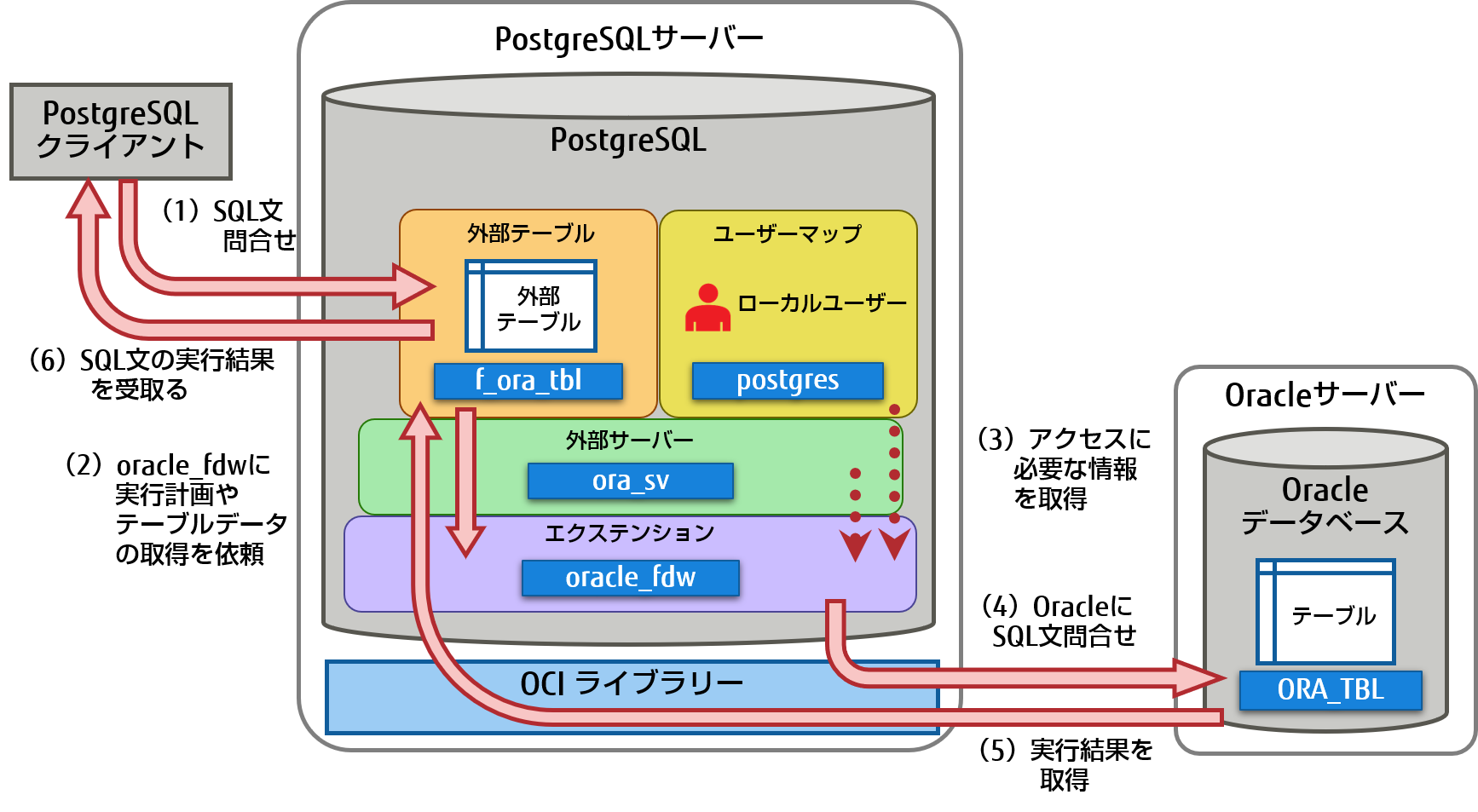
This post covers real-life experiences when:
- Source : In theory, it doesn’t really matter what the source is (you can use a very similar approach for most of the most popular DBs). Oracle has been the database system of choice for large enterprises for many years. That’s my focus.
- Target : There is no reason to be specific on this aspect. You can choose any target database in AWS and this approach will still fit.
- Mode : You can do a full refresh or an incremental refresh. Batch data loads (source and target states are deferred) or (near) real-time data loads. I’ll touch on both here.
- Frequency : A one-time migration followed by a complete switch to the cloud, or a period of transition where data needs to be up to date on both sides at the same time. This means developing daily synchronization between on-premises and AWS. The former is simpler and makes much more sense, while the latter is requested more often and has far more breakpoints. We will discuss both here.
Problem description
Often the requirements are simple.
Since we want to start developing the service within AWS, please copy all the data to the “ABC” database. Quick and easy. Now I need to use data in AWS. Later on, consider which parts of the DB design need to be changed to accommodate your activities.
There are some things to consider before proceeding.
- Don’t jump too far into the idea of ”copying what I have and dealing with it later.” So, yes, this is the easiest and quickest to complete, but it also creates fundamental architectural issues that would be impossible to fix later on without majorly refactoring large parts of the new cloud platform. problems may occur. . Imagine that the cloud ecosystem is completely different than the on-premises ecosystem. Several new services will be introduced in the future. Naturally, people will start using the same thing in completely different ways. Replicating on-premises state one-to-one to the cloud is almost always a bad idea. This may apply to your particular case, but be sure to double-check.
- Question your requirements with meaningful questions such as:
- Who is the typical user of the new platform? On-premises, they can be transactional business users. In the cloud, you can be a data scientist or data warehouse analyst, or the primary user of your data can be a service (Databricks, Glue, machine learning models, etc.).
- Do you expect normal day-to-day operations to continue after moving to the cloud? If not, how do you expect them to change?
- Are you planning for your data to grow significantly over time? The answer is probably yes. Because that’s often the single most important reason to move to the cloud. New data models must be prepared to accommodate it.
- End users are expected to think about the typical expected queries that the new database will receive from users. This defines how much the existing data model needs to change to remain relevant to performance.
Migration setup
Once you have selected your target database and thoroughly discussed your data model, the next step is to become familiar with the AWS Schema Conversion Tool. There are several areas where this tool can be useful.
- Analyze and extract the source data model. SCT reads the contents of your current on-premises database and first generates a source data model.
- Suggests a target data model structure based on the target database.
- Generates a target database deployment script to install the target data model (based on what the tool detects from the source database). This generates a deployment script, after which your database in the cloud can load data from your on-premises database.

Here are some tips for using schema conversion tools.
First, the output is rarely used directly. We think of it as a reference result that you can make adjustments to based on your understanding and purpose of the data and how you want to use it in the cloud.
Second, in the past, tables were probably selected by users who expected short, short results about specific data domain entities. But now the data can be selected for analytical purposes. For example, database indexes that previously worked in on-premises databases are no longer useful, and there is no obvious performance improvement for the DB system associated with this new usage. Similarly, you may want to partition your data differently on the target system as you did before on the source system.
We also recommend that you consider doing some data conversion during the migration process. This basically means changing the target data model for some tables (so that the tables are no longer 1:1 copies). Later, you will need to implement the conversion rules in the migration tool.
Configuring the migration tool
If the source and target databases are of the same type (e.g., on-premises Oracle vs. Oracle on AWS, PostgreSQL vs. Aurora Postgresql, etc.), it is best to use a specialized migration tool that the specific database natively supports (e.g. : Data Pump Export and Import, Oracle Goldengate, etc.).
However, in most cases, the source and target databases are not compatible, so the obvious tool of choice is AWS Database Migration Service.
AWS DMS essentially allows you to configure a list of tasks at a table level that defines:
- What is the exact source DB and table to connect to?
- Specification of the statement used to retrieve data in the target table.
- Conversion tool (if available). Defines how source data is mapped to target table data (if not 1:1).
- What is the exact target database and table to load the data into?
DMS task configuration is done in an easy-to-use format such as JSON.
In the simplest scenario, you simply run the deployment script on the target database and start the DMS task. But that’s not all.
One-time complete data migration
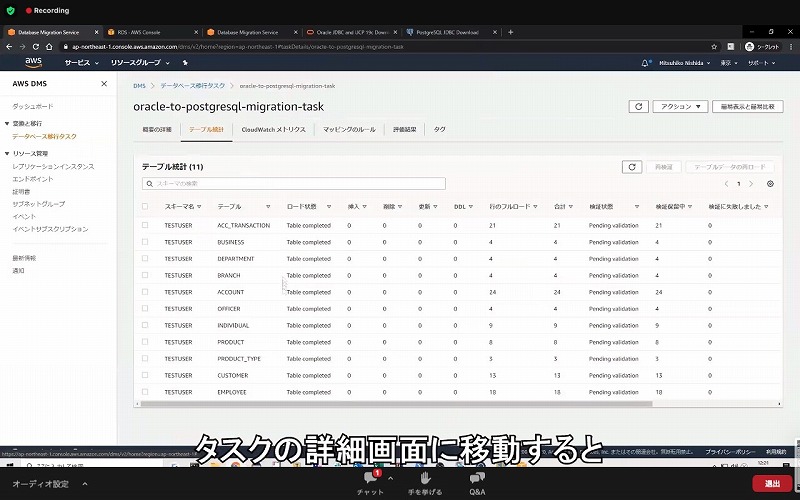
The easiest case to perform is when the request moves the entire database once to the target cloud database. Basically, what you need to do is:
- Define a DMS task for each source table.
- Please specify the DMS job configuration correctly. This means setting up proper parallelism, variable caching, DMS server configuration, DMS cluster sizing, etc. This is usually the most time-consuming phase, as it requires extensive testing and fine-tuning of optimal configuration conditions.
- Verify that each target table is created (empty) with the expected table structure for the target database.
- Schedule the time frame during which data migration will occur. Before doing so, make sure you have a sufficient time window for the migration to complete (by running performance tests). During the migration itself, the source database may be limited from a performance standpoint. It is also expected that the source database will remain unchanged while the migration is running. Otherwise, the migrated data may differ from the data stored in the source database after the migration completes.
If DMS is properly configured, nothing bad can happen in this scenario. All source tables are retrieved and copied to the AWS target database. The only concerns are the performance of the activity and ensuring that every step is properly sized so that the activity does not fail due to lack of storage space.
Daily incremental sync
This is where things start to get complicated. That is, if the world were ideal, it would probably always work fine. However, the world is never ideal.
DMS can be configured to operate in two modes:
- Full Load – Default mode described and used above. DMS tasks start when you start them or when they are scheduled to start. Once completed, the DMS task is complete.
- Change Data Capture (CDC) – In this mode, DMS tasks run continuously. DMS scans the source database for changes at the table level. When a change occurs, it attempts to immediately replicate the change to the target database based on the configuration in the DMS task associated with the changed table.
If you use CDC, you have yet another choice to make. That is how CDC extracts delta changes from the source DB.
#1. Oracle Redo Log Reader
One option is to choose Oracle’s native database redo log reader. CDC can leverage this to capture changed data and replicate the same changes to the target database based on the latest changes.
While this may seem like an obvious choice when dealing with Oracle as a source, there are pitfalls. Because the Oracle Redo Log Reader leverages the source Oracle cluster, it directly impacts all other activity running within the database (in fact, it creates active sessions directly within the database). database).
The more DMS tasks you configure (or the more concurrent DMS clusters you have), the more you will need to increase the size of your Oracle cluster. Basically, it adjusts the vertical scaling of the primary Oracle database cluster. This definitely impacts the total cost of the solution. The impact is even greater if your project has long-term daily syncs.
#2. AWS DMS Logminer
Unlike the above options, this is a native AWS solution to the same problem. In this case, DMS does not affect the source Oracle DB. Instead, copy the Oracle redo logs to the DMS cluster and perform all processing there. It saves Oracle resources, but requires more operations and is therefore slower. Also, as you can easily guess, custom readers for Oracle redo logs are probably slower than Oracle’s native readers.
Depending on the size of your source database and the number of daily changes, the best-case scenario could result in near real-time incremental synchronization of data from your on-premises Oracle database to your AWS cloud database.
Other scenarios may still not result in near real-time synchronization, but can be achieved by adjusting or experimenting with the performance configuration and parallelism of the source and target clusters (between source and target). You can get it as close as possible. Amount of DMS tasks and their distribution across CDC instances.
You may also want to know what changes to the source table (such as adding a column) that CDC supports, since not all possible changes are supported. In some cases, the only option is to manually modify the target table and restart the CDC task from scratch (all existing data in the target database will be lost in the process).
When things go wrong, no matter what happens
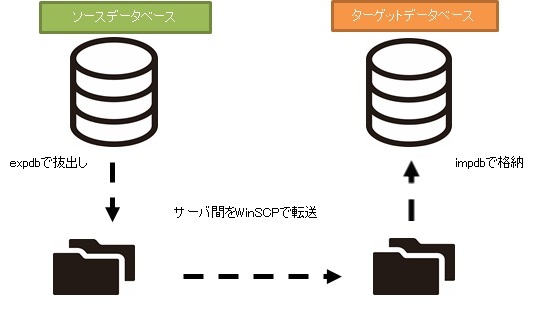
I learned this the hard way, but there is one particular scenario related to DMS where the daily replication promise is difficult to meet.
DMS can only process redo logs at a fixed, defined rate. It doesn’t matter if you have more DMS instances running your tasks. Still, each DMS instance only reads the redo log at a single defined rate, and each must read the entire redo log. It doesn’t matter whether you use Oracle Redo Logs or AWS Logminer. Both have this limitation.
CDC will not work if the source database contains a large number of changes within a day and the Oracle redo logs grow very large each day (for example, 500GB or more). Replication will not complete by the end of the day. Some of the outstanding work will be brought in the next day, and new change sets are already waiting to be replicated. The amount of unprocessed data is increasing every day.
In this particular case, CDC was not an option (after running many performance tests and attempts). The only way to ensure that all delta changes from at least the current day were replicated on the same day was to approach it like this:
- Isolate very large tables that are rarely used and replicate them only once a week (for example, on the weekend).
- Configure replication of smaller, but still large tables to be split between multiple DMS tasks. In the end, a single table is migrated in parallel by 10 or more separate DMS tasks, ensuring clear data partitioning between DMS tasks (this includes custom coding), and executed daily. .
- Add more instances of DMS (up to four in this case) and divide the DMS tasks evenly between them. This means not only by number of tables but also by size.
Basically, we used DMS full load mode to replicate daily data. That was the only way to achieve at least same-day data replication completion.
It’s not a perfect solution, but it’s still there and works just as well after all these years. It might not be such a bad solution after all. 😃


![How to set up a Raspberry Pi web server in 2021 [Guide]](https://i0.wp.com/pcmanabu.com/wp-content/uploads/2019/10/web-server-02-309x198.png?w=1200&resize=1200,0&ssl=1)


