Visualize how you want users to use your product.
# What is a user flow?
User flows are defined by the steps that users take when interacting with your product. This product includes everything from websites and applications to the services you provide and the products you sell.
If you went to the supermarket to buy eggs, what would you do? Enter through the entrance door and head towards the dairy section. Once you have the eggs, go to the checkout counter. Pay for the product and exit through the exit door. This was the process of purchasing the desired product.
Similarly, when a user follows a specific path to achieve a specific set of goals or perform a task, that path becomes a user flow.
# What is the User Flow Tool?
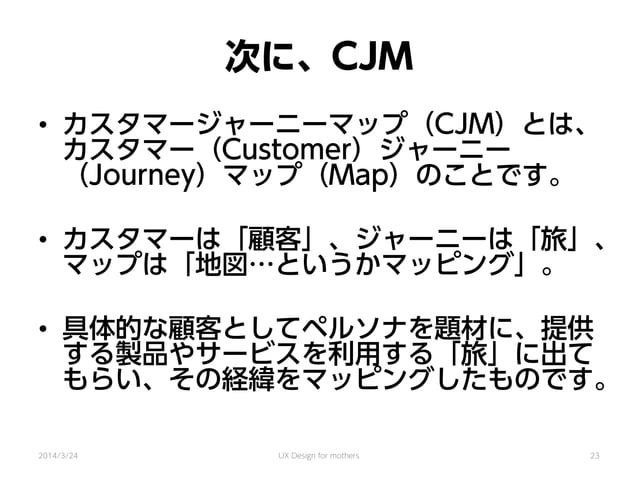
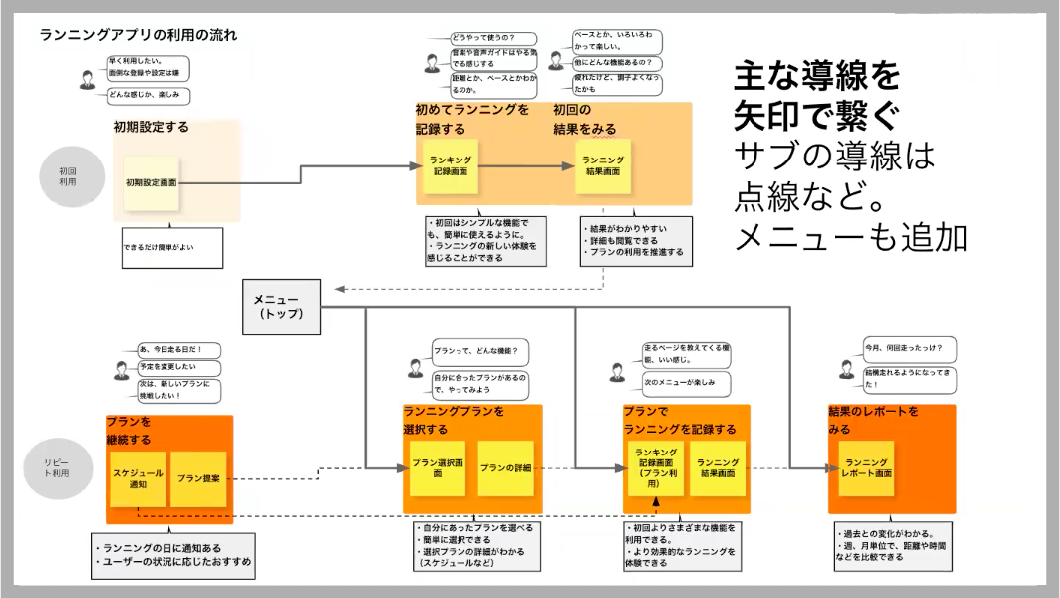
The user flows we’ve been talking about so far are completely theoretical. But to fully understand the interactions a user might have with your product, you need a visual representation of all possible user flows. That’s where user flow tools come into play. The User Flow Tool is a tool that provides a visual representation of user flows. These tools provide a nice diagrammatic representation of the user flow.
# Why is it essential to use user flow tools?
You may be wondering why using a user flow tool is so important.
Ask yourself why you are creating your product (website, application).
You want to give your users a great experience, right? To do that, you need to understand every interaction your users might have with your product. A schematic diagram of all possible interactions is provided by user flow tools. Once you understand your user flow, you can start improving the user experience.
wire flow
Wireflow is not only available online, but it is also an open source tool. Helps you prototype user flows. The best part is that you don’t need Photoshop skills to create user flow diagrams with Wireflow. It also offers the option of using over 100 customized built-in graphics.
Wireflow believes in real-time collaboration. This means you can work on designs with friends, colleagues, and group members. So double your efforts. Double the fruit!
Wireflow allows you to design your project room. These virtual rooms allow you to add anyone and even set the privacy of your project room as you wish.
In short, it’s a very easy-to-use tool with many simple yet important features. The developers of this tool aim to simplify the process of designing user flows.

Milo
From brainstorming with cross-functional teams to gathering feedback for multiple iterations, we create product experiences that are a little magical.
Miro is the #1 collaborative whiteboarding platform for teams of all sizes, trusted by over 45 million users worldwide. Create a single visual source of truth by centralizing product specifications, wireframes, UX flows, and more on a whiteboard that never needs to be erased. Break free from text-only roadmaps with color coding, grouping, and eye-catching templates.
Get direct feedback by allowing stakeholders to comment. Explore over 300 templates and powerful integrations with your favorite tools. Miro is trusted by over 45 million users worldwide and has a free plan that lasts forever. Monthly subscriptions start at $8 per month.

Timbury
Timblee helps you create user flow diagrams in the very early stages of product development. Considering that mobile phones have become a more important part of our lives, Timblee works well on mobile phones as well as on the web. Timblee aims to eliminate the need for complex tools in the early stages of user experience planning.
Although it’s not completely free, you can try it for free for the first 14 days so you can decide if it’s worth your money. Isn’t it amazing?
It hosts several features that allow you to design sitemaps along with flow diagrams. It offers a relatively easy-to-use drop-and-drag canvas, making it ideal for beginners. One of its notable features is the ability to share your designs with others. Other people can see your work and give feedback, even if they don’t have a Timblee account.

Microsoft Visio
The name indicates that it is part of the Microsoft family. Microsoft Visio is a wide-spectrum vector graphics application. In other words, you can do a lot of other things with Visio besides designing flow diagrams. By now, one thing should be clear that is only available to Microsoft users.
There are many templates available, and you can choose the one you like. The professional version has even more templates and layouts. You can also link data sources to diagrams. What’s interesting about Microsoft Visio is that its interface is similar to MS Office. Most of us have been using MS Office since childhood, so it’s not hard to get your hands on Visio.
Like all Microsoft products, Visio isn’t free. A 30-day free trial may be available.
Draw.io
Draw.io is a web-based online application for designing flow diagrams. All of its general features are free, but if you want to use some high-end integrations you have to pay. You will be given the option to save the diagram to Google Drive, Dropbox, or your computer. This is one of the most popular browser-based diagramming applications. You can import a variety of file formats into Draw.io, including Lucidchart, Gliffy, and more.
Several templates are provided. There is a rich library of shapes from which you can choose what you need. No registration is required to get started with Draw.io. Plus, you can download the desktop app and work freely even when you’re offline. Compatible with almost all browsers and works well on mobile devices.
smart draw
Smartdraw is a flow diagram tool available online and can also be downloaded for Windows. The developers of Smartdraw claim that Smartdraw is even easier than Visio. In other words, it claims to be a cheaper and compatible alternative to Visio. You can import and export diagrams in the same format as Visio. It can also be run on Mac. More than 70 different templates are provided for different diagram types.
Although Smartdraw is not completely free, it is quite affordable compared to its peers.
One of its notable features besides ease of use is that it offers automatic formatting. Automatically format diagrams to remove all kinds of mistakes and flaws. Easily integrate Google apps and MS Office tools.
omni graffle
OmniGraffle is available for Mac as well as iOS. It is a relatively easy to use application. Like other Mac applications, it’s a bit pricey. There is a professional version in addition to the standard version. It offers a huge number of basic tools, including pen, line, shape, and text tools. On the other hand, the list of features offered is quite long. Professionals will be happy to use such high-end features.
The main feature that sets this apart is that it offers design layers. Design layers allow users to visualize their designs.
Kaku
Cacoo is a popular tool. Cacoo allows you to design flow diagrams along with other types of diagrams. Cacoo developers believe in teamwork. Cacoo allows you and your teammates to work on and edit diagrams at the same time. It also provides an opportunity to comment on your teammates’ work. All of this is on your canvas.
Cacoo has two working modes. Start with your idea from scratch or choose from hundreds of pre-built templates.
A 14-day free trial is provided and you must pay for the service after the trial ends. Cacoo’s canvas is very easy to organize. You can also manage your team together.
justin mind
Justinmind is a prototyping tool. Compatible with both. web and mobile. It provides several mobile gestures and web interactions to make your design easy and fun. Numerous transitions and animations are also available to make your designs even more interactive.
You can create dynamic data lists. We also support user testing using data. Preview your design instantly with this tool. This preview will help you remove unnecessary features. Therefore, you can save time and effort. Link and export your design to HTML with a single link. Finally, you can invite clients and team members to view the design to avoid misunderstandings at a later stage.
mock plus
Mockplus is also a free prototyping tool. The tool is very easy to use with a simple interface. Mockplus is available for iOS, Android, and Web. There are over 200 ready-made components and templates to choose from. Approximately 3000 vector icons are provided. All of this will help you work even faster.
However, don’t assume that just because it includes large icons doesn’t mean you can’t customize them the way you want. You can create customized libraries with icons and interactions of your choice. It also offers a classic drag-and-drop approach for simple designs. It supports instant preview and allows you to link your designs to HTML.
flow map
Flowmapp is an online tool for designing flow diagrams and visual sitemaps. Features an interactive work board. Share boards with teammates and clients to foster real-time collaboration. In addition to that, you can also transfer the project to someone else after your role is finished. Plan your designs professionally with Flowmapp. Then, you can use Flowmapp’s helpful tools to turn those plans into reality.
Supports helicopter view. This view gives you a top-down view of your project and gives you a new approach to design.
Users are offered a 14-day free trial.
lucid chart
This tool provides a workspace. It combines features from three different processes: diagramming, data visualization, and collaboration. Facilitate networking so you can collaborate on projects in real time. You can plan and brainstorm, then design.
Lucidchart only runs in browsers that support HTML5. This feature suggests that no third-party updates are required.
There is a free version that gives you access to all the basic features of Lucidchart. On the other hand, the paid version includes all the best features.
conclusion
Imagine you are trying to write an essay. You have the plot of your essay drawn out in your head, but you don’t have a pen and paper to write it down. If you don’t write your essay, you won’t be able to proofread it and fix any mistakes. Can I submit it to my teacher without proofreading it?
The same goes for situations where you have your user flow all planned out in your head, but don’t have the tools to actually visualize and design the flow. You can’t work on improving user experience (UX) without visualizing user flows.
Therefore, we list the requirements needed to design a user flow. Note that different tools offer different capabilities. Next, choose a user flow tool based on your needs.


![How to set up a Raspberry Pi web server in 2021 [Guide]](https://i0.wp.com/pcmanabu.com/wp-content/uploads/2019/10/web-server-02-309x198.png?w=1200&resize=1200,0&ssl=1)


