Google always has many projects on its plate, but only a few special projects get the honor of being passed on to commercial development. One such special project is Fuchsia OS. It has been available to the public since 2016, but there has been little to no interest from consumers. It is an operating system that aims to unify the entire gadget ecosystem under one umbrella. Fuchsia OS is designed to run not only on smartphones and desktops, but also on any smart device part of an IoT network, and like Apple, Google wants to provide a similar unified experience across all platforms. It seems like it is. And with the rise of high-speed mobile communications through 5G, this will become even more effective.
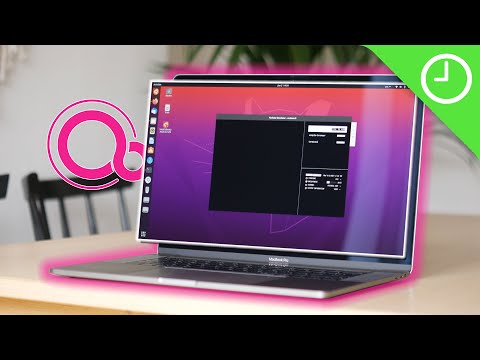
At its core, Fuchsia OS is hardware spec agnostic and provides a uniform experience across all devices . A modular approach allows manufacturers to selectively choose Fuchsia elements based on device, while developers can push out small updates just to implement new features. Fuchsia not only provides a unified operational interface, but can also ultimately assume the role of a single operating system to manage all machines.
This may have given you enough hints that Google is planning to replace Android with Fuchsia and even integrate Chrome OS , but this article provides more details about the OS in development and Learn how Google is making Android possible. The world of technology is in a storm. First, let’s learn what role Google envisions for the OS and the ideas that inspired it.
About Fuchsia OS
Google may be planning to wipe Android off the face of the earth, or at least from Gen Z’s memory, with Fuchsia OS, but the OS’s biggest and most sought-after role is a consistent, unwavering one. It’s about providing an experience . Applies to all devices regardless of specifications, size, and utility .
Why fuchsia?
Apple may be best known for its iPhones and Macs, but it has more software tricks up its sleeve than it’s revered for. The exclusivity of the company’s software has not only helped Apple maintain a strong lead in the industry, but also helped Apple avoid a management conflict that resulted in founder Steve Jobs being fired from his own company. It also helped me get back on my feet. Now, Google is trying to accomplish that, but in a different way, by adhering to open source principles .
The brainchild of Google developers, Fuchsia is expected to be a big part of all smart machines and gadgets in the near future. This uniformity across all possible platforms makes users feel left out when switching to a new smartphone brand or moving from browsing the web or using the same apps on one device to another. This will no longer happen . Virtually every smart thing you can think of—smart speakers, security cameras, thermostats, air and water purifiers, helper robots, and robots that assist helper robots—regardless of its form, virtually every smart thing you can think of delivers the same user experience.
Designed for audio interaction
While increased software exclusivity is good for Google financially, another key reason for choosing the childish Fuchsia over a modified version of Android is that the new OS will rely on voice-based experiences . Rather than focusing on interactions that leverage voice-based experiences . touch. This means that Fuchsia is suitable for devices with displays, and even devices with displays, whether or not they support touch interfaces .
In this era of virtual aids, voice has taken center stage, and Google Assistant is one of its top contenders. We’ve added amazing features like the ability to receive routine and basic calls on your behalf. These features may become components of Fuchsia. Additionally, focusing on voice rather than touch gives tech giants the freedom to implement visual elements without having to worry about whether they are properly optimized for each screen size and shape.
Start fresh without updating
Android was primarily designed for smartphones with QWERTY keyboards, and then evolved to include touch controls. Although it’s already 10 years old and supports many devices beyond just smartphones and tablets, it still relies heavily on touch interactivity. So if Google wants to prepare for the challenges of the next decade, starting from scratch seems like a better option than re-modifying Android to suit new needs.
Separately, Google may be trying to distance itself from the Oracle lawsuit. The two software giants are locked in a battle of nerves over royalty issues related to Google’s use of the open-source Java application programming interface, or API, in developing early versions of Android. The two giants have been at odds since 2010, and according to the last court order, Google was required to pay $8.8 billion to Oracle, but Google has challenged this order and is currently preparing a review request. .
Google already retired bad APIs in 2015, but moving to a new ecosystem far away from the ghosts of Java and Oracle not only gives Google more freedom to explore and thrive; You’ll be back to a blank page with Oracle. perhaps. In addition to this, in order to distance itself from Linux and continue to focus on the niche market it has created, Google is using its own kernel called “Zircon” instead of the Linux kernel used by Android. .
In addition to this, Fuchsia OS also allows Google to address issues with devices running on outdated software . You will learn about that possibility in the next section.
zircon kernel
Part of Fuchsia’s product’s novel approach is a new kernel used for the operating system. This kernel is called Zircon and is coded in C++ rather than the C used to create Linux kernels. Essentially, Zircon is a microkernel that, in layman’s terms, better manages the interaction between software and hardware, resulting in more efficient use of resources such as processing power and network speed .
The Zircon kernel is not limited to smartphones and PCs, but supports a wide range of hardware, including digital cameras, smart speakers, other IoT devices, and desktops and laptops of all shapes and sizes. It also helps Google push updates to all your devices at the same time, ensuring that every device you interact with is always up to date. If this is true, zircon kernels could help build a utopia for geeks.
And unlike the Linux kernel, which is written solely to meet hardware requirements, Zircon is updated regularly so your device is immediately up to date with the latest updates.
Fuchsia OS: Modular approach
Fuchsia takes a modular approach. This means that the code is divided into building blocks or “packages” instead of one big stack. Everything, including system files, is made up of these small chunks, aka packages, and can also be made up of even smaller “components.” These components consist of only the code necessary to perform a single task . A component cannot accomplish much on its own, but when grouped with other components, it enables executives to execute processes. Additionally, there are two types of components: “agents” that run in the background and “modules” that are visible to the user. 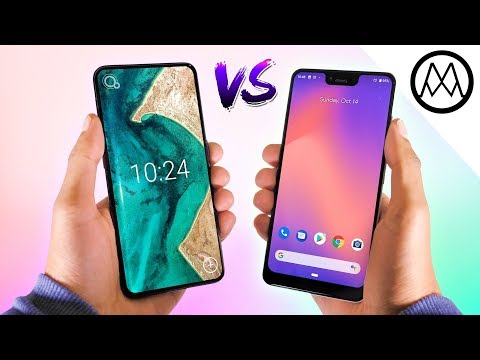
This modularity allows system files and update packages to be divided into smaller units that are easily accepted by the system, but it also has other benefits. Another expected benefit of Fuchsia’s modular framework is the possibility to add new functionality by simply installing new components . When you look at this in action, modularization not only solves the problem of system update delays and bugs, but also speeds up app updates . If you want to visualize this better, you can also look at it like modular hardware, such as an assembled PC. You can also simply look at it as Motorola’s flagship product with Moto Mods to improve its functionality.
All of this is promising, but it requires both cooperation and enthusiasm from developers, as this modular approach is essential to the uniform experience that Fuchsia guarantees.
modular file system
Fuchsia OS currently supports several file systems, including:
- read only
- Temporary in memory (for RAM)
- Persistent file system for permanently storing files
- Integrity verification package storage file system (for data encryption), and
- Typical FAT storage system
Fuchsia’s architecture is flexible with modularity at its core, allowing for support for additional file systems in the future .
Fuchsia OS is transforming computing, but how?
Real-time updates
Although Android is the leader when it comes to user base, it nevertheless lags behind in terms of updates. User experience can be subjective, but many people still prefer iOS over Android, given factors such as longer software support and a more uniform experience across different devices. I like it. Google was previously reported to be considering splitting update packages at the vendor level and Android framework level, but this would only help make Android security updates slightly faster. However, Fuchsia adds this functionality to the entire operating system.
Google, on the other hand, uses its own Zircon microkernel instead of the Linux kernel in Fuchsia OS, pushing updates in near real-time, along with a modular approach. This means that your smartphone, regardless of brand, can receive updates at about the same speed and frequency as a Google Pixel device.
For this reason, Google designed Amber, an update system built into Fuchsia OS. This updates not only system packages and installed applications, but also new microkernels and bootloaders . The Fuchsia team is currently tinkering with various update frameworks to ensure faster and more accurate modular updates and interoperability between systems.
ledger
To make Fuchsia more human-like, the OS will include a feature called Ledger that manages usage-related data for each device. This allows users to start working on a new device directly where they left off on their previous device . This feature not only syncs data from individual apps individually, but also syncs the entire interface as a whole. All this information is stored on a common network, giving users a seamless experience when switching devices .
fill the gap
The name fuchsia comes from the color of the same name and the flower of the fuchsia plant, of which there are over 110 species. Although the name is not very common, you may be able to easily identify it by looking at this color ( HEX: ). Although many people easily confuse it with pink, fuchsia can actually be visualized as a hybrid of pink and purple. But this name not only describes the color combination, but also has an underlying metaphor associated with it.
Almost all official repositories maintained by Fuchsia mark it as a sum of pink and purple. Beneath the surface, this means that operating systems are designed to bridge the gap between smartphones and PCs, portable and stationary devices, web-based and native applications, and even Android and iOS devices. means that it has been.
Flutter is a software development kit (SDK) specifically designed for developing Fuchsia apps and can be used to create apps for both Android and iOS in addition to Fuchsia OS. With minimal code changes, developers can now port the front end of their applications to other platforms , providing a uniform experience not only on systems running on Fuchsia OS, but also on systems outside the platform. It will be.
Reliance on web apps
The web is gradually being taken over by progressive web apps or interfaces that run directly from the web, providing an app-like experience without requiring installation. There is limited information available about the Fuchsia app at this time, but as we look toward a connected future, we can safely assume that the OS will be designed for a web-first experience , similar to Chrome OS. .
In fact, the team of Googlers managing the project is working on something called “Web Runner,” a web assembly engine used to run web apps on Fuchsia OS. This will make the Internet an integral part of the operating system . However, this does not mean that the entire operating system relies on the web to work, and we expect to see real-world examples of native applications being ported to the platform soon.
Fuchsia Interface Definition Language (FIDL)
Fuchsia could be an interesting proposition for end users, but it’s equally exciting for developers. Google wants everyone to be able to contribute to the development of Fuchsia, regardless of their programming language strengths. To ensure this, the engineers working on the project developed FIDL (short for Fuchsia Interface Definition Language), which is designed to integrate commonly used programming languages.
FIDL currently supports C/C++, Mozilla’s Rust, as well as Google’s own Go and Dart (the main languages for creating Fuchsia apps), with support for more languages in the future . It is scheduled to be done . For example, FIDL allows developers to develop apps in Rust and migrate them to Go, Dart, or other supported languages without having to recode the GUI . This is done by treating the new code as an “implementation”.
This is an exciting opportunity for developers. If you are a developer, you can use this tutorial to learn more about FIDL.
How is Fuchsia OS different from Android?
user interface
Fuchsia OS is far from commercialization, but thanks to a few good Samaritans, we’ve gained some insight into what it might look like. Various leaks and hints about what Fuchsia OS will look like indicate that it will be a card-based interface that looks strikingly similar to Google Now. However, there are a number of elements that appear to be inspired by Chrome OS and iOS , with heavy use of Google’s Material Design 2. 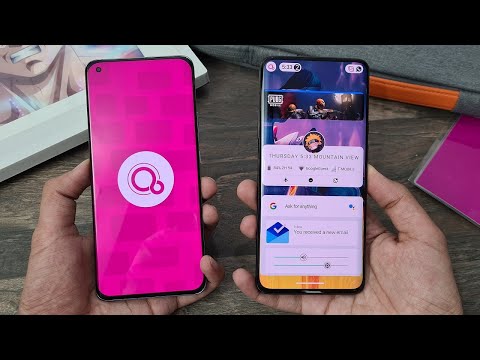
Google recently replaced files related to its user interface, formerly known as Armadillo, with something called Dragonglass. Although the new user experience is being privately developed by Google , some public comments in the repository indicate that Google is working on at least three different user shells or desktop environments for Fuchsia: Dugonglass, Flamingo, and Dragonglass. It has been pointed out that.
Not much is known about these user shells, but Dragonglass appears to be the same interface available on smart displays like the Google Home Hub. Instead of icons, there are different cards corresponding to different actions and apps, with Google aiming to give users a better experience than spending a lot of time finding the right option on a touch screen. It suggests that there is. Rather, this OS is poised for the fast-paced world of the future, potentially reducing our reliance on touch .

Although the Armadillo interface is pre-built, you can still try it out and see any differences that may occur between Android and Fuchsia OS. There are applications that emulate the Fuchsia experience both on Android smartphones ( search for the APK here ) and on the web ( check it out ), and you can easily explore them. This now deprecated interface has a single button in the navigation bar that is now responsible for navigating to the home interface. Additionally, dragging this button from the bottom to the top within an app brings up a quick settings pane (which may remind you of the iOS gestures in the control panels of phones older than the iPhone X).
I can’t comment on the exact user interface yet, but it’s possible that Google will remove the homepage completely and introduce a unified interface that shows Quick Settings, and recently the Google Now (powered by an advanced version of Google Assistant) feed . Single page. We’ll keep you updated as we learn more about what the new interface will look like.
Cross-platform computing with Fuchsia OS
Fuchsia OS is designed to truly harness the power of sharing, allowing you to enjoy uniform performance of your interface and apps across all your devices, regardless of shape or size. But more importantly, Fuchsia OS makes applications easier to port and allows Google to take advantage of Apple’s rich application ecosystem.
Flutter, an SDK developed by Google, can be used to create identical apps for iOS and Android , but it is also currently the only SDK platform for developing Fuchsia apps. This SDK recently exited beta, but it’s not just a sign that Google is serious about making Android users feel like they’re not far behind iOS users in terms of user experience. It also suggests that they would like people to try it out . Fuchsia’s core user shell is also built using Flutter.
Additionally, developers can get serious about Fuchsia development, the official emulator for testing Android apps, and Android Studio now has support for Fuchsia’s Zircon kernel. At the time of this announcement, it appeared that Google wanted developers to be able to run Fuchsia in Android Studio, but recent changes were made to the AOSP Gerrit repository that allow Android apps to use the help of custom versions. It was emphasized that it was borrowed and executed in Fuchsia . Android runtime.
In addition to this, a year ago Google added support for Swift, a programming language developed by Apple, to Fuchsia. This does not mean that the Fuchsia OS will run iOS apps directly, but this step will at least encourage developers currently limited to the Apple ecosystem to try their hand at developing apps for the unified operating system. It will encourage you to do so.
Fuchsia OS feels like an Android successor: Here’s why
It’s possible that Fuchsia OS will replace Android in the future, and there are several reasons to suggest that. Fuchsia certainly feels inspired by Android, even though it doesn’t look exactly the same. With Fuchsia, Google is reducing its dependence on other software giants, but it also appears to be doing its part to give both users and developers peace of mind. Here are some reasons why we guarantee that.
UI elements similar to Android Pie
- Single Navigation Button: While Fuchsia isn’t necessarily similar to Android Pie, it feels like the latest version of Android is meant to prepare users for the transition to a new ecosystem. A prime example is the single home button and Google’s recent decision to restrict Google Pixel 3 users from opting out of the new navigation bar. This seems like a step towards adapting users to Fuchsia’s navigation.
- App actions and suggestions : Next, the Fuchsia suggestions seen in the demo interface are similar to Android Pie’s “app actions,” which are actions suggested on a per-app basis based on user preferences and regular action selections. Masu. Android Pie uses machine learning to curate these options, and with the advent of smarter, more intelligent systems, these suggestions are not only likely to become more accurate, but also one of the core It also eliminates the need to touch the screen to perform suggestions. The purpose of fuchsia.
- App modularity: The third and final similarity between Android and Fuchsia is modularity. Google recently introduced something called “App Bundle”, which is an alternative file format that developers can use to upload their apps to the Google Play Store. As you may have figured out by now, or if you haven’t yet, App Bundles allow developers to break their apps into smaller chunks, making them easier to download ( without having to download a large app or game again). Don’t you hate it when you lose your internet connection midway?) . Additionally, App Bundles not only ease the download process for users, but also allow developers to add additional on-demand features to their apps without forcing users to download additional packages.
Google is already working on a prototype of Fuchsia
Google is already working on certain software and hardware products, indicating its active participation, which is interesting not only for developers but also for consumers. Back in July of last year, Google was reported to be developing a YouTube app for Fuchsia OS, apart from other random developments like the Tic-Tac-Toe game.
When it comes to hardware, Google recently discovered a device codenamed “Sherlock” that was hogging resources. It is suspected to be a digital camera and successor to Google Clips . The device uses a Sony IMX277 sensor and is most likely a digital camera, but given the investigative nature of the name it could also be a security camera.
Finally, one Fuchsia device that actually grows into a commercial product is the Google Home Hub. It doesn’t actually run Fuchsia, but it was one of the early prototypes tested. Smart displays made by Google run on a separate platform called Cast, unlike other smart displays that rely on the Android Things platform. To be clear, Cast and Fuchsia are different platforms, but the latter is expected to have some of the features of smart speakers, such as an interface for direct actions and a greater reliance on voice control. Masu. Therefore, it is likely a device launched to sense users’ general feelings about this experience.
The fuchsia logo resembles a “Q”
This last point may be too speculative, but it’s still worth noting. The Fuchsia OS logo is very similar to the text “Q” , but this is not very impressive unless Android Q is the next version of Android. So, do Google plan to replace Android Q with Fuchsia, or is it too early?
Android Pie has appeared as a major change to Oreo, so throwing a Fuchsia to a user can be counterproductive, but you can still expect aggressive development with Android Q. There are already attempts to run Fuchsia on smartphones and Huawei sub brand Honor. Is the first brand to participate in this test.
Future of Fuchsia OS?
As I learned about the past and the present of the Fuchsia OS, it is a reasonable question to ask about the future of Fuchsia OS. With the words of Travis Geiselbrecht, a member of Google’s Fuchsia team, the company seems to be working hard and working hard . Due to the development of separate SDK, special programming language, new kernels, and strong opposition to Linux, Fuchsia is a smartphone, laptop, or even a device simply connected, such as Google Home or Google It looks like you are ready to take over the entire ecosystem. Home hub. Fuchsia is an operating system that controls all of them.
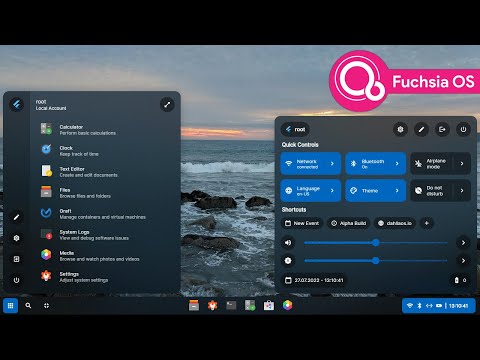
In the future, FuchSIA is fused with other emerging technology such as cloud -based computing, ultra -high -speed 5G networks, quantum computing, so that the operating system is not executed individually. It may evolve. On each device. Instead, this comprehensive OS can be executed as a distributed instance on each device, all working in cooperation.
Related items: Looking for an alternative to Android? There is the best here
This may sound like science fiction, but there is no basis to deny it. But in all of these, will the function of customizing user experience like Android smartphones be lost, or artificial intelligence customizes user experience and matches our needs? This time is time. As it will be solved, we will continue to update this article each time a major development in this field is carried out so that you can always grasp the future of Fuchsia OS.


![How to set up a Raspberry Pi web server in 2021 [Guide]](https://i0.wp.com/pcmanabu.com/wp-content/uploads/2019/10/web-server-02-309x198.png?w=1200&resize=1200,0&ssl=1)


