Let’s discuss some of the popular container orchestration tools available on the market.
What is container orchestration?
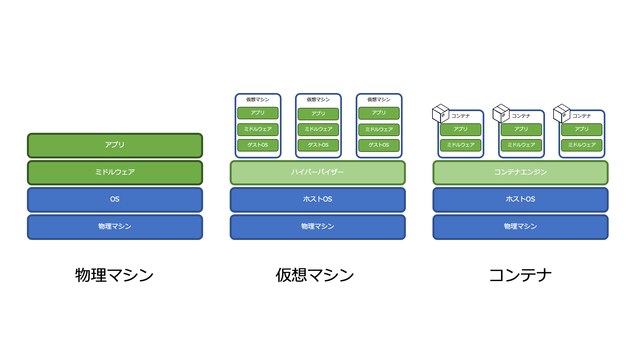
Container platforms such as Docker have become very popular these days for packaging applications based on microservices architectures. Containers are highly scalable and can be created on demand. This is fine for a small number of containers, but imagine you have hundreds of containers.
When the number of containers increases dynamically based on demand, the container lifecycle and its management become extremely difficult.
Container orchestration solves problems by automating container scheduling, deployment, scalability, load balancing, availability, and networking. Container orchestration is the automation and management of the lifecycle of containers and services.
This is the process of managing and orchestrating multiple containers and microservices architectures at scale.
Fortunately, there are many container orchestration tools on the market.
Let’s check them out!
Kubernetes
As you can imagine, right?
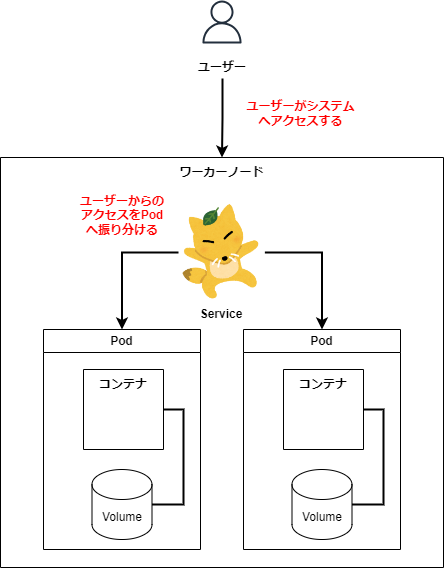
Kubernetes is an open source platform originally designed by Google and now maintained by the Cloud Native Computing Foundation. Kubernetes supports both declarative configuration and automation. Helps automate the deployment, scaling, and management of containerized workloads and services.
The Kubernetes API helps establish communication between users, cluster components, and external third-party components. The Kubernetes control plane and nodes run on a group of nodes that form a cluster. An application workload consists of one or more pods running on worker nodes. The control plane manages pods and worker nodes.
Companies such as Babylon, Booking.com, and AppDirect use Kubernetes extensively.
Features
- Service discovery and load balancing
- storage orchestration
- Automated rollout and rollback
- horizontal scaling
- Managing secrets and configurations
- self-healing
- Batch execution
- IPv4/IPv6 dual stack
- automatic bin packing
Want to learn Kubernetes? Check out these learning resources.

open shift
Redhat offers OpenShift Container Platform as a Service (PaaS). Helps automate applications on secure, scalable resources in hybrid cloud environments. Provides an enterprise-grade platform for building, deploying, and managing containerized applications.
Built on Redhat Enterprise Linux and Kubernetes engine. Openshift has various features for managing clusters through the UI and CLI. Redhat offers Openshift in two additional variations.
- Openshift Online – Delivered as Software as a Service (SaaS)
- OpenShift Dended – Delivered as a managed service
Openshift Origin (Origin Community Distribution) is an open source upstream community project used by OpenShift Container Platform, Openshift Online, and OpenShift D dedicated.

nomad
Nomad is a simple, flexible, and easy-to-use workload orchestrator for deploying and managing containerized and non-containerized applications at scale across on-premises and cloud. Nomad runs as a single binary with a small resource footprint (35 MB) and is supported on macOS, Windows, and Linux.
Developers use Infrastructure as Declarative Code (IaC) to deploy applications and define how applications are deployed. Nomad automatically recovers applications from failures.
Nomad orchestrates any type of application (not just containers). We offer first-class support for Docker, Windows, Java, VM, and more.
Features
- simple and reliable
- Modernize legacy applications without rewriting them
- Easily achieve large-scale federation
- Proven scalability
- Multicloud made easy
- Native integration with Terraform, Consul, and Vault
Docker Swarm
Docker Swarm uses a declarative model. You define the desired state of your service, and Docker maintains that state. Docker Enterprise Edition integrates Kubernetes and Swarm. Docker now offers flexibility in choosing your orchestration engine. The Docker Engine CLI is used to create a collection of Docker engines on which you can deploy application services.
Docker commands are used to interact with your cluster. Machines that participate in a cluster are called nodes, and Swarm managers handle cluster activity.
Docker Swarm consists of two main components.
- Manager – A manager node assigns tasks to worker nodes within a swarm. Leaders are elected based on the Raft consensus algorithm. The leader handles all management and task orchestration decisions for the herd.
- Worker nodes – Worker nodes receive tasks from manager nodes and execute them.
Features
- Cluster management integrated with Docker Engine
- distributed design
- Declarative service model
- scaling
- Adjustment of desired state
- multi-host networking
- Service discovery
- load balancing
- Safe by default
- rolling update
Docker Compose
Docker Compose is for defining and running multi-container applications that work together. Docker-compose describes a group of interconnected services that share software dependencies and are coordinated and extended together.
You can configure services for your application using a YAML file ( dockerfile ). Next, use the docker-compose up command to create and start all the services from your configuration.
docker-compose.yml looks like this:
 version: '3'
volumes:
  app_data:
services:
  elasticsearch:
    image: docker.elastic.co/elasticsearch/elasticsearch:6.8.0
    ports:
      - 9200:9200
      - 9300:9300
    volumes:
      - ./elasticsearch.yml:/usr/share/elasticsearch/config/elasticsearch.yml
      - ./elastic-certificates.p12:/usr/share/elasticsearch/config/elastic-certificates.p12
      - ./docker-data-volumes/elasticsearch:/usr/share/elasticsearch/data

  kibana:
    depends_on:
      - elasticsearch
    image: docker.elastic.co/kibana/kibana:6.8.0
    ports:
      - 5601:5601
    volumes:
      - ./kibana.yml:/usr/share/kibana/config/kibana.yml
  app:
    depends_on:
      - elasticsearch
    image: asadali08527/app:latest
    ports:
      - 8080:8080
    volumes:
      - app_data:/var/lib/app/
Docker Compose allows you to incorporate your app code into multiple independently running services that communicate using your internal network. This tool provides a CLI for managing the entire application lifecycle. Docker Compose has traditionally focused on development and testing workflows, but is now focused on more production-oriented features.
Docker Engine can be a standalone instance provisioned across a Docker Machine or Docker Swarm cluster.
Features
- Multiple isolated environments on a single host
- Save volume data when creating a container
- Recreate only changed containers
- Moving compositions between variables and environments
mini cube
Minikube allows users to run Kubernetes locally. Minikube lets you test your applications locally in a single-node Kubernetes cluster on your personal computer. Minikube has integrated support for Kubernetes dashboards.
Minikube runs the latest stable release of Kubernetes and supports the following features:
- load balancing
- multi cluster
- persistent volume
- node port
- ConfigMaps and secrets
- Container runtimes: Docker, CRI-O, and containers
- Enabling CNI (Container Network Interface)
marathon
Marathon is for Apache Mesos with the ability to tune apps and frameworks.
Apache Mesos is an open source cluster manager. Mesos is a project powered by Apache with the ability to run both containerized and non-containerized workloads. The main components of a Mesos cluster are Mesos agent nodes, Mesos master, ZooKeeper, and the framework. The framework works with the master to schedule tasks to agent nodes. Users interact with the Marathon framework to schedule jobs.
The Marathon Scheduler uses ZooKeeper to find the current master to submit tasks to. Marathon scheduler and Mesos masters have a secondary master running to ensure high availability. Clients interact with Marathon using the REST API.
Features
- High availability
- stateful app
- Beautiful and powerful UI
- constraints
- Service discovery and load balancing
- health check
- Event subscription
- metrics
- REST API
Cloudization
Cloudify is an open source cloud orchestration tool for deployment automation and lifecycle management of containers and microservices. It offers features such as on-demand clusters, auto-healing, and scaling at the infrastructure level. Cloudify can manage your container infrastructure and orchestrate services running on top of your container platform.
Easily integrates with Docker and Docker-based container managers, including:
- docker
- Docker Swarm
- Docker Compose
- Kubernetes
- Apache mesos
Cloudify helps you create, repair, scale, and destroy container clusters. Container orchestration is key to providing a scalable and highly available infrastructure on which to run container managers. Cloudify provides the ability to coordinate disparate services across platforms. You can deploy your application using the CLI and Cloudify Manager.
rancher
Rancher is an open source platform that uses container orchestration known as Cattle. Leverage orchestration services like Kubernetes, Swarm, and Mesos. Rancher provides the software needed to manage containers, so organizations don’t have to build a container service platform from scratch using a separate set of open source technologies.
Rancher 2.x allows you to manage Kubernetes clusters running on a customer-specified provider.
There are two steps to getting started with Rancher.
Prepare your Linux host
Prepare a Linux host with 64-bit Ubuntu 16.04 or 18.04 (or another supported Linux distribution and at least 4 GB of memory. Install a supported version of Docker on the host.
start the server
To install and run Rancher, run the following Docker command on your host:
$ sudo docker run -d --restart=unless-stopped -p 80:80 -p 443:443 rancher/rancherThe Rancher user interface allows you to manage thousands of Kubernetes clusters and nodes.
container ship
Containership is meant to enable the deployment and management of multicloud Kubernetes infrastructure. Flexibly operate in public, private cloud, and on-premises environments from a single tool. It allows you to provision, manage, and monitor Kubernetes clusters across all major cloud providers.
Containerships are built using cloud-native tools such as Terraform for provisioning, Prometheus for monitoring, and Calico for networking and policy management. It’s built on standard Kubernetes. The Containership platform provides an intuitive dashboard as well as a powerful REST API for complex automation.
Features
- Multi-cloud dashboard
- audit log
- GPU instance support
- Non-disruptive upgrade
- schedulable master
- Unified metrics
- real-time logging
- Introducing zero downtime
- Persistent storage support
- Private registry support
- Automatic scaling of workloads
- SSH key management
AZK
AZK is an open source orchestration tool for development environments through manifest files (Azkfile.js) and is commonly used by developers to develop web applications using various open source technologies. Helps you install, configure, and run the tool.
AZK uses containers instead of virtual machines. Containers are similar to virtual machines, offering better performance and consuming fewer physical resources.
You can reuse the Azkfile.js file to add new components or create new components from scratch. Sharing ensures complete equivalence between development environments on different programmers’ machines, reducing the chance of bugs during deployment.
GKE
GKE provides a fully managed solution for container application orchestration on Google Cloud Platform. GKE clusters are powered by Kubernetes. You can interact with your cluster using the Kubernetes CLI. You can use Kubernetes commands to deploy and manage applications, perform administrative tasks, set policies, and monitor the health of deployed workloads.
Google Cloud’s advanced management features are also available for GKE clusters, including Google Cloud load balancing, node pools, node autoscaling, autoupgrades, node autohealing, logging, and monitoring with Google Cloud’s operations suite.
Google Cloud provides CI/CD tools to help you build and serve application containers. Cloud Build lets you build container images (such as Docker) from a variety of source code repositories, and you can use Container Registry to store container images.
GKE is an enterprise-ready solution with pre-built deployment templates.
Interested in learning GKE? Check out this beginner’s course.
AKS
AKS is a fully managed Kubernetes service from Azure that provides serverless Kubernetes, security, and governance. AKS manages Kubernetes clusters and makes it easy to deploy containerized applications. AKS automatically configures all Kubernetes masters and nodes. Only agent node management and maintenance is required.
AKS is free. Charges are only incurred for the agent nodes in the cluster, not the master. You can create AKS clusters in the Azure portal or programmatically. Azure also supports additional features such as advanced networking, Azure Active Directory integration, and monitoring using Azure Monitor.
AKS also supports Windows Server containers. You can monitor the performance of your cluster and deployed applications from Azure Monitor. Logs are stored in an Azure Log Analytics workspace.
AKS is certified as Kubernetes compliant.
AWS EKS
AWS EKS is a fully managed Kubernetes service. On AWS, you can run EKS clusters using AWS Fragrate, serverless computing for containers. Fragrance eliminates the need for server provisioning and management and allows you to pay per resource per application.
With AWS, you can use additional features with EKS such as Amazon CloudWatch, Amazon Virtual Private Cloud (VPC), AWS Identity, Auto Scaling Groups, and Access Management (IAM) to monitor, scale, and load balance your applications. . EKS integrates with AWS App Mesh to provide a native Kubernetes experience. EKS runs the latest Kubernetes and is certified as Kubernetes compliant.
conclusion
Finally, we hope the above list has given you a good idea of the various container orchestration tools. In the future, it will be easier to choose the best tool for your use case.
Next, find your Kubernetes management software.


![How to set up a Raspberry Pi web server in 2021 [Guide]](https://i0.wp.com/pcmanabu.com/wp-content/uploads/2019/10/web-server-02-309x198.png?w=1200&resize=1200,0&ssl=1)


