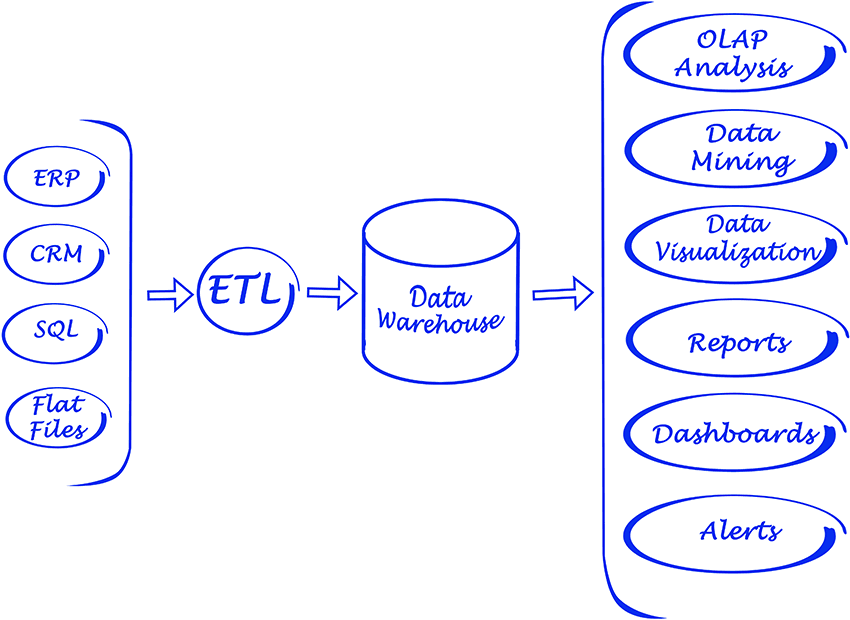
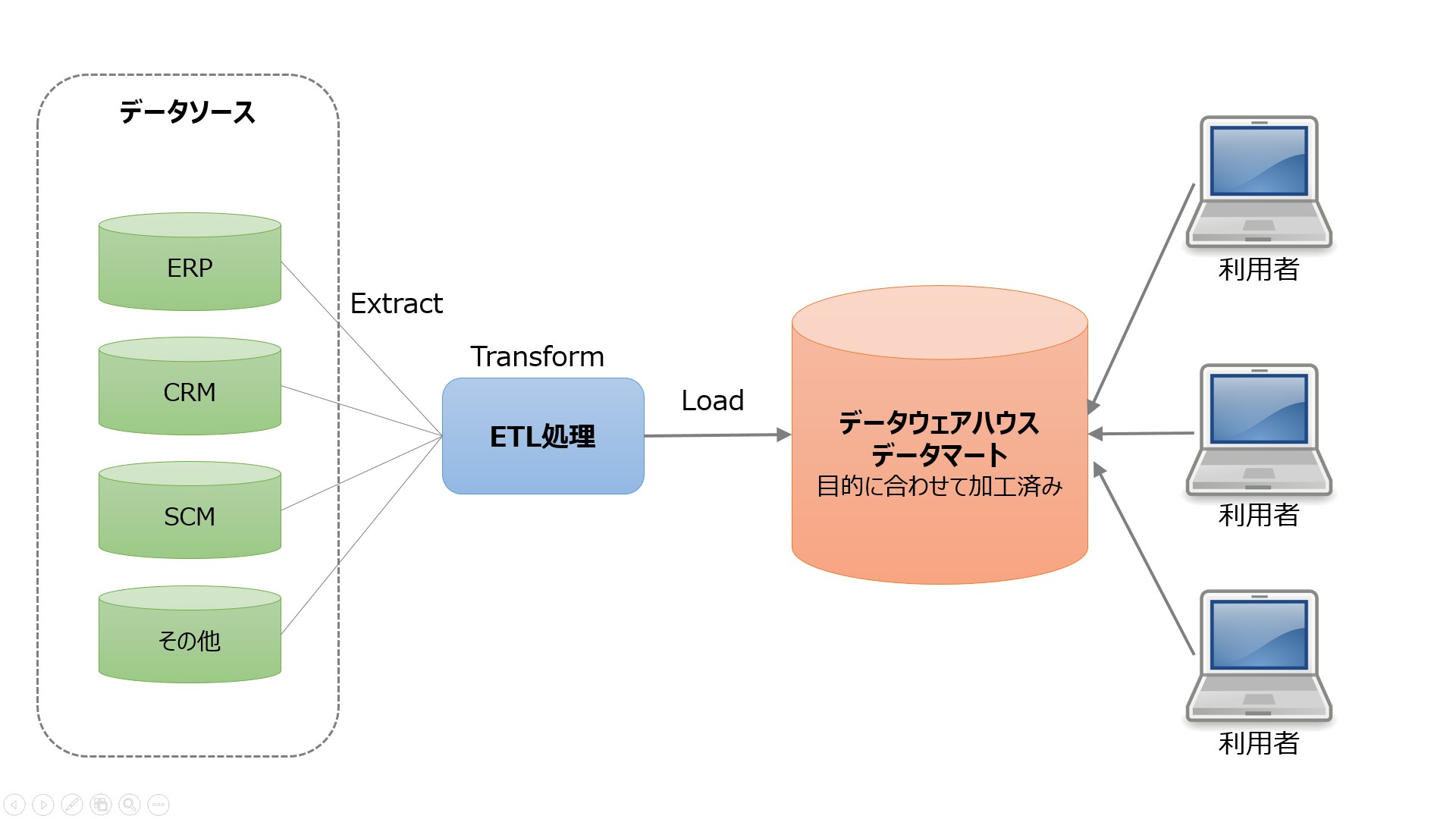
ETL stands for Extract, Transform, Load. ETL tools extract data from various sources and transform it into an intermediate format suitable for the target system or data model requirements. And finally, load the data into your target database, data warehouse, or even data lake.
I remember 15 to 20 years ago when only a few people understood what the term ETL was. When various custom batch jobs peaked on on-premises hardware.
Many projects were running some form of ETL. Even if you don’t know it, you should name it ETL. During that time, every time I described a design that included an ETL process, or called it out and described it as such, it seemed almost otherworldly technology and very unusual.
But today the situation is different. Moving to the cloud is a top priority. And ETL tools are a very strategic part of most project architectures.
After all, moving to the cloud means sourcing data from on-premises and converting it into a cloud database in a format that is as compatible as possible with cloud architectures. That’s exactly what ETL tools do.
History of ETL and its connection to the present
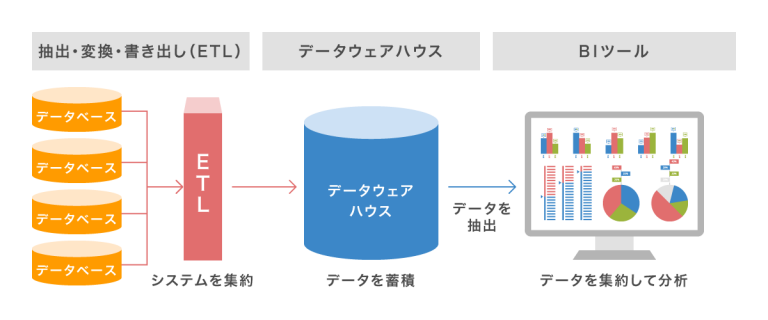
The main functionality of ETL has always been the same.
extraction
ETL tools extract data from a variety of sources, including databases, flat files, web services, and more recently, cloud-based applications.
This typically means taking a file on a Unix file system as input and doing some pre-processing, processing, and post-processing.
You can see reusable patterns for folder names, such as:
- input
- output
- error
- archive
There was also another subfolder structure under these folders, mainly based on dates.
This was the standard way to process incoming data and prepare it for loading into some kind of database.
Unix file systems no longer exist (although they used to). The file probably doesn’t even exist. Now we have APIs, or application programming interfaces. It’s possible, but you don’t have to use a file as your input format.
All can be stored in cache memory. You can leave it as a file. Whatever it is, it must follow a structured format. In most cases this means JSON or XML format. In some cases, the good old comma-separated values (CSV) format works just as well.
Define the input format. It’s up to you whether this process also includes creating a history of your input files. This is no longer standard procedure.
conversion
ETL tools transform extracted data into a format suitable for analysis. This includes data cleaning, data validation, data enrichment, and data aggregation.
As in the past, data passed through complex custom logic in Pro-C or PL/SQL procedural data staging, data transformation, and data target schema storage steps. This was a required standard process, as was splitting incoming files into subfolders based on the stage in which they were processed.
Why was it natural if it was fundamentally wrong at the same time? By directly transforming the incoming data without using persistent storage, the biggest advantage of raw data, immutability, is removed. It was lost. The project was just scrapped without a chance to rebuild it.
Well, I wonder. Currently, the fewer raw data transformations you perform, the better. That is, for initial data storage into the system. Indeed, the next step may be significant data changes and data model transformations. However, raw data should be kept as unchanged as possible and stored in an atomic structure. If you ask me, it’s a big change from the on-premise days.
load
ETL tools load the transformed data into a target database or data warehouse. This includes creating tables, defining relationships, and loading data into the appropriate fields.
The loading step is probably the only step that has followed the same pattern over the years. The only difference is the target database. Previously it was almost always Oracle, but now it can be anything available in the AWS cloud.
ETL in today’s cloud environments
If you plan to bring data from on-premises to the (AWS) cloud, you need an ETL tool. We couldn’t do without it, which is why this part of our cloud architecture was probably the most important piece of the puzzle. If this step is wrong, then something else will happen and the same smell will be shared everywhere.
There are many contests out there, but I’d like to focus on the three that I personally have the most experience with.
- Data Migration Service (DMS) – An AWS native service.
- Informatica ETL – Probably the major commercial player in the ETL world, successfully moving businesses from on-premises to the cloud.
- Matillion for AWS – A relatively new player within the cloud environment. It’s not native to AWS, but it’s native to the cloud. There’s no history like Informatica.
AWS DMS as ETL
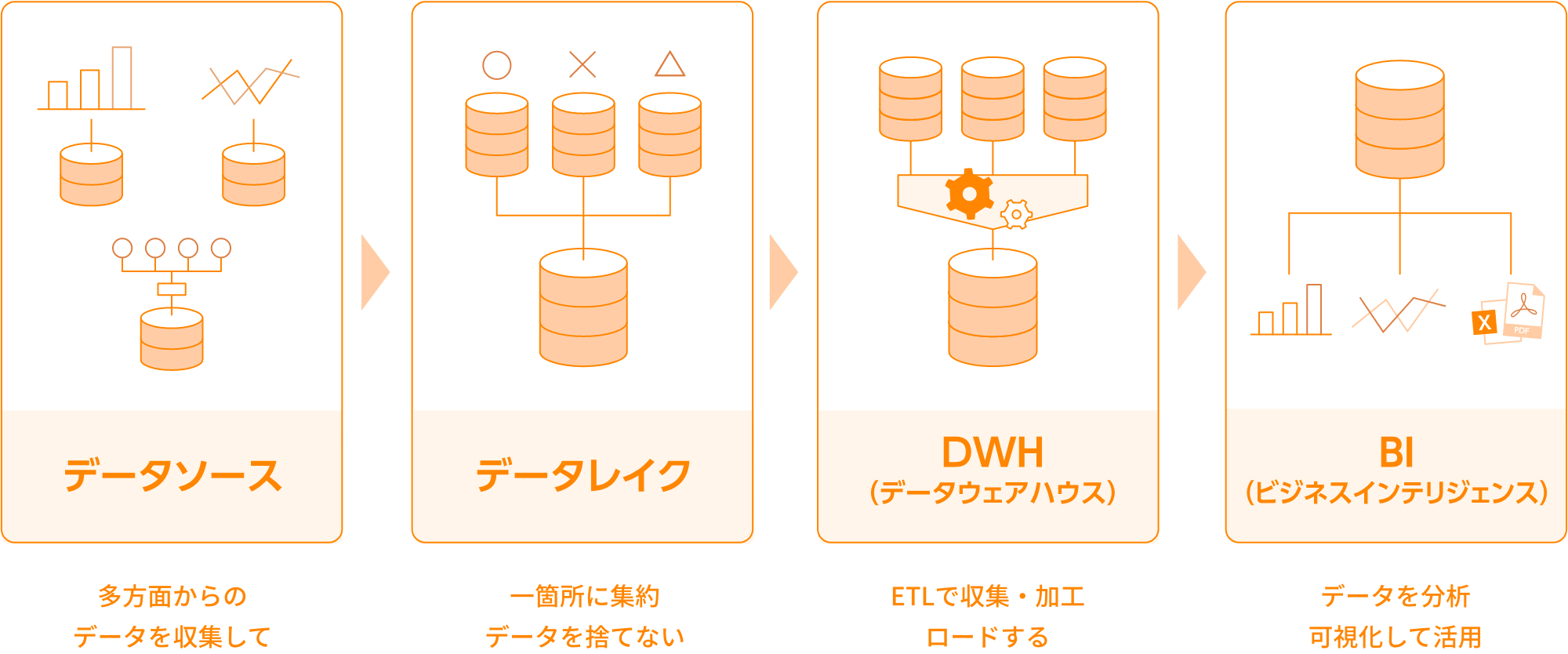
AWS Data Migration Services (DMS) is a fully managed service that enables you to migrate data from a variety of sources to AWS. Supports multiple migration scenarios.
- Homogeneous migration (e.g. Oracle to Amazon RDS for Oracle).
- Heterogeneous migrations (such as Oracle to Amazon Aurora).
DMS can migrate data from various sources such as databases, data warehouses, and SaaS applications to various targets such as Amazon S3, Amazon Redshift, and Amazon RDS.
AWS treats the DMS service as the ultimate tool for ingesting data from any database source to a cloud-native target. Although the main purpose of DMS is just copying data to the cloud, it also does a good job of transforming data along the way.
You can define DMS tasks in JSON format to automate various transformation jobs when copying data from source to target.
- Merge multiple source tables or columns into a single value.
- Split the source value into multiple target fields.
- Replace source data with another target value.
- Remove unnecessary data or create completely new data based on the input context.
So, yes, you can definitely use DMS as an ETL tool for your projects. It’s probably not as sophisticated as the other options below, but it works well enough if you clearly define your goals in advance.
suitability factor
DMS offers some ETL functionality, but it’s mostly about data migration scenarios. However, there are some scenarios where it is better to use DMS instead of ETL tools such as Informatica or Matillion.
- DMS can handle homogeneous migrations where the source and target databases are the same. This is an advantage if your goal is to migrate data between databases of the same type, such as Oracle to Oracle or MySQL to MySQL.
- DMS provides some basic data transformation and customization capabilities, but may not be very mature in that respect. This is an advantage even if your data transformation needs are limited.
- DMSs typically have very limited data quality and governance needs. However, these are areas that can be improved later in the project by using other tools for that purpose. Sometimes you want to make the ETL part as simple as possible. In that case, DMS is the perfect choice.
- DMS is a more cost-effective option for organizations with limited budgets. DMS has a simpler pricing model than ETL tools like Informatica and Matillion, making it easier for organizations to predict and control costs.
Matillion ETL
is a cloud-native solution that can be used to integrate data from various sources such as databases, SaaS applications, and file systems. It provides a visual interface for building ETL pipelines and supports various AWS services such as Amazon S3, Amazon Redshift, and Amazon RDS.
Matillion is easy to use and is a good choice for organizations that are new to ETL tools or have less complex data integration needs.
Matillion, on the other hand, is a kind of tabula rasa. There are some potential predefined features, but you will need to write custom code to achieve them. You can’t expect Matillion to do the job out of the box, even if that feature is there by definition.
Matillion often described itself as an ELT rather than an ETL tool. This means that it is more natural for Matillion to perform the load before converting.
suitability factor
In other words, Matillion is more effective than before in that it transforms data only after it is stored in the database. The main reason for this is the custom scripting mandate already mentioned. Because all special functionality must be coded first, its effectiveness is highly dependent on the effectiveness of your custom code.
My hope is that this will be handled better by the target database system, leaving Matillion with only a simple 1:1 load task, and the chance of using custom code here to discard tasks is greatly reduced. Of course.
Although Matillion offers a variety of features for data integration, it may not offer the same level of data quality and governance features as some other ETL tools.
Matillion can be scaled up or down based on your organization’s needs, but it may not be as effective when processing very large amounts of data. Parallelism is quite limited. Informatica is definitely the better choice in this regard as it is more advanced and feature-rich.
However, for many organizations, Matillion for AWS may provide enough scalability and parallelism capabilities to meet their needs.
Informatica ETL

Informatica for AWS is a cloud-based ETL tool designed to help you integrate and manage data across various AWS sources and targets. It is a fully managed service that provides a variety of features for data integration, including data profiling, data quality, and data governance.
Key features of Informatica for AWS include:
- Informatica is designed to scale up or down based on your actual needs. It can handle large amounts of data and can be used to integrate data from various sources such as databases, data warehouses, and SaaS applications.
- Informatica provides various security features such as encryption, access control, and audit trails. Compliant with various industry standards such as HIPAA, PCI DSS, and SOC 2.
- Informatica provides a visual interface for building ETL pipelines, allowing users to easily create and manage data integration workflows. It also provides a variety of pre-built connectors and templates that you can use to connect your systems and enable the integration process.
- Informatica integrates with various AWS services such as Amazon S3, Amazon Redshift, and Amazon RDS. This allows you to easily integrate data between different AWS services.
suitability factor
Informatica is clearly the most feature-rich ETL tool on the list. However, it can be more expensive and complex to use than other ETL tools available on AWS.
Informatica can be expensive, especially for small and medium-sized businesses. The pricing model is based on usage, so your organization may have to pay more as your usage increases.
It can also be complex to set up and configure, especially for first-time users of ETL tools. This can require a significant investment of time and resources.
This also leads to what we might call a “complicated learning curve.” This can be a disadvantage if you need to integrate data quickly or have limited resources for training and onboarding.
Additionally, Informatica may not be as effective at integrating data from sources other than AWS. DMS or Matillion may be better options in this regard.
Finally, Informatica is a very closed system. There are limited features that can be customized to suit your project’s specific needs. You should use the setup provided out of the box as is. Therefore, that somehow limits the flexibility of the solution.
last word
As with many other cases, there is no one-size-fits-all solution, even something like AWS’ ETL tools.
You can also choose Informatica’s most complex, feature-rich, and expensive solution. However, it makes sense to do most of these in the following cases:
- This project is quite large and I have no doubt that the entire future solution and data sources will be connected to Informatica as well.
- You can afford to bring in a team of seasoned Informatica developers and configurers.
- We appreciate having a strong support team behind us and are willing to pay for it.
If anything above is wrong, try Matillion.
- Generally, if your project needs are not very complex.
- Flexibility is a key requirement when processing needs to include some highly custom steps.
- If you don’t mind building most features from scratch with your team.
For less complex cases, AWS’s DMS as the native service is an obvious choice and will probably serve your purpose well.
Next, check out our data transformation tools to better manage your data.


![How to set up a Raspberry Pi web server in 2021 [Guide]](https://i0.wp.com/pcmanabu.com/wp-content/uploads/2019/10/web-server-02-309x198.png?w=1200&resize=1200,0&ssl=1)


