Want to speed up your database queries? Learn how to use SQL to create database indexes to optimize query performance and speed data retrieval.
When retrieving data from a database table, you often need to filter based on specific columns.
Suppose you want to write a SQL query that retrieves data based on certain conditions. By default, when you run a query, it scans the entire table until all records that meet the criteria are found and returns the results.
This can become very inefficient if you need to query large database tables containing millions of rows. Creating a database index can speed up such queries.
![[Explanation] How to create a database index with SQL](https://it-biz.online/wp-content/uploads/2023/03/create_index-800x442.png)
What is a database index?
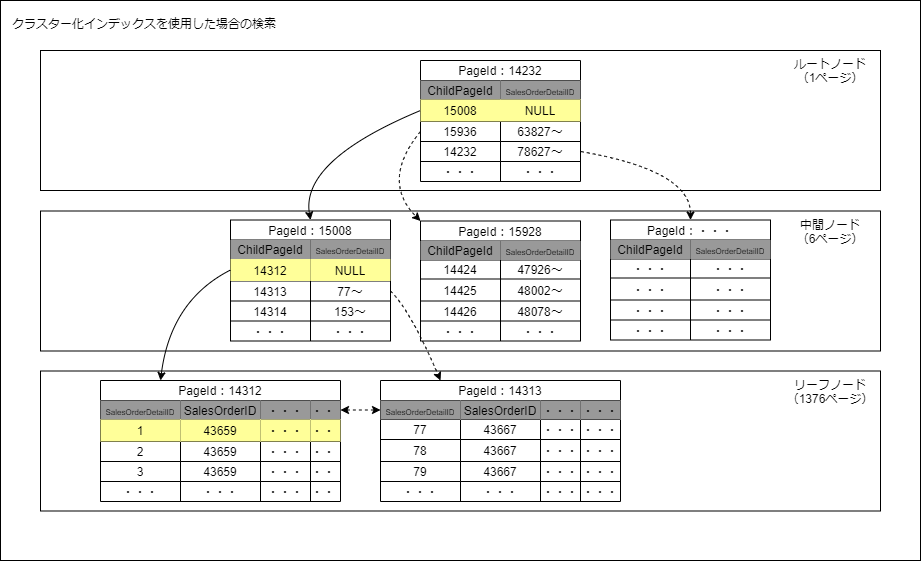
When you want to find a specific term in a book, do you scan the entire book page by page looking for that specific term? Well, not really.
Instead, browse the index to find pages that refer to that term and jump directly to those pages. A database index is very similar to a book index.
A database index is a set of pointers or references to the actual data, but ordered in a way that speeds up data retrieval. Internally, you can implement database indexes using data structures such as B+ trees and hash tables. Therefore, database indexes improve the speed and efficiency of data retrieval operations.
![[Explanation] How to create a database index with SQL](https://lh6.googleusercontent.com/AjTkSfs4cfG-NCVZSdbQwUoU8ahyP3zB085TyzcTUSgHinKodNNKyThtSE7-aWiQp2ItuRfqVDLM3em2ygfKi25K3B8kuVBCIbIQqickW79ZyUuFlPhbfh077gUOfuyf2JdSEB4i)
Creating database indexes in SQL
Now that you know what a database index is and how it speeds up data retrieval, let’s learn how to create a database index in SQL.
When performing filtering operations by specifying retrieval conditions using a WHERE clause, you can query certain columns more frequently than others.
CREATE INDEX index_name ON table (column)here,
-
index_nameis the name of the index being created. -
tablerefers to a table in a relational database -
columnPoints to the name of the column in the database table on which the index should be created.
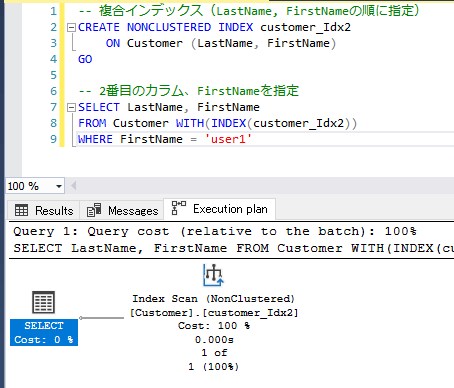
Depending on your requirements, you can also create indexes on multiple columns (multi-column indexes) . The syntax for that is:
CREATE INDEX index_name ON table (column_1, column_2,...,column_k)Now let’s move on to a real example.
![[Explanation] How to create a database index with SQL](https://tech.pjin.jp/wp-content/uploads/2021/09/1efad1b5aa917a846fa5b3fc11367269-2-1024x710.png)
Understanding database index performance improvements
To understand the benefits of creating an index, you must create a database table with a large number of records. The code example is for SQLite . However, you can also choose to use other RDBMS such as PostgreSQL or MySQL .
Set records in database table
You can also use Python’s built-in random module to create records and insert them into the database. However, I use Faker to populate a database table with 1 million rows.
The following Python script:
- Create and connect to the
customer_dbdatabase. - Create a
customerstable withfirst_name,last_name,city, andnum_ordersfields. - Generate synthetic data and insert the data (1 million records) into the
customerstable.
The code is also available on GitHub .
 # main.py
# imports
import sqlite3
from faker import Faker
import random

# connect to the db
db_conn = sqlite3.connect('customer_db.db')
db_cursor = db_conn.cursor()

# create table
db_cursor.execute('''CREATE TABLE customers (
                  id INTEGER PRIMARY KEY,
                  first_name TEXT,
                  last_name TEXT,
                  city TEXT,
                  num_orders INTEGER)''')

# create a Faker object
fake = Faker()
Faker.seed(27)

# create and insert 1 million records
num_records = 1_000_000

for _ in range(num_records):
    first_name = fake.first_name()
    last_name = fake.last_name()
    city = fake.city()
    num_orders = random.randint(0,100)
    db_cursor.execute('INSERT INTO customers (first_name, last_name, city, num_orders) VALUES (?,?,?,?)', (first_name, last_name, city, num_orders))

# commit the transaction and close the cursor and connection
db_conn.commit()
db_cursor.close()
db_conn.close()
Now you can start your query.
Creating an index for the city column
Suppose you want to retrieve customer information by filtering based on city column. The SELECT query looks like this:
 SELECT column(s) FROM customers
WHERE condition;
So, let’s create city_idx in city column of the customers table.
CREATE INDEX city_idx ON customers (city);⚠ Creating an index takes a significant amount of time and is a one-time operation. However, filtering on
citycolumn provides significant performance benefits when a large number of queries are required.
Delete database index
To drop an index, use the DROP INDEX statement:
DROP INDEX index_name;Comparison of indexed and non-indexed query times
If you run a query within a Python script, you can use the default timer to capture the query execution time.
Alternatively, you can use the sqlite3 command-line client to run your queries. To work with customer_db.db using the command-line client, run the following command in Terminal:
$ sqlite3 customer_db.db; To get the approximate execution time, you can use .timer functionality built into sqlite3 like this:
 sqlite3 > .timer on
        > <query here>
Because we created an index on city column, queries that include filtering based on city column in the WHERE clause will be significantly faster.
First, run the query. Then create the index and rerun the query. Note the execution time in both cases. Here are some examples.
| query | time without index | indexed time |
|---|---|---|
| Select * from customer Where is the city like “New%”? limit 10; | 0.100 seconds | 0.001 seconds |
| Select * from customer WHERE city=’New Wesley’; | 0.148 seconds | 0.001 seconds |
| Select * from customer WHERE city IN (“New Wesley”, “New Steven”, “New Carmenmouth”); | 0.247 seconds | 0.003 seconds |
You can see that the retrieval time with the index is several orders of magnitude faster than without the index on the city column.
Best practices for creating and using database indexes
You should always check whether the performance gain is greater than the overhead of creating database indexes. Here are some best practices to keep in mind.
- Select the appropriate columns to create the index. Avoid creating too many indexes as this increases overhead.
- Whenever an indexed column is updated, the corresponding index must also be updated. Therefore, creating a database index (while speeding up searches) significantly slows down insert and update operations. Therefore, you should create indexes on columns that are frequently queried but rarely updated.
When should I not create an index?
By now you should understand when and how to create indexes. However, let’s also discuss cases in which a database index is not required.
- If the database table is small and does not contain many rows, the cost of a full table scan to retrieve the data is not very high.
- Avoid creating indexes on columns that are rarely used for searches. If you create an index on a column that is not frequently queried, the cost of creating and maintaining the index outweighs the performance gain.
summary
Let’s review what we learned.
- When querying a database to retrieve data, you may need to filter more frequently based on specific columns. Database indexes on these frequently queried columns improve performance.
- To create an index on a single column, use the syntax
CREATE INDEX index_name ON table (column). If you want to create a multi-column index, useCREATE INDEX index_name ON table (column_1, column_2,...,column_k). - Whenever an indexed column changes, the corresponding index must also be updated. Therefore, to create an index, choose appropriate columns that are frequently queried and not frequently updated.
- If your database tables are relatively small, the cost of creating, maintaining, and updating indexes will outweigh the performance gains.
Modern database management systems include query optimizers that check whether indexes on certain columns can speed up query execution. Next, learn best practices for database design.


![How to set up a Raspberry Pi web server in 2021 [Guide]](https://i0.wp.com/pcmanabu.com/wp-content/uploads/2019/10/web-server-02-309x198.png?w=1200&resize=1200,0&ssl=1)


