IMAP is a standard email protocol used for email retrieval. This special layer allows computers and servers to share messages with each other.
You must have been accessing and using email for a long time via your PC, laptop, smartphone, etc.
But have you ever wondered how you can easily access these emails and use them as if they were stored locally on your PC or smartphone?
IMAP determines how a server or computer behaves with email. Users will have easy access to their email.
Understand what IMAP is, how it works, its benefits, and other important details.
What is IMAP?
Internet Message Access Protocol (IMAP) is a common layer protocol by which email clients receive email from mail servers over IP/TCP connections. It was developed by Mark Crispin in 1986 to allow users to easily access their mailboxes from remote locations as if they were local.
It is one of the most used email protocols in the industry and gives users seamless access to email. Most servers and email clients support IMAP, including Google, Outlook, and Mozilla Thunderbird.

The feature that sets IMAP apart is its ability to allow users to access all their email from any device. It basically acts as a bridge or intermediary between your email client and server, allowing you to easily access it without downloading it.
With IMAP, all delivered emails are stored on the server and can be read at any time using the server as a medium. It is stored centrally, so changes to a particular email are updated dynamically. The changes will appear when you access your email from another device.
However, you will need an Internet connection to access your email and see your changes. In addition to reading, these layers also allow you to organize folders, save messages as drafts, and flag messages on the server.
Besides?
Access all your emails using multiple email applications. IMAP allows those apps to stay in sync with your email and display the current status of your email. IMAP relies heavily on the TCP/IP transport layer to help read and modify email over the Internet.
IMAP uses port 143 by default when a TCP connection is established between the server and client. However, this is not the only port used by IMAP. It also listens on port 993 if the client wants to connect securely to the server over an SSL/TLS connection.
How does IMAP work?
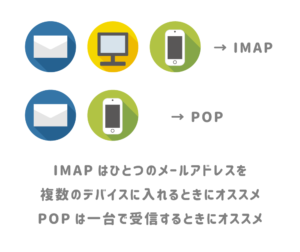
IMAP is an incoming email protocol that acts as an intermediary layer between email servers and clients. IMAP works very simply and seamlessly, requiring only the TCP/IP transport layer to do its job.
Once the connection is established between the server and the client, the user only reads emails from the server and does not download them. When you access your email, it may feel like it’s available locally, but it’s actually stored on your email server.
Therefore, IMAP allows you to access your email from any device or location you live. There is no problem with reading server emails via IMAP on smartphones, PCs, laptops, tablets, etc.
IMAP features
For your understanding, the following steps provide details of each process in IMAP functionality.
- The first step you need to take as a user is to sign in to your email client account. During login, the client accesses the email server via IMAP. IMAP works with most email clients, including Gmail, Outlook, and Thunderbird.
- IMAP then uses port 143 or 993 to establish a connection between the email server and the client. IMAP is automatically assigned to port 993 when operating over Secure Socket Layer (SSL). Over TCP/IP, it is assigned to port 143.
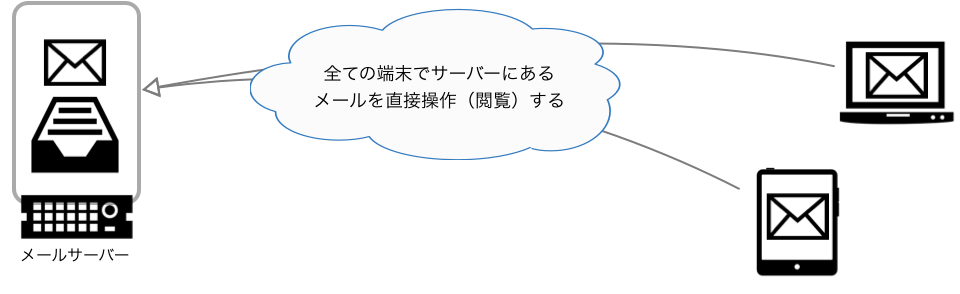
- When you log into your email account, the client displays the headers of all recently received emails. Scroll down and click on the next page to access the subject header of every email.
- If you want to read a particular email, IMAP will download that particular email and allow you to see all the details under the header. However, only messages are automatically downloaded, not attachments.
- Email clients most often use IMAP as an intermediary layer to provide quick access to email. Most importantly, it is very secure, so there is no possibility of unauthorized access. Although there are many email retrieval protocols such as POP and SMTP, IMAP provides the smoothest and fastest functionality.
- Once you read an email from an email server, the email remains on the server unless you make changes to it. Any changes you make within your mailbox will be dynamically updated and will appear even when accessed from another device. IMAP does not automatically delete accessed email unless the user deletes it.
Next, we will discuss the advantages and disadvantages of IMAP.
IMAP advantages and disadvantages
Each email retrieval protocol has its own strengths and weaknesses. Let’s talk about things related to IMAP.
Advantages of IMAP
- With IMAP, emails are automatically downloaded only when you click on them. Therefore, you can access your emails seamlessly and quickly through your client without having to download them first.
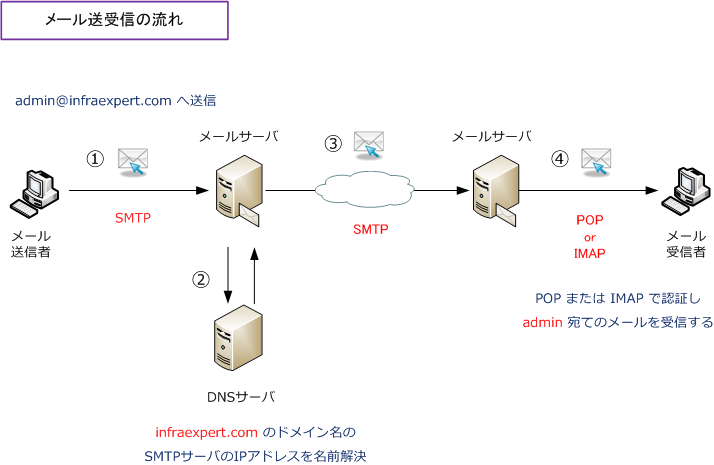
- You can access your email from anywhere in the world through your email client and from any device you own, including your PC, tablet, and smartphone. Your emails are always synced to our server so they’re always available.
- In addition to retaining incoming messages, IMAP stores all email you receive or send on a remote IMAP server. Therefore, you can access all your emails at any time and feel like they are stored on your device’s local storage.
- IMAP allows you to access your email offline. Attachments can also be accessed after they are downloaded.
- You have the option to organize your emails into different folders and subfolders on your server. You can also flag emails that are important to you. Plus, you can easily read, sort, search, and organize your emails.
- IMAP supports the IDLE extension, which allows email clients to display which emails in your inbox are unread or read.
- It is a simple, fast, and easy to use email retrieval protocol that is not easily found with other protocols. This process is very streamlined, allowing you to quickly access your email over any internet connection.
These benefits have made IMAP very popular within the industry and among users of major email clients.
Disadvantages of IMAP
Although IMAP has many advantages, it also has some disadvantages. Here is the list:
- An Internet connection is always required to easily read, download, send, and reply to emails through the client. If you don’t have internet access, you can only read specific emails that you’ve read.

- When you’re offline, you can’t access all the emails you receive. Additionally, if you experience server problems or internet outages, you will not be able to access your received or sent emails.
- IMAP requires a large amount of server storage because all emails sent and received are stored on the server. If your server has limited storage, you may need to delete old emails to accommodate new ones.
- If you receive a large amount of email every day, you may need to purchase additional server space.
- IMAP’s authentication mechanism can be bypassed by a hacker who uses a protocol analyzer and can easily obtain usernames and passwords transmitted in plain text.
IMAP security concerns
While IMAP may be growing day by day due to its perks and compatibility with multiple devices, it does come with security concerns, such as:
- If the server where all your emails are stored is compromised, serious problems can occur. If your email provider’s server malfunctions or shuts down improperly for any reason, you may no longer be able to access any of your email.
Additionally, if your security is compromised, hackers will have access to all your important documents and other people’s personal information.
- IMAP sends usernames and passwords unencrypted from the client side to the server. Login details are sent in plain text format. In this way, hackers can easily use the analyzer to steal login details from clients.
However, if IMAP is integrated with the TLS protocol, login details can be encrypted during communication.
- One of the major issues associated with IMAP is its inherent lack of compatibility with MFA or multi-factor authentication. Due to this, hackers can easily utilize password spraying techniques to illegally log into various email accounts.
This is a major concern for many organizations that use email clients with authentication capabilities, as it leaves a lot of information vulnerable. Therefore, many organizations prefer to avoid using IMAP.
IMAP and POP3
POP3 and IMAP are two widely used email protocols. Let’s discuss some differences between them.
| IMAP | pop 3 |
| Internet Message Access Protocol (IMAP) is an advanced protocol that allows you to view all folders on your server. | Post Office Protocol (POP3) is a simple protocol that allows you to download messages from your Inbox to your local computer. |
| Here, users access their email from their preferred device. | Here you can view and access your email from the device you downloaded it to. |
| IMAP acts as an intermediary between client and server. Therefore, the server stores each email. | Once the email is downloaded, it is deleted from the server without any configuration. |
| You can’t access your email while offline. | You can access your email on the same device even when you’re offline. |
| The email will not be downloaded until the user clicks on the email body. The sender name and subject line are immediately populated in your email client. | By default, emails are downloaded. Therefore, it takes a long time to load. |
| IMAP requires more space to store emails because emails are not automatically deleted from the server. | POP3 saves email storage space because emails are automatically deleted from the server. |
FAQ
Answer: IMAP is becoming increasingly obsolete because Microsoft stopped supporting IMAP username and password authentication. In addition to Microsoft, many email clients have also stopped supporting this protocol. However, some email clients still support this email retrieval protocol and continue to improve it.
Answer: IMAP may be more secure because all email is stored on the server. Even if you lose your phone or there is some malfunction on the email client side, all your emails will be safely stored on our servers. However, POP3 downloads and stores all your email on your device, which can be a serious problem if your device is stolen or lost.
Answer: Emails are not lost when importing and exporting in Outlook when changing from POP to IMAP. Simply create a new IMAP account in your email client and export your messages from POP to IMAP.
last word
This article explains IMAP and how it works. This email retrieval protocol makes accessing your emails very easy. IMAP offers many perks and features that make it an excellent choice for many email clients.
Then check out our apps to clean up your email inbox.


![How to set up a Raspberry Pi web server in 2021 [Guide]](https://i0.wp.com/pcmanabu.com/wp-content/uploads/2019/10/web-server-02-309x198.png?w=1200&resize=1200,0&ssl=1)


