In this tutorial, you will learn how to add, modify, and remove elements from a Python list using Python list methods.
When you start programming in Python, lists are one of the first built-in data structures you learn. Over the next few minutes, we’ll review the basics of Python lists and discuss some useful list methods you can use when working with lists.
Let’s get started!
Python list overview
In Python, a list is a collection of items of the same or different data types. You can use looping constructs such as for loops to loop through the collection and access the items.
Like all Python iterables, lists follow zero indexing and support slicing operations.
These are mutable collections , so you can change them wherever you see fit. This includes adding and removing elements from a list, sorting elements in a particular order, reversing the order of elements, etc. Python’s built-in list methods help you perform these actions.
Next, let’s take a look at some useful Python list methods.
Python’s built-in list methods
In this section, you will learn some useful list methods. Code a sample to see these list methods in action.
Use the following pgm_langs list: This is a list of strings containing the names of common programming languages.
pgm_langs = ['Python','Go','Rust','JavaScript'] 
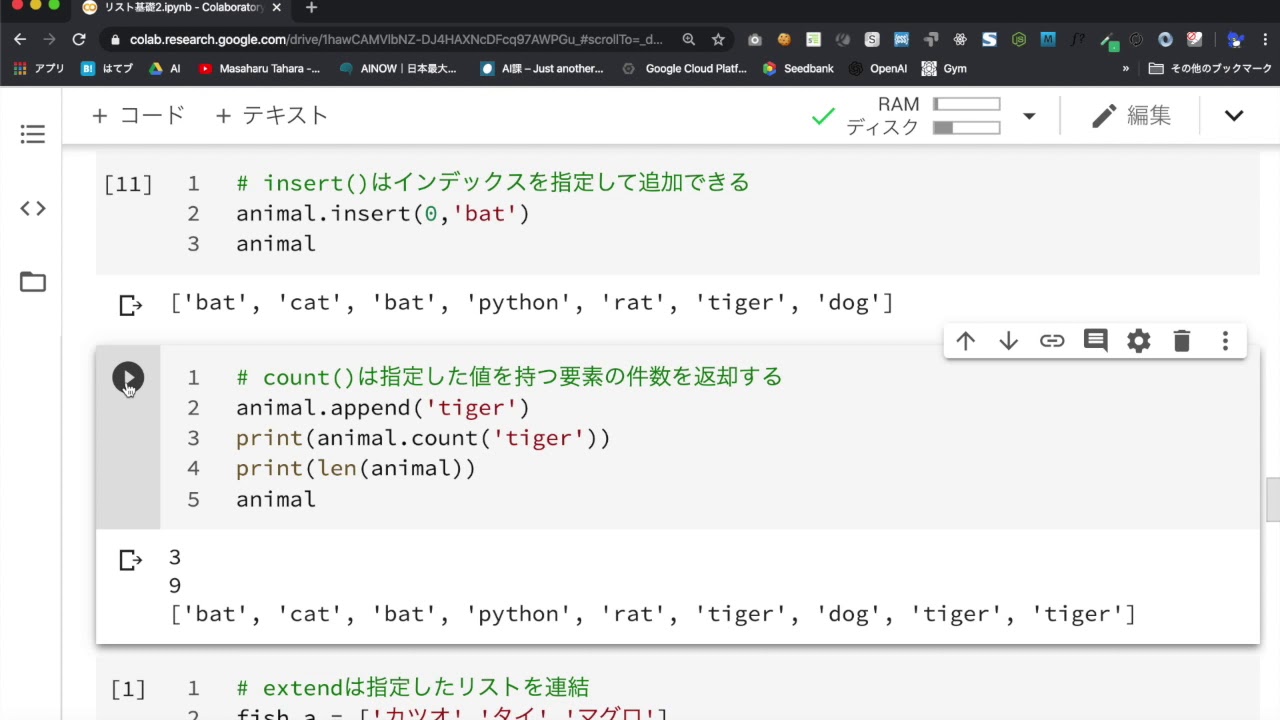
Insert list items using insert()
Sometimes you want to insert an element at a specific index. To do this, you can use the insert() method. A call to insert() list method includes:
- the index to insert the element, and
- Element to insert.
Let’s insert “Scala” at index 1 using index() method.
 pgm_langs = ['Python','Go','Rust','JavaScript']
pgm_langs.insert(1,'Scala')
print(pgm_langs)
# Output: ['Python', 'Scala', 'Go', 'Rust', 'JavaScript'] 
Add items to a list using append()
In some cases you may need to add an element to the end of the list. To do this, you can use the append() method.
Let’s use the append() method to add the string “Java” to the end of the list.
 pgm_langs.append('Java')
print(pgm_langs)
# Output: ['Python', 'Scala', 'Go', 'Rust', 'JavaScript', 'Java']
Add Iterable with extend()
You probably know that you can add a single item using the append() method. But what if you want to add multiple items to an existing list (such as an item list)? The extend() method provides a concise syntax for doing this.
Let’s use extend() method to add the elements of the list more_langs to the pgm_langs list.
 more_langs = ['C++','C#','C']
pgm_langs.extend(more_langs)
print(pgm_langs)
# Output: ['Python', 'Scala', 'Go', 'Rust', 'JavaScript', 'Java', 'C++', 'C#', 'C']
You can loop through the list of items and add one item at a time using append() method. However, this is redundant. It is more convenient to use extend() method instead.
 for lang in more_langs:
    pgm_langs.append(lang)
Reverse the list with reverse()
To reverse the order of elements in a list, call reverse() method.
You can see that the pgm_langs list is reversed.
 pgm_langs.reverse()
print(pgm_langs)
# Output: ['C', 'C#', 'C++', 'Java', 'JavaScript', 'Rust', 'Go', 'Scala', 'Python']
Also read how to flip a list and spin it in the opposite direction in Python.
Sort a list using sort()
sort() method allows you to sort Python lists on the fly. You can see that since pgm_langs is a list of strings, the sorting is done alphabetically.
 pgm_langs.sort()
print(pgm_langs)
# Output: ['C', 'C#', 'C++', 'Go', 'Java', 'JavaScript', 'Python', 'Rust', 'Scala']
To sort the list in reverse alphabetical order, set reverse parameter to True in the sort() method call.
 pgm_langs.sort(reverse=True)
print(pgm_langs)
# Output: ['Scala', 'Rust', 'Python', 'JavaScript', 'Java', 'Go', 'C++', 'C#', 'C']
Learn more about sorting Python lists.
Create a shallow copy with copy()
It may be helpful to modify a copy of the original list rather than modifying the original list itself. List Method copy() Returns a shallow copy of a Python list.
Let’s create a shallow copy of the pgm_langs list and name it pgm_langs_copy . Then set the first element of the list to “Haskell” and print it.
 pgm_langs_copy = pgm_langs.copy()
pgm_langs_copy[0]='Haskell'
print(pgm_langs_copy)
# Output: ['Haskell', 'Rust', 'Python', 'JavaScript', 'Java', 'Go', 'C++', 'C#', 'C'] However, you can see that the pgm_langs list is unchanged . Therefore, creating a shallow copy and modifying it will not change the original list.
 print(pgm_langs)
# Output: ['Scala', 'Rust', 'Python', 'JavaScript', 'Java', 'Go', 'C++', 'C#', 'C']
Get the number of items with count()
Sometimes it is useful to know how many times a particular element appears in a list. The count() method returns the number of times an element appears in the list.
Every element appears exactly once in pgm_langs list. So when I try to get the count for “Go” I get the correct 1.
 print(pgm_langs.count('Go'))
# Output: 1
Using the count() method is one way to remove duplicate items from a Python list.
Get the index of an item using Index()
To find the index of an item in a Python list, you can use index() method. Let’s say you want to find the index of “C#” in the pgm_langs list. You can use the assert statement to verify that the element at index 7 is ‘C#’.
 print(pgm_langs.index('C#'))
# Output: 7
assert pgm_langs[7] == 'C#'
Remove item at index using Pop()
Next, let’s take a look at the list method that removes an element from a Python list. pop() method is used to remove and return the element at a specific index. From the previous code example, we can see that “C#” is the language at index 7.
You can see that calling pop() method on the pgm_langs list with 7 as the index returns the element at index 7, ‘C#’, and removes it from the list.
 print(pgm_langs.pop(7))
# Output: 'C#'
print(pgm_langs)
# Output: ['Scala', 'Rust', 'Python', 'JavaScript', 'Java', 'Go', 'C++', 'C']
Therefore, the pop() method removes and returns the element at the specified index. However, specifying an index is optional . If you do not specify an index, the pop() method removes and returns the last element of the Python list, as shown below.
 print(pgm_langs.pop())
# Output: 'C'
print(pgm_langs)
# Output: ['Scala', 'Rust', 'Python', 'JavaScript', 'Java', 'Go', 'C++']
Remove items using Remove()
Sometimes you know which element you want to remove, but you don’t know its index. In this case you can use the remove() method. This method takes in the element you want to remove and removes it. Let’s remove “Java” from the pgm_langs list using remove() method as shown below.
 pgm_langs.remove('Java')
print(pgm_langs)
# Output: ['Scala', 'Rust', 'Python', 'JavaScript', 'Go', 'C++']
Remove all items using clear()
What if you want to remove all items from a Python list? You can loop through the list and remove each element using the remove() method, like this:
 for lang in pgm_langs:
    pgm_langs.remove(lang)
But is there a better way? Yes, use the clear() method. You can see that calling the clear method on the pgm_langs list removes all the elements, leaving pgm_langs an empty list.
 pgm_langs.clear()
print(pgm_langs)
# Output: []
Overview of Python’s list methods
Let’s briefly summarize the various list methods and their syntax.
| list method | syntax | explanation |
|---|---|---|
| put in() | list1.insert(index, elt) | Insert elt into index of list1 |
| addition() | list1.append(elt) | Add elt to the end of list1 |
| stretch() | list1.extend(list2) | Add elements from list2 to the end of list1 |
| Sorting () | list1.sort() | Sort the list on the fly |
| go backwards () | list1.reverse() | Reverse list1 on the spot |
| copy() | list1.copy() | Returns a shallow copy of list1 . |
| count() | list1.count(elt) | Returns the number of elt in list1 . |
| index() | list1.index(elt) | Returns the index of elt in list1 . |
| pop() | list1.pop(index) | Delete index elt and return it. |
| remove() | list1.remove(elt) | Delete elt from list1 |
| clear() | list1.clear() | remove all elements from list1 |
conclusion
We hope this tutorial helped you understand how to use the most common list methods in Python. The next step is to learn about Python tuples and the difference between lists and tuples in Python.


![How to set up a Raspberry Pi web server in 2021 [Guide]](https://i0.wp.com/pcmanabu.com/wp-content/uploads/2019/10/web-server-02-309x198.png?w=1200&resize=1200,0&ssl=1)


