Google Chrome now includes a “Fast Pages” label in the context menu for links on Android. This change will take effect in Chrome 85 beta . This serves as a metric to assess what to expect in terms of overall page speed.
Google labels web pages based on signals from the Core Web Vital metrics, which consider various factors such as content load time, responsiveness, and stability.
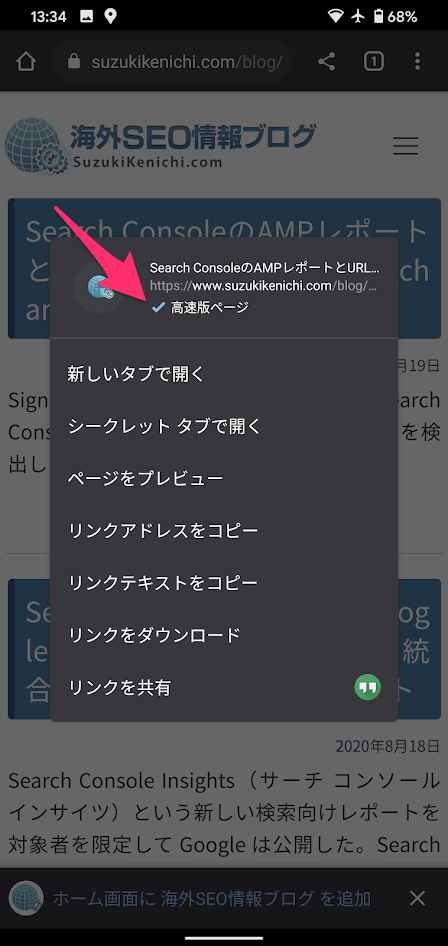
If a web page meets Google’s Web Vital metrics, you’ll see an express page label in the context menu, which you can access by long-pressing the link. Look at the badge in the image below. 
According to Google, Chrome may also badge links as “fast” if the URL is historically fast. “Historical data for URLs from sites with a similar structure is aggregated. Historical data is not available if the URL data is insufficient to assess speed, or if the URL is new or unpopular. “Evaluated on a per-host basis,” Google explains.
To help developers optimize web pages, Google updates its developer tools and provides recommendations and related resources. Google further states that complying with these changes will increase engagement, especially for businesses . It will also improve your ranking on search engine results pages.
You can enable fast labeling now in Chrome 85 beta. To do this, open chrome://flags, enable “Get context menu performance information and remote tips” and restart the browser. When accelerated page labeling is rolled out more broadly, Chrome users will see labels when they turn on Lite mode or Chrome Diagnostics.


![How to set up a Raspberry Pi web server in 2021 [Guide]](https://i0.wp.com/pcmanabu.com/wp-content/uploads/2019/10/web-server-02-309x198.png?w=1200&resize=1200,0&ssl=1)


