Image annotation is the basis for efficient labeling to easily train machine learning models. Check out these best image annotation tools to make the process efficient.
What is image annotation?
A machine learning model processes the tagged images after manual annotation and reproduces the annotations without human supervision. Image annotations establish standards that the model tries to follow, so label errors are also replicated.
Labeling or classifying images with descriptive data that helps identify and classify objects, people, or scenes within an image is image annotation.
Image annotation is very important in fields such as computer vision, robotics, and autonomous driving because it allows robots to understand and interpret visual data.

Drawing bounding boxes around objects in an image, labeling objects with text, and dividing an image into sections based on visual characteristics are examples of image annotation.
Advantages of using image annotation
Many industries can benefit from image annotation, including e-commerce, healthcare, and autonomous driving. This allows machines to accurately identify and classify objects in images. This enhances the ability to perform activities such as object detection, image retrieval, and diagnostics.
This has the potential to increase productivity, efficiency, and cost savings. Annotated photos can also train and enhance machine learning models to improve accuracy and effectiveness. The ability of machines to understand and interpret visual data is enabled by image annotation, advancing the science of computer vision.
Example of using image annotation

Image annotation is very useful as advances are made in the technological field. When everything revolves around data, it is also important to properly label the data so that the model can understand it better.
Let’s now look at some examples of using image annotations.
object detection
This is a way to find and identify specific items in an image. Algorithms can use image annotations to recognize and label objects in photos. This is useful in applications such as self-driving cars that need to recognize and avoid oncoming vehicles.
Image classification
The process of classifying images into one of many predetermined categories is known as image classification. You can assign appropriate categories to images through image annotations. Applications such as content moderation that need to classify photos as appropriate or inappropriate can benefit from this.
medical image analysis
Add labels to medical images such as X-rays and MRIs to indicate the presence of cancer, fractures, or other abnormalities. This facilitates better image analysis and improves diagnostic accuracy for medical professionals and researchers.
Although labor-intensive, there is value in using image processing to automate inventory management and monitoring. Image annotation is a key component of agile security.
It supports operations such as pedestrian tracking, facial recognition for theft detection, thermal vision, night vision during the darkest hours, and crowd detection. Effortlessly solve complex projects with enhanced access to advanced technology.
Let’s take a look at some of the key tools you can use to annotate images for efficient labeling.
markup hero
Instantly share photos and files with Markup Hero while adding free annotations in any web browser. It’s easy to use and easy to learn.
It is an effective tool for image annotation that allows users to quickly add various shapes, arrows, text, and other components to photos. The tool’s easy-to-use design allows users to work and visually communicate with others in real time.

Markup Hero lets you annotate your photos in a variety of ways, including highlighting important information, drawing attention to specific areas, and adding labels and descriptions. Users of the program can also crop, resize, and rotate photos, making it easy to capture the perfect shot.
Users can easily send and receive comments and feedback on annotated photos. In short, Markup Hero is a simple, adaptable, and robust image annotation tool perfect for anyone who wants to interact and communicate graphically with others in real time.
key lab
Keylabs allows users to annotate photos by adding bounding boxes, keypoints, and semantic segmentation. AI developers can annotate images more efficiently thanks to Keylabs. The platform includes all styles and methods of image annotation, giving developers great flexibility.
Users of the program can quickly and properly categorize photos with a user-friendly UI. It provides a variety of features for managing workflows, measuring progress, and allows users to collaborate with team members.
The software also offers viable customization options, including the creation of bespoke annotation templates and custom workflows. Keylabs provides built-in quality control elements combined with annotation functionality to ensure annotation accuracy and consistency.
It also facilitates data augmentation approaches that increase the amount and diversity of annotated datasets. Its semantic segmentation helps resolve complexity with complete ease.
Keylabs is a flexible image annotation tool that helps streamline data annotation steps and improve the accuracy of machine learning algorithms.
V7 Lab
The goal of V7 Labs , an image annotation tool, is to help organizations and individuals create accurate, high-quality datasets for machine learning and computer recognition projects. The tool’s extensive annotation feature set makes it suitable for a variety of situations.
One of V7 Labs’ key features is its ability to provide high-quality training data quickly and effectively. The tool uses AI-assisted annotation to speed up the annotation process, reducing the time and effort required to create accurate datasets.
TensorFlow and PyTorch are just a few of the popular machine learning frameworks that V7 Labs offers seamless integration. This allows users to easily export annotated datasets in the style required by their preferred machine learning framework.
This tool has the potential to significantly speed up the annotation process and improve the quality of training data through collaborative workflows and AI-assisted annotation capabilities.
label box
Labelbox is the world’s most powerful vector labeling tool, with a focus on simplicity, speed, and a variety of use cases. It also makes the most incredible sense. Set up in minutes, scale to any team size, and iterate quickly to generate accurate training data.
You can tailor annotations to your project requirements, such as object recognition, semantic segmentation, and labeling for image classification.

By employing dynamic filters that manipulate content, data, or text embeddings, you can quickly and efficiently add labels to relevant results at scale and queue them for human review. .
Labelbox facilitates collaboration among large numbers of users, with the ability to assign tasks, review notes, and track progress. Additionally, we provide quality assurance tools to ensure accurate and reliable labeling.
This is your go-to set of tools for finding and classifying errors. Quickly find image data using filters such as annotations to prioritize images for labeling and create review assignments to address the most pressing issues.
scale
The image scale annotation tool allows you to include a scale bar or ruler to refer to the size of objects in your image. This is especially useful when examining photos of complex structures such as microorganisms or geological formations.
Users of the program can annotate photos with text labels, arrows, and other forms to draw attention to specific details.

With the help of ML, large numbers of images can be annotated accurately and quickly with high quality using active tools such as pre-labeling, superpixel segmentation, and ML-based quality checks. The tasks of scaling images can be combined.
Additionally, when the target item is unknown, it is useful to configure the image task to automatically build a consensus classification job.
Scale image annotation tools are frequently used in conjunction with other image analysis software tools, such as image segmentation software and object identification software, to create complex visual representations of complex data sets. It is an important tool for researchers and professionals in various fields that rely on accurate and thorough image analysis.
super annotate
SuperAnnotate is a powerful annotation application that allows users to annotate photos and videos quickly and accurately. Created for computer vision teams, AI researchers, and data scientists to annotate datasets for computer vision models.
Bounding boxes, pointers, polygons, lines, and segmentations are just a few of the many annotation types supported by SuperAnnotate.
SuperAnnotate also provides quality control tools such as automated reviews and consensus reviews to ensure high-quality annotations. The tool’s user-friendly interface allows teams to collaborate effortlessly and speed up the annotation process. It also provides great query and data management features that help you track relevant data and improve the quality of your datasets.
Overall, SuperAnnotate is a great annotation tool for data scientists and machine learning teams looking to speed up the creation of computer vision models, improve annotation quality, and streamline the annotation process.
under supervision
With the help of annotation tool Supervisely , users can annotate and label photos and videos for use in computer vision tasks. The platform’s user-friendly interface supports different types of annotations such as object recognition, segmentation, classification, and tracking.
Supervisely’s robust annotation engine makes annotation easy with options such as automatic polygon segmentation, shapes, text manipulation, and easy labeling.
Supervisely users can collaborate with other members of their team by sharing their work, making comments, and exploring annotations. As a result of the platform’s integration with well-known deep learning frameworks such as TensorFlow, PyTorch, and Caffe, users can also export their annotations in a variety of formats.
Supervisely is a popular annotation tool among computer vision engineers, data scientists, and academics due to its powerful annotation capabilities and easy interaction with deep learning frameworks. Detailed lessons and documentation are also available on the site to help customers get started on their annotation projects quickly and effectively.
scarabelle
Scalabel helps improve accuracy using automated annotations. Built with extensibility, adaptability, and ease of use in mind. Scalabel’s collaboration and version control support allows multiple people to work on the same project at the same time.
Additionally, it provides various features for quality control, including tools for review, validation, and remediation.
One of Scalabel’s distinguishing features is its ability to interact with other machine learning frameworks such as TensorFlow, PyTorch, and Caffe, allowing users to train models directly within their applications. With 3D clouds and 2D video tracking, frame-to-frame annotation prediction is now seamless.
Scalabel is a robust and adaptable annotation preferred by researchers and developers in the machine learning field because it provides a variety of annotation types, interactions, version control, quality control, and interaction with machine learning frameworks. It’s a tool.
eagle
The ideal tool for organizing images and ideas is Eagle . This tool aims to simplify annotation of large datasets so that you can train computer vision models more quickly. The program also allows users to track progress, review caliber annotations, and view and modify annotations.
Eagle provides an easy-to-use user interface and encourages teamwork. It provides several useful features such as organizing labeling tasks, defining annotation types, and importing/exporting datasets. Eagle also helps you better manage large numbers of images, and you can use the smart folder feature to find specific sets of images faster.
Additionally, audio and video management features allow you to preview videos without having to open them individually.
Additionally, it provides cloud services integration, making it easy to scale and process large datasets using Google Cloud. Ultimately, Eagle is a robust and adaptive image processing and analysis tool that is particularly suited for object recognition and segmentation applications in machine learning.
rectangular labels
An image labeling tool called RectLabel annotates photos for machine learning applications. This easy-to-use software allows users to annotate images by drawing the coordinates of a bounding box around the evocative elements within the image. Bounding boxes, polygons, and lines are just a few of the different annotation types that the tool can handle.
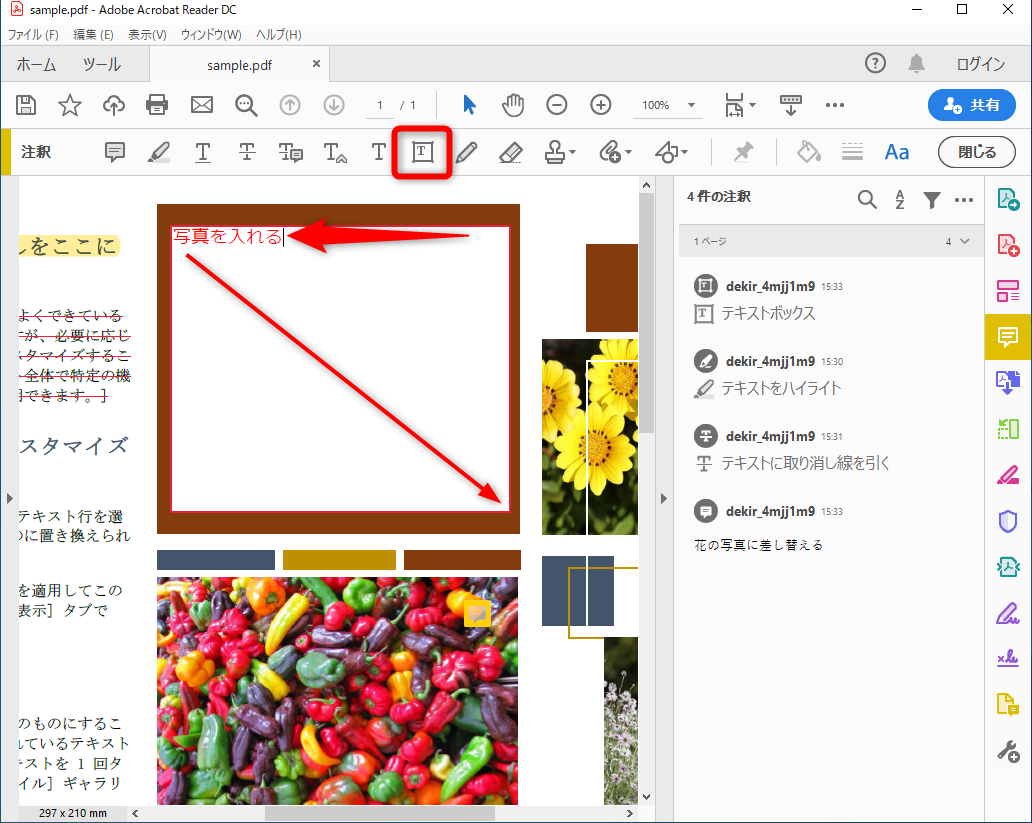
Several features provided by RectLabel help ensure accuracy and efficiency of the annotation process. It also features an intelligent tagging system that speeds labeling by automatically suggesting labels based on the user’s previous annotations.
Additionally, this tool allows users to precisely control the size and placement of the bounding box, resulting in high-quality annotations.
RectLabel allows users to extract annotations in various file formats such as JPG, PNG, and BMP. RectLabel is a powerful and adaptable tool for image annotation that streamlines the steps in machine learning jobs.
conclusion
Global digitization has increased demand for models using deep learning and the ability of machines to identify and classify items. Regardless of the market, image annotation is at the heart of the best achievements in computer vision.
Finally, the implementation of image annotation technology will benefit many businesses such as machine learning, healthcare, and e-commerce. These techniques can improve efficiency and accuracy when performing tasks such as object recognition, segmentation, and classification.
It also reduces labor costs and helps businesses make data-driven decisions. For best results, it is essential to choose the right tool and ensure that your annotations are of high quality.
You can also explore some of the best AI image generators to get stunning images in seconds.


![How to set up a Raspberry Pi web server in 2021 [Guide]](https://i0.wp.com/pcmanabu.com/wp-content/uploads/2019/10/web-server-02-309x198.png?w=1200&resize=1200,0&ssl=1)


