Steam Deck is a handheld gaming console, but it also delivers a PC-like experience in the palm of your hand. You can already access Steam Deck’s desktop mode through our recently published guide. However, if you want to enhance the capabilities of your portable console, you can use the dock to connect your Steam Deck to your TV, as well as a wide range of peripherals such as a keyboard and mouse. Valve sells an official docking station for Steam Deck, but there are also several third-party docks available on the market. In this guide, we’ll help you take this experience to the next level with the best docks available on Steam Deck. To choose the best docking station for your needs, keep reading.
For those who don’t know, the Steam Deck is essentially a gaming PC based on AMD’s Zen 2+ RDNA architecture. This means that while the game is optimized to run well on SteamOS, you can still do your work in desktop mode running Arch Linux. Moving to a Linux desktop environment provides a more familiar experience. But doing the same on a handheld can be a nightmare.
Thankfully, Valve uses the Steam Deck’s USB-C port to connect a docking station, allowing you to use peripherals like a monitor, mouse, and keyboard with your handheld. Not only can you use it for work, but you can also connect a controller and play games on a big screen. Additionally, an important point to keep in mind when choosing a dock is the charging speed. The Steam Deck charges at 45W, so your dock must support at least 45W fast charging.
That said, this guide includes 10 of our favorite USB-C docks for Steam Deck. We’ve also added some USB-C hubs for gamers looking for a more portable solution. Let’s take a closer look 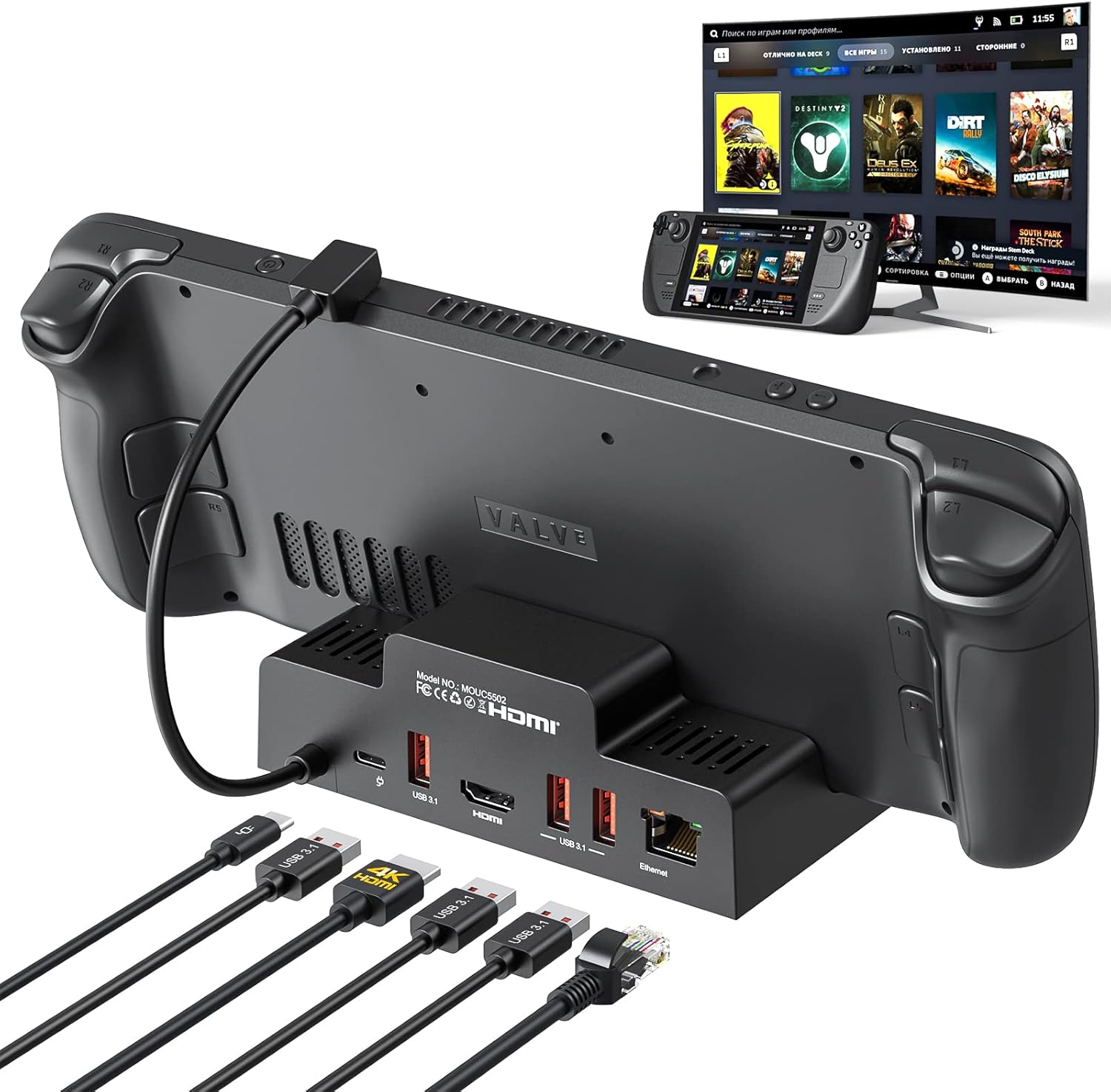
1.Jsaux docking station
- Ports: 6 (USB-C PD x 1, Ethernet x 1, HDMI x 1, USB 3.0 x 3)
- Video output: up to 4K @ 60Hz
- Ethernet: Yes
- Power supply: max 100W
Within months of its release, Jsaux became one of the leading Steam Deck accessory manufacturers. When Valve’s official dock was still in production, Jsaux released its own docking station for gamers.
The Jsaux docking station comes with six different ports, including an Ethernet port for stable internet. You can connect a single HDMI monitor to provide up to 4K output with a 60Hz refresh rate. To power the Steam Deck, the docking station can provide up to 100W of power (Steam Deck supports fast charging up to 45W), making the dock versatile. Finally, there are three USB 3.0 ports for connecting peripherals such as a keyboard and mouse.
Design-wise, the Jsaux docking station is sleek and small, making it easy to carry. Additionally, the dock has a ridge that allows users to lean the Steam Deck directly against the docking station , creating a natural vertical stand. You can also connect a USB-C Android smartphone or iPad to this dock. This is great. Overall, this is a versatile and functional Steam Deck dock for under $50.
Purchased on Amazon ( $44.99 ) 
2.iVoler Docking Station
- Ports: 5 (1x USB-C PD, 1x HDMI, 3x USB 3.0)
- Video output: up to 4k @ 60Hz
- Ethernet: No
- Power supply: max 65W
The iVoler Docking Station is a sleek and compact Steam Deck dock with 5 ports. Three USB-A 3.0 ports allow users to connect their favorite peripherals and support up to 65W fast charging for mobile and other devices. It also features a USB-C power delivery port to charge your console at full speed (45W). Additionally, the dock supports up to 4K @ 60Hz output thanks to its HDMI 2.0 port. Unfortunately, the iVoler docking station doesn’t come with an Ethernet port, so you’ll still need to use a Wi-Fi connection with your Steam deck.
In terms of design, iVoler adopts a portable and lightweight design, allowing users to carry the dock anywhere without worrying about space. Additionally, the dock also acts as a backstand for the Steam Deck, allowing users to easily set up a stand. It is one of the cheapest products on this list.
Purchased on Amazon ( $29.99 ) 
3. Steam Deck Docking Station (Official)
- Ports: 7 (1x USB-C, 3x USB 3.1, 1x HDMI 2.0, 1x DisplayPort 1.4, 1x Ethernet)
- Video output: up to 4K @ 60Hz or 1440 @ 120Hz
- Ethernet: Yes
- Power delivery: 45W pass-through
Valve’s official Steam Deck docking station has been on the market for a long time. Despite being a late entry, this is one of the best docks you can buy for your handheld console. It’s packed with all the essential ports you need to power your Steam deck and connect it to your TV or monitor.
Official docking station includes 1 HDMI 2.0 port and 1 Display-Port 1.4 port, allowing for multi-monitor setups and AMD Freesync support (currently unavailable, but expected to be enabled soon) . This port supports video output up to 4K @ 60Hz or 1440p @ 120Hz. Additionally, it features three USB 3.1 Gen2 ports and supports 45W pass-through charging. The official dock also features a Gigabit Ethernet port, giving gamers faster internet connectivity.
In terms of design, Valve has gone for a minimalist and compact design that can be carried in the average backpack. Additionally, as seen above, the docking station allows you to stand the Steam Deck upright without any support.
Purchase on Steam ( $89.99 )
4. Anker 575 USB-C Docking Station
- Ports: 13 (3 USB-A, 3 USB-C, 2 HDMI 2.0, 1 DisplayPort, 1 Ethernet, SD/microSD card slot, 3.5 mm AUX, and 1 DC input)
- Video output: up to 4K @ 60Hz via HDMI or DisplayPort
- Ethernet: Yes
- Power supply: max 85W
Anker is a well-known brand for smartphone charging solutions and peripherals. However, Anker is slowly making inroads into the docking station market, and the Anker 575 docking station is one of its top products. This docking station is an all-in-one solution for those who want to get the most out of their Steam Deck. The Anker 575 has 13 different ports, including a microSD/SD card expansion slot, an Ethernet port, audio input/output jacks, multiple USB-C and USB-A ports, and more.
The Anker 575 docking station also has two HDMI ports and one DisplayPort , capable of outputting up to 4K @ 60Hz. You can connect three monitors through these ports and choose to stream media at 1080p @ 60Hz. Additionally, the Anker 575 can charge the Steam Deck through the 85W charging port and another device at the same time through the 18W USB-C PD port.
The docking station has a boxy design and is heavier (approximately 360 grams) than other docks, making it less portable. However, if you want to create extra space in your luggage or are looking for an all-in-one solution for your Steam deck, the Anker 575 is the right choice, albeit quite expensive.
Purchased on Amazon ( $249.99 ) 
5. Jsaux M.2 Steam Deck Dock
- Ports: 6 (1x USB-C PD, 2x USB 3.0, 1x HDMI, 1x Ethernet)
- Video output: up to 4k @ 60Hz
- Ethernet: Yes
- Power supply: max 100W
At the top of the list, the Jsaux Steam Deck Dock had no shortage of things, but the company thought it would be a good idea to push the boundaries and extend its capabilities. This dock has almost all the features offered by Jsaux’s original docking station, but adds an M.2 SSD slot to the dock. Users can remove the dock’s top plate and install an M.2 SSD to expand their Steam deck storage . The dock supports up to 4TB of storage space, providing huge storage options for any gamer.
Features two USB-A 3.0 ports, one HDMI port supporting up to 4K @ 60Hz or 2K @ 120Hz, an Ethernet port for direct internet connectivity, and up to 100W charging (with included 65W adapter) ). In terms of appearance and size, it looks similar to the standard Jsaux docking station, but is slightly larger and has an etched pattern on the top.
The M.2 SSD slot is covered by a lid, allowing you to prop the Steam deck against the dock itself. If you’re planning on significantly expanding your console’s storage, you should get this Jsaux docking station for Steam Deck.
Purchased on Amazon ( $109.99 )
6. MOKiN Steam Deck Docking Station
- Ports: 7 (1x USB-C, 3x USB 3.0, 1x HDMI, 1x DisplayPort, 1x Ethernet)
- Video output: up to 4K @ 60Hz
- Ethernet: Yes
- Power supply: max 100W
An affordable alternative to the official Steam Deck docking station is the MOKiN docking station. It comes with seven important ports, including an HDMI 2.0 port and a DisplayPort 1.4 port, allowing you to use a dual monitor setup. The dock supports up to 4K @ 60Hz or 2K @ 120Hz. Additionally, it has an Ethernet port that supports speeds of up to 1 Gbps for a stable internet connection.
There are three USB 3.1 ports on the back (lined vertically to save space), allowing you to connect multiple peripherals at the same time. Additionally, the MOKiN docking station provides up to 100W of charging power to your console.
Design-wise, the dock is compact and comes with a protective layer to prevent scratches on the steam deck. The docking station boasts a fitted buckle design and includes a non-slip pad on the bottom that securely holds the portable console in place .
Purchased on Amazon ( $48.99 )
7. NewQ Docking Station for Steam Deck
- Ports: 4
- Video output: up to 4K @ 60Hz
- Ethernet: No
- Power supply: max 100W
The NewQ Docking Station for Steam Deck addresses two problems in one accessory: a stand to prop up your Steam Deck on a table, and a docking solution with all the ports you need. Compared to other options on this list, this clip-on docking station from NewQ is one of the most portable . Clips to the back of the steam deck to save table space. Additionally, the dock also acts as a kickstand for the Steam Deck, allowing players to prop the Steam Deck up against a coffee table and easily stream content.
This Steam Deck dock has an HDMI port that supports up to 4K @ 60Hz output, two USB 3.0 ports for connecting a mouse and keyboard, and one USB-C port. Additionally, the NewQ dock supports up to 100W charging. Unfortunately, due to its small size, the company had to exclude an Ethernet cable and an additional USB port. Therefore, if users want to connect additional controllers or use a direct internet connection, they will have to look elsewhere. We recommend this Steam Deck dock as it is extremely portable and has an innovative design.
Purchased on Amazon ( $29.99 )
8. Walnew USB-C Hub
- Ports: 7
- Video output: up to 4K @ 30Hz
- Ethernet: No
- Power supply: max 100W
Next up is a convenient USB-C hub instead of a typical docking station. As it turns out, Steam Deck supports USB-C hubs. The Walnew USB-C hub comes with 7 essential ports. The Walnew hub doesn’t come with an Ethernet port, but does include three USB 3.0 ports, an SD/MicroSD card reader, and a USB-C port that supports up to 100W charging. For video output, the Walnew hub features an HDMI port that allows you to stream content at 1080p or 4K @ 30Hz.
Design-wise, the Walnew hub is small and lightweight, allowing users to put it in their pocket or travel bag. The low video output and lack of an Ethernet port may be an issue for some, but for those who want a portable dock for their Steam Deck without spending a lot of money, this is a great option. At less than $25, this is the cheapest Steam Deck dock on our list.
Purchased on Amazon ( $23.99 )
9. Belkin Multiport Docking Station
- Ports: 7 (1x USB-C PD, 2x USB 3.0, 1x HDMI 1.4, SD/Micro SD 3.0, 3.5mm audio jack)
- Video output: 4K @ 30Hz
- Ethernet: None (with attachment)
- Power supply: max 100W
The Belkin 7-in-1 USB-C Hub is another ultra-portable docking solution for Steam Deck with all the ports you need for a complete experience. It houses 7 different ports and features 2 USB 3.0 ports, 1 SD/MicroSD card slot, an HDMI 1.4 port that can output up to 4K @ 30Hz video, and a USB-C Power Delivery port that supports 85W fast charging . I am.
The Belkin hub also comes with a 3.5mm audio input/output jack, allowing users to connect headphones to the console. This hub doesn’t have a built-in Ethernet port, but the company sells a USB-C Ethernet adapter that can be used for ultra-fast internet. However, except for the charging process, it occupies one onboard USB-C port.
The Belkin 7-in-1 docking station’s compact design makes it suitable for frequent travelers. If you want a small docking solution that works with your Steam deck as well as your MacBook, this Belkin hub is for you.
Purchased on Amazon ( $44.99 )
10. Anchor 543 USB-C Hub
- Ports: 6 (USB 3.0 x 2, USB-C x 2, HDMI x 1, Ethernet x 1)
- Video output: 4K @ 30Hz
- Ethernet: Yes
- Power supply: max 65W
This list already includes Anker’s rugged 575 docking station, but not everyone wants to spend that kind of money or need that many ports. If you’re looking for an ultra-portable USB-C hub for your Steam deck, the Anker 543 is the way to go.
Anker 543 USB-C hub has 6 essential ports, including 2 USB 3.0 ports, an HDMI port with up to 4K @ 30Hz video output , and support for up to 65W fast charging via USB-C PD port is included. Built-in Ethernet port capable of speeds up to 1Gbps. However, the highlight of this dock may be its small and compact form factor, which makes it suitable for travel purposes. So if you want an all-in-one solution without worrying about purchasing additional support attachments, this is the perfect choice.
Purchased on Amazon ( $38.99 )
So in this article, we’ve highlighted 10 of our favorite Steam Deck docks that everyone should check out. While the Steam Deck is powerful on its own when used in handheld mode, a docking station allows you to realize the console’s true potential. You can also learn how to right-click and use the on-screen keyboard in Steam Deck, but being able to connect a physical keyboard and mouse is extremely useful. So, which docking station for Steam Deck are you planning to buy? Let us know in the comments below.
Steam Deck allows users to connect to a monitor without a dock. You’ll need to get a USB-C to HDMI cable and plug it into the USB-C port on your Steam deck. However, note that the Steam Deck only has one USB-C port, so you won’t have the option to charge the console if you connect it with a USB-C to HDMI cable.
Steam Deck has built-in Bluetooth support. So as long as the user has a Bluetooth keyboard and mouse connected to the handheld console, it should work fine. However, a dock is required to connect a wired mouse to a wireless mouse or wired keyboard.


![How to set up a Raspberry Pi web server in 2021 [Guide]](https://i0.wp.com/pcmanabu.com/wp-content/uploads/2019/10/web-server-02-309x198.png?w=1200&resize=1200,0&ssl=1)


