Substratum is a great tool for theming your Android device. Although Substratum offers tools, you need theme packs to change the look of your Android device. There are currently a lot of Substratum themes on the Play Store, but over time, more and more themes will be built and ported to the Substratum theme engine. With so many options to choose from, it can be very confusing which theme to try first. Don’t worry. Here is a list of 15 cool Substratum themes that you can apply to your device.
Note : These themes work with regular Google apps, but we recommend using Theme Ready Google Apps, which you can download here .
1. Default dark
If you like the standard experience on your device, but want a darker tone, Default Dark is the theme for you. Brings a dark gray color to the entire system UI while keeping the icons and fonts standard.
Download (free)
2. Android O
Want to get the Android O look on your device but don’t have a Pixel or Nexus? Don’t worry. Android O themes are there to recreate the entire look of the next version of Android on your device. In addition to changing the system UI and Google apps, it also comes with Android O wallpapers and sound packs .

Download ($0.99)
3. Pixel-Android O Dark
The Android O theme looks great, but some people prefer themes with a darker meaning. This is where this theme comes in handy. The Pixel-Android O Dark theme brings a dark tone to the overall look of Android O , giving you the best of both worlds.
Download ($1.49)
4. Overview theme
If you prefer a minimalist look for your device, Outline Theme is the best choice. All icons are replaced with minimal “outline” drawings , giving the entire system a cleaner, more tidy look .

Download ($1.49)
5. The theme of dreaming
Reverie is another light theme made for users who prefer a simple yet elegant look . The system UI and icons, fonts, and colors complement each other to give your device a fresh look.

Download ($1.49)
6. Pitch Black Theme
The official Resurrection Remix theme is now available for everyone to download. The PitchBlack theme is best known for its completely black look with red icons and fonts . The included fonts and boot animations make it a complete package for those who want to achieve the perfect red/black look for their device. Additionally, using black on devices with OLED/AMOLED displays is known to be great for saving battery power , and this theme is one of the best black themes out there .

Download ($2.99)
7. Antares Theme
The Antares theme is inspired by hexagonal designs . Comes with a bluish-grayish backtone and a secondary color of your choice. This theme also comes with its own font pack, boot animation, and portal sound pack.

Download ($0.99)
8. GRVY’s theme
Brought to you by loyal members of the Dirty Unicorns team, GRVY is one of the most customizable themes. GRVY has both dark and light themes, combined with the highest quality vectorized glyphs almost everywhere, giving you a futuristic look and a retro feel .

Download ($1.49)
9. Dark Matter
GRVY offers a combination of retro and futuristic looks, while Dark Matter is a dark theme that aims to give your device a complete futuristic look . Every aspect of the device’s appearance is given appropriate details to ensure a breathtaking experience.
Download ($1.49)
10. Complex theme
Composite themes are highly customizable themes for Android Nougat and newer devices. A lighter version of the same theme is also available, but the darker tones look more sophisticated and feature-rich .

Download ($1.49)
11. Coalfield Theme
Originally created for the CyanogenMod theme engine, the Coalfield theme has now been ported to the Substratum theme engine, and the attention to detail is incredible. It has a pastel color scheme on a dark background and looks very nice overall.

Download ($1.49)
12. Swift Dark
Swift Dark theme is another theme that brings dark mode not only to your system but also to almost all widely used apps . It’s highly customizable , so you can change it to suit your preferences.

Download ($1.99)
13. Grace
Greyce adds a completely gray UI to the entire system UI, unlike most dark themes that rely on adding a bluish tone to a slightly gray background. The darkness of this theme is completely different, so give it a try for yourself.
Download (free)
14. Luminous
As the name suggests, the Luminous theme aims to provide users with a bright user experience . It may work on Android Marshmallow, but the developer suggests that you should use it on Android Nougat or later for the best experience. If you want the colors to really pop off the screen , try this.
Download ($1.49)
15. Flux
Flux is a Substratum theme that is quite unique in itself. While most themes follow a linear approach to designing and customizing icons and the overall appearance of the device, Flux follows a circular design that appeals to many users. Add to that a great combination of colors and you’ll have the perfect theme for your device.
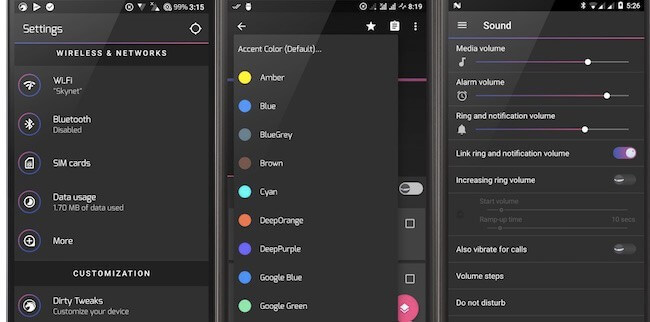
Download ($1.49)
See also: How to theme Substratum on your Android device
Personalize your Android device with these Substratum themes
These were some of the best Substratum themes currently available on the Play Store. Substratum opens the door to new levels of customization and we’ve listed some of the best theme packs available. Give it a try and share your theme settings and experiences in the comments section below.


![How to set up a Raspberry Pi web server in 2021 [Guide]](https://i0.wp.com/pcmanabu.com/wp-content/uploads/2019/10/web-server-02-309x198.png?w=1200&resize=1200,0&ssl=1)


