Having a portable gaming PC means you’ll need to install countless games on it, and storage space will definitely be an issue in the future. While tech-savvy users can disassemble the Steam deck and install a new built-in SSD, Valve provides an easily accessible microSD card slot for the average consumer. So, no matter what kind of Steam deck you own, check out the best SD cards to expand your handheld’s storage capacity.
For those who don’t know, expanding your Steam Deck’s storage using a microSD card is very easy. Just open the bottom slot and insert the SD card to meet your simple requirements. Make sure to purchase a microSD card that supports the UHS-1 standard. All cards on the list support it. We also list the lowest and highest prices for each SD card storage option. So without wasting any more time, let’s take a look at the six microSD cards you can buy for your Steam deck. 
Best SD Cards for Steam Deck (2024)

1. SanDisk Ultra
The first microSD card on our list is made by SanDisk and is widely popular among consumer electronics users. SanDisk Ultra is an affordable SD card manufactured by Western Digital’s popular sub-brand. SanDisk Ultra is slower compared to other memory cards on this list due to its U1 class. However, the fact remains that this SD card can easily run and load virtually any game. This is due to the UHS-1 card slot available on the Steam Deck.
When it comes to transfer speeds, the SanDisk Ultra MicroSD card can easily run up to 120 MB/s. This is perfect for users who have a 64GB Steam Deck model and need an inexpensive card to store their games on. SanDisk Ultra comes in a variety of storage sizes, from as low as 64 GB to as high as 512 GB.
Buy on Amazon (starts at $11.60 for 64GB and ends at $47.50 for 512GB)

2.Samsung EVO Select
Samsung is a leading company in the field of consumer electronics and mobile phones. However, the company is also known for manufacturing storage solutions for electronic devices, and the Samsung EVO Select SD card is one such product. One of the most popular microSD cards for Steam decks you can buy, the Samsung EVO Select offers the highest read speeds of up to 130 MB/s. Enough for the Steam Deck’s UHS-1 card slot. Additionally, it comes in a variety of capacities, with options up to 512GB.
Additionally, Samsung’s microSD cards are waterproof, dustproof, X-ray, and magnetically resistant, making them extremely durable. EVO Select is perfect for anyone looking for an affordable SD card and Samsung reliability. A microSD card is also required to install Windows on Steam Deck. Learn more in the linked article.
Buy on Amazon (Starting at $9.49 for 64GB, up to $39.99 for 512GB)
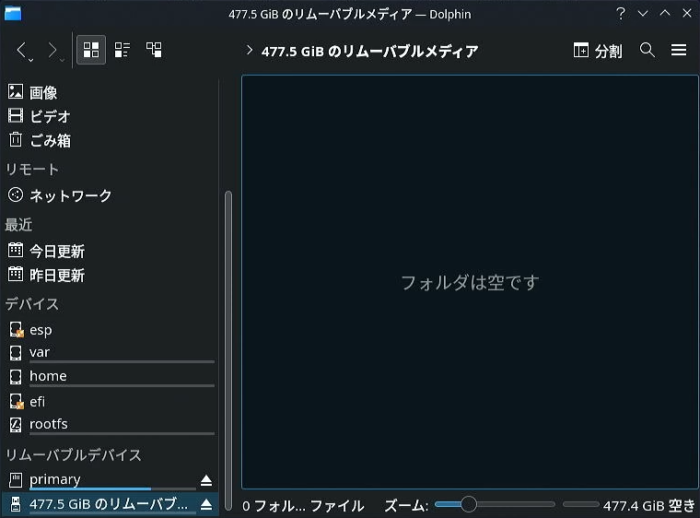
3. SanDisk Extreme microSD card
The SanDisk Extreme microSDXC UHS-I card is another product from SanDisk on this list that is even better than the Ultra. This card is great in terms of read and write speeds, and also offers a whopping 1TB microSD card for your Steam deck. SanDisk Extreme offers read speeds of up to 160 MB/s and write speeds of up to 80 MB/s, making it ideal for running games on your Steam deck. I also use a 512GB SanDisk Extreme card and can attest to good game load times.
The only downside to this SD card is its price . However, if you don’t want to compromise and need enough storage, then you should choose SanDisk Extreme microSDXC card without thinking twice.
Buy on Amazon (starts at $10.49 for 64GB, up to $115 for 1TB)
4. Lexar Professional 1066x
Lexar may be a lesser-known brand on this list, but it’s one of the big names when it comes to memory card products. Lexar Professional 1066x microSD cards support impressive read speeds of up to 160MB/s and write speeds of up to 120MB/s (70 MB/s write speeds for the 64GB storage model). These speeds allow users to play their favorite Steam Deck games without any problems at any time.
In terms of products, Lexar sells memory cards in 64GB, 128GB, 256GB, and 512GB capacities. If you need a memory card with good read and write speeds, we recommend purchasing a Lexar SD card.
Buy on Amazon (starts at $12.99 for 64GB, up to $75.99 for 512GB)
5. Kingston Canvas Go Plus
Many people have probably heard of the name Kingston. After all, they are the company responsible for popularizing pen drives in the market, along with SanDisk. Although the company isn’t a huge company when it comes to microSD card options, they’ve released quite a few. One such option is the Canvas Go Plus microSDXC card. One of the few cards on this list that are optimized for game storage , the Kingston Canvas Go Pro has transfer speeds of up to 170MB/s , making it the highest on our list of the best Steam Deck SD cards. is.
Apart from that, the company claims that this memory card is durable, waterproof, temperature resistant, shock resistant, vibration resistant, and X-ray resistant. It also comes with an SD card adapter, so you can use it with multiple systems. Currently, Kingston offers cards in 64GB, 128GB, 256GB, and 512GB storage sizes.
Buy on Amazon (starts at $11.99 for 64GB, up to $61.75 for 512GB)
6. Samsung Pro Plus microSD card
Rounding out our list of the best microSD cards for Steam decks in 2024, we have another offering from Samsung. EVO Pro Plus is one of Samsung’s premium microSD cards, optimized for game storage and larger file storage. This supports storage sizes from 128 GB up to 512 GB, making it a great option for Steam Deck.
Otherwise, the card is well protected from dust, water, X-rays, and magnets. In terms of speed, the Samsung EVO Pro Plus can deliver read speeds of up to 150 Mb/s and write speeds of up to 120 MB/s. If you want a card with top-level read and write speeds and reliability, this is a great option.
Buy on Amazon (starts at $15.99 for 128GB, up to $58.99 for 512GB)
What do MicroSD card classifications mean?
While researching or purchasing SD cards, you may have noticed that most cards have some type of marking on them. Most of them say that the card is a variant of A2, which belongs to U1. What do these words and numbers mean?
These are the classes that determine the performance of microSD cards and are primarily done for camera use. Since microSD cards are primarily built for photo/video storage , these ratings help users understand their performance. For example, the symbol U with a number next to it determines the card’s minimum sustained performance. For example, for 4K recording, the memory card must be U3 class, as the minimum sustained performance of a U3 card is 30 MB/s.
Similarly, A1 and A2 determine the performance of the card’s apps. A1 cards have a minimum random read of 1500 IOPS and random write of 500 IOPS. Similarly, A2 cards have a minimum random read of 4000 IOPS and random write of 2000 IOPS. Unsurprisingly, based on Steam Deck’s read performance, the sweet spot for microSD cards is cards with an A2 U3 rating . However, a combination of any of these options can still provide satisfactory performance.
So, which of the microSD card options listed above do you think is right for you? Did we miss out on a great Steam Deck microSD card? Let us know in the comments below.


![How to set up a Raspberry Pi web server in 2021 [Guide]](https://i0.wp.com/pcmanabu.com/wp-content/uploads/2019/10/web-server-02-309x198.png?w=1200&resize=1200,0&ssl=1)


