The two most important software that small and medium-sized businesses use to efficiently run their IT infrastructure and operations are Windows Server and Office 365 (Microsoft 365).
Organizations of all sizes around the world use Microsoft products, and Microsoft Windows has over 69% market share as of December 2021, according to a Statista report.
A large global market share of Windows Server is powered by the Core Engine. Without it, Windows servers cannot become domain controllers and play an important role in server networks around the world.
The core engine of Microsoft Windows Server is Active Directory (AD).
Active Directory (AD) is the workhorse of the server that provides authentication to all resources attempting to access domain resources in your infrastructure. Therefore, AD management and operation is very important.
In this article, we will understand what AD is, how it works, its structure and benefits, and finally we will look at the key software used to effectively manage Active Directory. Masu.
Active Directory (AD)
AD is a set of services and databases that runs on Microsoft Windows Server and plays a key role in establishing a Windows server as a domain controller. Without AD, a Windows server can only be a standalone server, not a domain server.
As a database, AD stores entire infrastructure information such as users, computers, groups, applications, and other objects, which are categorized according to names and attributes.
AD simplifies the administrator’s job of managing access control and permissions for network resources and various objects. This mechanism helps authenticate users and provide them with the permissions they need to access network resources and objects. It also provides additional services such as single sign-on (SSO), security certificates, LDAP, and access rights management.
Other important services provided by AD include Lightweight Directory Services (LDS), Certificate Services, Active Directory Federation Services, and Rights Management Services.
How is Active Directory (AD) configured?
AD stores data in a hierarchical structure consisting of domains, trees, and forests.
- Domain: A domain represents a group of objects such as users, groups, and devices that share the same AD database.
- Tree: One or more domains form a single tree, and multiple domains within the tree trust each other.
- Forest: A forest is a group of trees. Trees within the same forest trust each other and also share directory schemas, catalogs, application information, and domain configuration.
- Organizational Unit (OU): OU is used to organize users, groups, computers, and other organizational units.
About Office 365
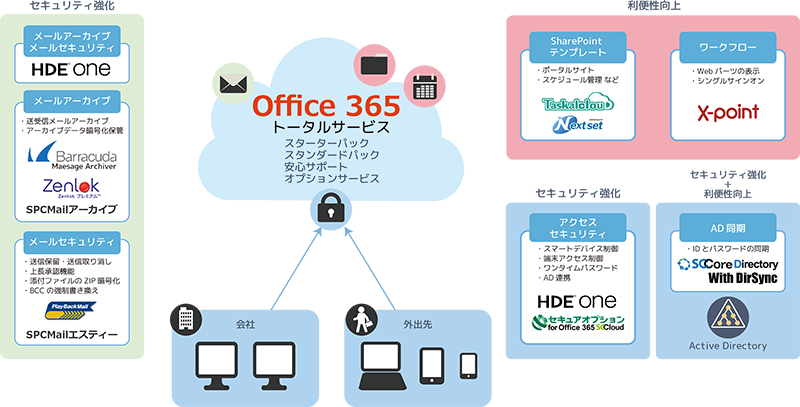
Office 365 is a cloud-based SaaS (Software as a Service) solution provided by Microsoft on a subscription model.
This software package includes the same functionality as traditional versions of Microsoft Office, including Word, Excel, PowerPoint, Outlook, OneNote, and additional applications such as Access and Publisher.
Because Microsoft Office 365 is cloud-based, business users large and small can work from anywhere without the need for external infrastructure and with the highest security of cloud storage.
According to the latest Statista report, 731,000 companies are using Office 365 in the United States alone, and more than 1 million companies worldwide are using Office 365.
Although Office 365 is complete end-to-end software, it includes third-party third-party software that allows you to manage your IT infrastructure with enhanced security, perform frequent backups and restores as needed, and generate multiple reports. Learn about Office 365 management software. Things like data compliance and auditing all boil down to improvising the performance of an entire organization.
Why use Active Directory (AD) and Office 365 management software?
Microsoft’s AD service is flexible and powerful, but as networks and infrastructure grow, businesses are looking for solutions that simplify operations and management. AD also has limited backup, restore, automation, and reporting capabilities.
Widespread use of Office 365 has failed in several areas, including limits on the number of users that can be managed at the same time, and lack of support for CSV-based group user changes.
To customize Office 365, IT administrators often need to use scripting languages like PowerShell, which can be time-consuming and tedious.
Even administrators need to switch between multiple consoles to manage their Active Directory, Exchange Server, and Office 365 environments. This increases the burden on administrators and increases the time it takes to complete each task.
What’s more, backup and restore options are limited, and there are few automation options. Automation is very important as today’s manual tasks are increasing.
So, let’s take a look at some of the external software used to manage AD and Office 365 to address today’s challenges such as group add-ons, automation, delegation, compliance, and security. Start by reviewing the software that makes management and operations easier. Active Directory and Office 365:
ManageEngine ADManager Plus
Award-winning (120+ awards) ManageEngine software provides affordable IT management software for small to medium-sized businesses to large enterprises. These products cover service management, operations management, active directory, and security requirements. The company claims that three out of five Fortune 500 companies use its ManageEngine products.
ADManager Plus software is a web-based platform for managing and running Active Directory (AD), Office 365, and Exchange all from a central console.
This makes it easier to consolidate and centralize AD reporting, delegate administrative tasks, and keep AD structures clean with less effort, saving administrators a lot of time.
This software simplifies the daily tasks of system administrators in the form of creating group user accounts in AD by modifying user account properties such as Exchange mailbox and Terminal Services properties.
User and Active Directory compliance and auditing can be maintained with minimal effort using the software’s 200 built-in reports.
Characteristics of AD
- Reports on compliance with government regulations such as SOX, HIPAA, GLBA, and PCI.
- Create and delegate security roles to grant or revoke permissions
- Automate routine AD tasks such as backup, restore, user provisioning, inactive user cleanup, and follow-up tasks.
Managing Office 365 with ADManager Plus
ADManager Plus lets you manage Office 365 without hassle or limitations. This software allows you to download active and inactive user reports and license details without using complex scripting languages.
The software can generate over 80 preconfigured reports about users, groups, contacts, Office 365 licenses, Exchange mailboxes, and Office 365 web applications without complex scripts.
Extensive reporting simplifies reporting and allows administrators to make informed decisions about managing a well-organized Office 365 environment.
ADManager Plus also helps with group user management, contact management, automation, and report scheduling.
Features:
- Flexible license management for Office 365
- Automate daily Microsoft 365 management tasks with simple one-click operations and view a detailed history of all automated tasks
- Reports can be scheduled, archived, and emailed.
- View detailed information about your Office 365 environment with preconfigured reports
This software simplifies the operation and administration of Active Directory and Office 365 management, taking it to the next level in terms of ease of use, reporting, security, fault tolerance, and more. The software’s extensive reporting provides compliance and delivery and optimal product or service assistance for administrators, auditors, and managers.
This software is available in three editions: Free Edition, Standard Edition, and Professional Edition. The free version has limited AD objects. You can evaluate the full version of the software for 30 days. Pricing starts at $595.00 per year. A complete demo can be found here .
Veeam Backup for Microsoft Office 365
Data security is very important for any organization, so Veeam Backup provides a comprehensive solution to keep your data safe on the Office 365 platform.
Microsoft Office 365 is a stable and flexible platform for working with Word, Excel, PowerPoint, Outlook, and more, but data security is a top priority. According to the report , 85% of Microsoft 365 users were affected by a data breach.
According to the company’s website, the software has 5.8 million subscriptions and has won more than 200 awards in various categories. Veeam software is used by 69% of 2,000 companies worldwide.
Veeam is an end-to-end backup and restore solution for Microsoft products such as Office 365, Exchange Server, SharePoint, OneDrive, and Microsoft Teams. The software also offers ransomware protection, on-premises and cloud protection.
This software eliminates the risk of losing access to or control over your office files and folders, Microsoft Teams email data, SharePoint sites, documents, libraries, OneDrive accounts, and settings, ensuring your data is always protected and available. It will look like this.
In addition to Office 365, the software also provides backup solutions for Windows, Linux, NAS, VMware, Azure, AWS, Nutanix, Active Directory, and MySQL.
Features
- Back up your data every 5 minutes and restore it flexibly in over 40 ways
- You can configure the frequency and time of Exchange and Sharepoint data to reduce the impact on your data center.
- On-premises and cloud backup options (AWS, Azure, IBM Cloud, etc.)
- Recover accurate data and address business disruptions with deep and sophisticated archive searches
Veeam Backup for Microsoft Office 365 is available with annual subscriptions ranging from 1 to 5 years. This software is free to use for 30 days before being deployed in a production environment. Licenses are available for your user base, giving you the flexibility to add licenses as your number of users grows.
Just SaaS protection
Datto SaaS Protection provides a comprehensive data protection solution for Microsoft 365, Exchange, Calendar, OneDrive, SharePoint, and Teams data with three-times-daily backups and flexible recovery options.
This software combines SaaS protection and SaaS defense tools and is specifically designed for managed service providers (MSPs). Completely prevent phishing by protecting your data from phishing scans by malicious cyber threats and protecting your data through frequent archiving and rapid data recovery.
A centralized, scalable console allows MSP customers to prevent ingestion and manage data quarantine and archiving attempts.
In short, Datto SaaS Protection Platform helps streamline data compliance, business continuity, and security, giving small and medium-sized businesses everything they need to succeed.
Main features
Protection against malicious cyber threats and data deletion errors
- Advanced threat protection that detects zero-day threats first, not days later
- Instead of looking for known security threats, identify unknown threats
- Protect your OneDrive folders from malware and recover them in one click
- Automatic archiving for OneDrive, SharePoint, Teams, Gmail, and Google Contacts, plus additional archiving whenever you need it
If you are looking for a business continuity solution to protect your data from cyber threats and data loss, Datto is one of your disaster recovery tools. This license is user-based and available upon request.

quest
Quest provides Active Directory (AD), Azure AD, and Hybrid AD solutions for management, migration, and security.
The AD migration and consolidation solution provided by Quest is non-impactful, allowing you to reorganize your production or live environment without service interruption.
Quest simplifies day-to-day AD administration activities such as managing AD accounts and groups, group policies, health and availability checks, and more, ensuring you save time and money.
Take your AD security to the next level by identifying breaches, preventing breaches, and mitigating threats with the Quest platform. This software scans your activity in real time and alerts you to any suspicious activity.
Quest software is available as a trial version for a limited time, and pricing is available upon request.

addax
Adaxes is an award-winning advanced automation and management platform that powers the management of Active Directory, Microsoft 365 (Office 365), and Exchange.
This user-friendly software simplifies daily activities, automates repetitive tasks, and strengthens Active Directory and Microsoft 365 security.
One of its uniqueness is that it offers complete user lifecycle management in terms of maintenance and management, including assigning mailboxes, Microsoft 365 licenses, activating user-specific Skype accounts, creating home folders, and sending welcome emails. It’s about providing automation.
It is a web-based platform that provides role-based access control for users and groups to ensure more specific and secure permissions to meet enterprise data standards.
A single, centralized console with advanced customization is used to manage AD, configure mailboxes, and manage Microsoft 365 licenses.
Save time and effort by automating and regularly scheduling daily tasks for IT administrators. You can download different types of reports from over 200 preconfigured reports or customize them based on your specific requirements.
Features
- You can automate most user management tasks, reducing your workload.
- Enhanced security with permission-based workflows and role-based security
- Effective AD environmental auditing with a comprehensive reporting model
- Automate the creation of mailboxes, distribution lists, and email-enabled recipients.
- Automatically recover passwords from login screen for macOS users and widows
The Adaxes Universal Web UI can be used by administrators, help desks, HR, managers, and other employees to perform AD, Exchange, and Microsoft 365 administrative tasks.
You can test the software for free for 30 days. Licensing policy is based on the number of active users in AD. Perpetual licenses start at $1,600 for 100 or more active users.
admin droid
AdminDroid is a tool that monitors and analyzes Office 365 and its entire family (Azure AD, Exchange, Sharepoint, Onedrive, Skype, Microsoft Teams, etc.) and generates over 600 reports.
This software is used to manage the entire Microsoft 365 stack with innovative features such as micro-level delegation, advanced scheduling, and AI-based reporting. Used by 60 million users in over 110 countries.
AdminDroid also provides an overview of your current SharePoint settings, permissions, sharing invitations, and document permissions. You can assign daily administrative activities to users to access or monitor specific Microsoft users, groups, mailboxes, or teams.
Its alerting capabilities are powerful enough to catch new anomalous events and alert you to login failures and forced attempts to secure your Office365 environment.
This software provides an additional layer of security when it comes to behavioral analysis, forensic investigations, fraud, and data breach investigations.
You can generate a variety of statistical and audit reports, including licenses, groups, security, mailbox size and usage, email traffic, spam and malware, and more.
Features
- Monitor all activity within Office 365 and investigate anonymous activity
- Over 45 preconfigured signals to protect your Microsoft 365 infrastructure
- Delegate effective management of resources, reports, and dashboards
- Detailed usage and security reports help you comply with audits such as HIPAA, SOX, FISMA, and ISO 27001.
AdminDroid has a free version and premium editions such as Standard and Pro. You can test the premium edition for free for 15 days. Pricing starts at $49 per year for 150 users. You can watch a live demo of the software here .
Imanami group ID
GroupID provides Active Directory and Office 365 solutions that include user and group automation, delegation, management, and lifecycle management.
The software won a 2021 Gartner Peer Insights Award for customer voice in identity management and governance.
Its automation platform simplifies the management of groups, users, and permissions for all types of organizations, saving human time and improving the accuracy and security of their environments.
Its synchronization mechanism detects AD changes and replicates data across all platforms, including on-premises, hybrid, and cloud environments.
The ability to delegate identity and access management simplifies complex activities such as user provisioning, deprovisioning, and other administrative tasks through a self-service web portal.
Features
- Transfer and terminate your account with the push of a button
- Group and user management solutions can help you make smart and timely decisions regarding certification requirements.
- Provides detailed views of unstructured data
- Reduce human error with query-based group definitions
- Improves directory consistency and security by ensuring that users do not have excessive privileges.
GroupID is secure and easy to install and maintain. This allows IT administrators to automate and extend AD and Office 365 functionality to the next level, effectively managing and securing their IT infrastructure.
The platform integrates with leading directories such as AD, Azure AD, shared LDAP-based directories, and messaging platforms such as Microsoft Exchange Server, Microsoft 365, and Google Workspace for business applications. You can test this software for free for 30 days. Prices are available upon request.
conclusion
Maintaining a secure and managed Active Directory is expensive in terms of cost and time.
Ensuring that members have permissions to domain groups and directories, cleaning up unused accounts, and other manual tasks can be difficult because errors can compromise security.
Most importantly, AD and Office 365 automation is critical in today’s complex and geographically distributed infrastructures.
To resolve all these and other issues, we recommend using the aforementioned software. An effective method is to try it out to confirm feasibility and plan the purchase of the appropriate software for your environment.
See also some tools for monitoring Active Directory.


![How to set up a Raspberry Pi web server in 2021 [Guide]](https://i0.wp.com/pcmanabu.com/wp-content/uploads/2019/10/web-server-02-309x198.png?w=1200&resize=1200,0&ssl=1)


