As with all cloud services, you must take responsibility for securing your cloud storage.
This article provides the best tips for securing your AWS S3 storage.
Before reviewing tips for securing AWS S3 storage, you should know why it’s important. In 2017, it exposed sensitive data including personal social media accounts and sensitive Department of Defense data .
Since then, organizations have taken great care to protect data stored in AWS S3.
Does that mean S3 is an insecure storage solution from Amazon Web Services? S3 is not a secure storage solution, but it’s up to you how you want to protect your data.
AWS shared responsibility model
Most of the solutions provided by public clouds offer a shared responsibility model. This means that AWS assumes responsibility for the security of the cloud platform, and cloud customers are responsible for security within the cloud.
This sharing model helps reduce data breaches. The diagram below illustrates AWS’s general responsibilities and customer responsibilities for protecting your data.
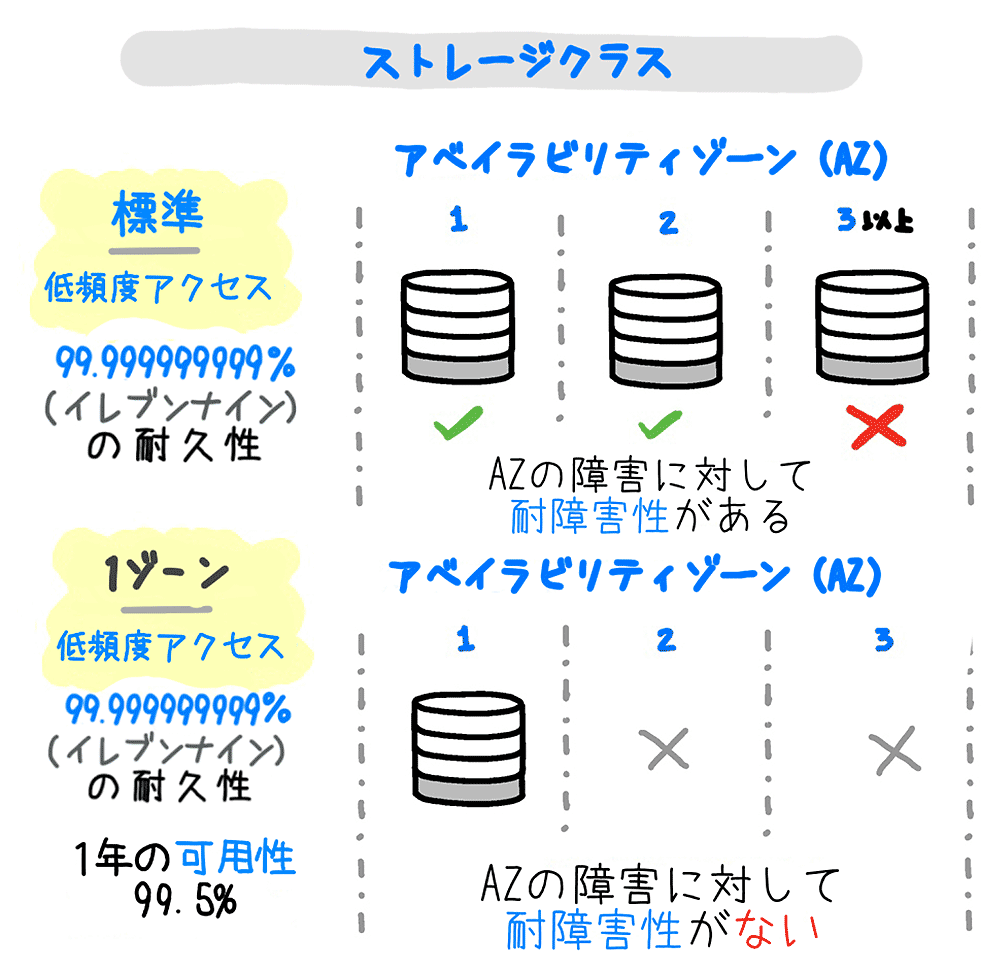
Please read the diagram above carefully to understand your responsibilities. Precautions to protect your S3 storage are essential, but they cannot prevent all threats. AWS offers several methods to help you proactively monitor and avoid the risk of data breaches.
Let’s take a look at the following best practices for securing AWS S3 storage.
Create private and public buckets
When you create a new bucket, the default bucket policy is private. The same applies to new objects uploaded. You must manually grant access to the entities you want to access your data.
By using a combination of bucket policies, ACL policies and IAM policies grant the right access to the right entities. However, this becomes complex and difficult when you keep both private and public objects in the same bucket. Mixing both public and private objects in the same bucket can lead to careful ACL analysis, which wastes productive time.
A simple approach is to separate objects into public and private buckets. Use a bucket policy to create a single public bucket and allow access to all objects stored in it.
 {
  "Effect": "Allow",
  "Principal": "*",
  "Action": "s3:GetObject",
  "Resource": "arn:aws:s3:::YOURPUBLICBUCKET/*"
}
Next, create another bucket to store your private objects. By default, all access to your bucket is blocked for public access. You can then use IAM policies to grant access to these objects to specific users or applications.

Data encryption at rest and in transit
To protect your data at rest and in transit, enable encryption. You can configure this in AWS to encrypt objects server-side before storing them in S3.
This can be accomplished using the default AWS-managed S3 key or a key created with a key management service. To force data encryption in transit using the HTTPS protocol for all bucket operations, you must add the following code to your bucket policy.
 {
  "Action": "s3:*",
  "Effect": "Deny",
  "Principal": "*",
  "Resource": "arn:aws:s3:::YOURBUCKETNAME/*",
  "Condition": {
    "Bool": { "aws:SecureTransport": false }
  }
} 
Utilize CloudTrail
CloudTrail is an AWS service that logs and maintains a trail of events that occur across AWS services. There are two types of CloudTrail events: data events and management events. Data events are disabled by default and can be further configured.
A management event is an S3 bucket creation, deletion, or update. Data events refer to API calls made to objects such as PutObject, GetObject, and GetObject.
Unlike management events, data events are priced at $0.10 per 100,000 events.
Create specific trails to record and monitor your S3 buckets in specific regions or globally. These trails store logs in S3 buckets.

CloudWatch and alerts
The CloudTrail setup is great for monitoring, but if you need control over alerting and self-healing, use CloudWatch. AWS CloudWatch provides instant logging of events.
You can also set up CloudTrail within a CloudWatch log group to create log streams. Adding CloudTrail events to CloudWatch adds some powerful functionality. You can configure metric filters to enable CloudWatch alarms for suspicious activity.
Setting up a lifecycle policy
Setting lifecycle policies not only protects your data but also saves you money. Set lifecycle policies to move unwanted data, make it private, and delete it later. This prevents hackers from accessing unnecessary data, freeing up space and saving costs. To save costs, enable lifecycle policies to move data from standard storage to AWS Glacier.
Data stored in Glacier can later be deleted if it adds no further value to you or your organization.
S3 block public access
AWS has taken steps to automate the ability to block public access to buckets, which previously used a combination of CloudWatch, CloudTrail, and Lambda.
Sometimes a developer accidentally exposes an object or bucket. These features are useful to avoid accidental access to expose buckets and objects.
The new block public access configuration feature prevents anyone from making your bucket public. You can enable this setting in the AWS console, as shown in the video above. You can also apply this setting at the account level, as explained in the video below.
Hear from AWS Trusted Advisor
AWS Trusted Advisor is a built-in feature used to analyze AWS resources in your account and recommend best practices.
We provide recommendations in five categories. One of the important features is security. Starting in February 2018, AWS will issue a warning when your S3 bucket becomes publicly accessible.
Third-party AWS security tools
In addition to Amazon, there are several third parties that provide security tools to protect your data. It can save you a lot of time and keep your data safe at the same time. Some of the commonly used tools are listed below.
security monkey
This is a tool developed by Netflix to monitor AWS policy changes and alert you if insecure configurations are found. Security Monkey performs several audits on S3 to ensure best practices are in place. It also supports Google Cloud Platform.
cloud custodian
Cloud Custodian helps you manage your resources in the cloud according to best practices. Simply put, once you have identified best practices, you can use this tool to scan your resources in the cloud and ensure that the best practices are met.
If conditions are not met, you can use various options to send alerts or enforce missing policies.
cloud mapper
Duo Security has created Cloud Mapper , a leading cloud visualization and auditing tool. It has similar functionality to Security Monkey and scans your S3 buckets for misconfigurations. Provides a great visual representation of your AWS infrastructure to help identify further issues.
And provide excellent reports.
conclusion
Most of your work is performed using data, so one of your key responsibilities is to ensure data security.
You never know when or how a data breach will occur. Therefore, precautionary measures are always recommended. It’s better to be safe than sorry. Protecting your data can save you thousands of dollars.
If you’re new to the cloud and interested in learning AWS, check out this Udemy course.


![How to set up a Raspberry Pi web server in 2021 [Guide]](https://i0.wp.com/pcmanabu.com/wp-content/uploads/2019/10/web-server-02-309x198.png?w=1200&resize=1200,0&ssl=1)


