When traveling to a foreign country, a translation app is essential for navigation, reading menus, understanding local phrases, and more. It would be even more convenient if the translation app had offline functionality. Since I’m traveling to a new place, I don’t know if I’ll have internet connectivity everywhere. In such cases, offline translation apps can be very helpful. So in this article, we will introduce you to 8 best offline translation apps for Android and iOS. Just download the language pack based on the country you’re traveling to. With that in mind, let’s unpack the list.
Best offline translation apps for Android and iOS (November 2020)
Here are the best offline translation apps for both Android and iOS. Click the links below to easily navigate to the corresponding app. Please note that you must download a language pack before using offline features. So, after installing the app, make sure you download offline resources.
What is an offline translation app?
Offline translation app allows you to translate text into your native language without an internet connection . Generally, apps use internet services to properly analyze and translate text. However, there are certain apps that offer all these translation benefits even completely offline.
With the offline translation app, you can talk in two languages in real time , detect your voice and translate it accordingly, transcribe your voice, detect your handwriting, take a photo and translate it, etc. You can do many other things.
List of top translation apps for Android and iOS
1. Google Translate — Best overall
Google Translate is definitely one of the best offline translation apps for Android and iOS. In offline mode, you can translate around 59 languages, including major languages like Chinese, German, Japanese, and Italian .
Please note that you will need to download a language pack to translate languages while offline. Apart from that, it also features a camera mode that instantly translates languages by simply pointing the camera at text, menus, signs, etc.

Next, there is a conversation mode that is very suitable for live translation . Finally, you can use Transcribe mode to speak and translate in real time, but only in 19 languages. Overall, I’d say Google Translate sets the bar high for translation apps and provides a seamless experience even when you’re offline.
Key features : camera mode, conversation mode, instant transcription, support for 59 languages, image upload and text translation, handwriting detection, translation
Installation : Android / iOS (free)
2. Apple Translate — perfect for iOS
If you are looking for the best offline translation app for iPhone, you should choose the new Apple Translation app. This app was developed by Apple and currently supports up to 11 languages. The best part is that Apple Translate supports offline functionality for all 11 languages . Admittedly, the language library is not as large as Google’s 59 languages, but Apple is continually developing apps and plans to add new languages in the future.
Currently, it includes major languages such as Chinese, French, German, and Russian. You can also get definitions of translated words , save translations, and have conversations through real-time translation. It definitely gives Google Translate a run for its money in terms of feature set. For more information, see Google Translate vs. Apple Translate.
Key features : conversation mode, instant transcription, support for 11 languages, free to use
Installation : Preinstalled with iOS 14.
3. Microsoft Translator — Improving our service
Similar to Google and Apple, Microsoft has also released a Translator app with offline support. In fact, Microsoft has improved the app so much that it now competes with Google Translate and Apple Translate. It is one of the few offline translation apps that supports over 70 languages , beating Google’s 59 language support. However, please note that offline support is limited to text mode only.
Additionally, you can perform voice translation and have parallel conversations in two languages . A unique feature of Microsoft Translator is the ability to have multi-person conversations with up to 100 people. Just connect your devices to each other and talk in real time. That’s amazing.
Not to mention, camera and screenshot translations are also available. Overall, we can say that Microsoft Translator is one of the best offline translation apps and you should definitely try it out.
Key features : offline mode supports more than 70 languages, camera translation, conversation mode, image upload and translation
Installation : Android / iOS (free)
4. iTranslate Translator — Expensive but great
iTranslate Translator is an advanced offline translation app that supports over 100 languages. However, 40 languages are available in offline mode. Easily translate texts and websites, and have conversations in voice-to-voice mode . The best thing about this app is that you also get an integrated dictionary that helps you find the definition of translated words.

Not to mention, there are also popular phrasebooks available in a variety of languages to make it easier to converse with locals in foreign countries. This app is available for both Android and iOS, but iOS is much better. So, if you think the new Apple Translate app is bare-bones, I say you should choose iTranslate Translator for your iPhone. Please note that most features are behind paid subscription plans.
Key features : Supports 40+ languages in offline mode, camera translation, audio-to-speech mode, image upload and translation
Installation : Android / iOS (free, with in-app purchases)
5. Translate now — feature-packed
Translate Now is another offline translation app for iOS that works very well. It supports over 110 languages , but offline translation is limited to only over 30 languages. Like other offline translation apps, you can use voice translation, camera translation, AR translation, and more.
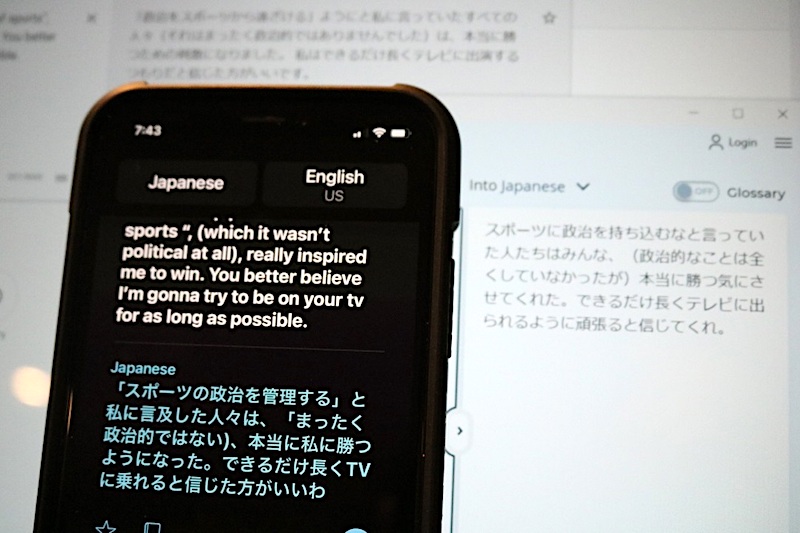
AR translation allows you to find words that describe objects around you. What’s unique about Translate Now is that it comes with a translation keyboard that lets you type in over 60 languages within your favorite apps. Not to mention, you can also create your own custom phrasebooks for instant access. All things considered, Translate Now is a reliable offline translation app for iOS that you should definitely try.
Main features : Supports more than 30 languages in offline mode, camera translation, conversation mode, AR translation, offline phrasebook
Installation : iOS (free, with in-app purchases)
6. Speak and Translate – Accurate Translation
As the name suggests, Speak and Translate is a translation app modeled on real-time translation of conversations. This is a great iOS app that works wonders when you’re connected to the internet. If you’re offline, you can easily translate text in 59 languages . By the way, Speak and Translate supports over 117 languages, which is very useful.
There’s also a Snap mode, which is basically a camera translation. In-conversation language detection , iCloud integration, and more. That said, keep in mind that the app uses Microsoft and Google services on the backend to properly translate languages. So, if you need a powerful offline translation app for iOS, trust Speak and Translate.
Key features : Supports 59+ languages in offline mode, 117 languages in total, Snap mode, Conversation mode, Uses Google and Microsoft services
Installation : iOS (free, with in-app purchases)
7. Naver Papago — The cool thing about AI
Naver Papago gained considerable popularity in a short period of time. It is one of the few services that utilizes AI to translate languages in real time . Although it only supports 13 languages including Korean, English, Japanese, Chinese, etc., it uses robust algorithms to provide accurate translations. This app allows text translation even when offline.

It also works in offline mode during conversations, unlike other apps on this list, but it’s limited to basic expressions. Apart from that, it comes with image translation, voice translation , handwriting detection, etc. At the same time, Naver Papago comes with some top-notch features and you can’t go wrong with it.
Key features : support for 13 languages in offline mode, text and camera translation, voice translation, use of robust AI, handwriting detection
Installation : Android / iOS (free)
8. SayHi Translation — perfect for conversations
SayHi Translate is the last offline translation app on this list, but it’s pretty feature-packed and does a solid job of translating. It is primarily designed for real-time bilingual conversations . It supports a total of 50 languages, but does not support offline mode for conversations.
However, you can use the app in offline mode for clipboard translations, phrasebooks, saving translations , recording conversations, and more. What I like about this app is that both the transcription and the reading of the translated text are very fast.
Needless to say, language detection is also on point . In summary, if you are looking for a translation app that allows you to converse in different languages, SayHi Translate is the best app for you.
Key features : Supports around 50 languages, perfect for bilingual conversations, basic operation in offline mode, voice recognition, fast and accurate
Installation : Android / iOS (free)
FAQ
Q. What is the best offline translation app?
I definitely choose Google Translate as the best offline translation app. However, there are other services that offer very good offline experiences, such as Microsoft Translator and iTranslate Translator.
Q. Are there any translation apps that don’t require the internet?
Yes, there are many translation apps that don’t require internet. We have compiled a list of 8 best offline translation apps for both Android and iOS. Among them are Google Translate, Apple Translate, Microsoft Translate, etc.
Q. Can I use the Google Translate app offline?
Yes, just tap the hamburger menu and select “Offline translation”. Download a language pack here and you’ll be able to use the app in offline mode to translate that language.
Q. Which is the best free translation app for iPhone?
I would choose iTranslate as the best offline translation app for iPhone. However, offline functionality is not free. If so, you can use the new Apple Translate app for free, which supports about 13 languages. Simply update to iOS 14 to get the Apple Translate app.
Q. Is iTranslate better than Google Translate?
I think Google Translate is better than iTranslate. Because Google’s service is completely free and supports over 59 languages in offline mode. On the other hand, iTranslate only supports 40 languages in offline mode and this feature is not available to free users.
Q. Is iTranslate free?
Yes, iTranslate is free, but only for text translation. If you want to access offline mode, conversation mode, and camera translation, you’ll need to subscribe to a paid plan starting at $3 per month.
Choose the best offline translation app for Android and iOS
These are the top offline translation apps available for Android and iOS. You can use Google Translate for the best overall experience, or use any of the other alternatives listed above. Anyway, that’s all from us. In case you are looking for the best notes app for Android, please refer to the linked article. If you have any questions, please let us know by commenting below.


![How to set up a Raspberry Pi web server in 2021 [Guide]](https://i0.wp.com/pcmanabu.com/wp-content/uploads/2019/10/web-server-02-309x198.png?w=1200&resize=1200,0&ssl=1)


