URL parameters are components added to URLs that help filter and organize content or track information on a website.
However, URL parameters also create SEO issues such as duplicate content and crawl budget issues. In this guide, we’ll share everything about parameterized URLs and how to deal with them.
Before learning about URL parameters, let’s understand what a URL is.
URL is an acronym for Uniform Resource Locator, which serves as the address of a web page. Typing a URL into the search bar or address bar of a search engine takes you to the website or webpage you want.
The URL structure consists of five parts.
https://www.yoursite.com/blog/url-parameters
In the example above, the URL portion would be:
#1.Protocol
“http://” or “https://” is a set of rules followed for transferring files on the World Wide Web.
#2.Domain
The domain is the name of your website. The name represents the organization or individual that operates the website. In the example above, “yoursite” is the domain name.
#3.Subdomain
Subdomains are intended to provide structure to your site. A commonly created subdomain is “www”. If you want to share different content or information on the same website, you can create multiple subdomains.
Businesses create multiple subdomains, such as “store.domain.com” and “shop.domain.com.”
#4.TLD
The top-level domain (TDL) is the section followed by the domain. Common TLDs include “.com,” “.org,” “.gov,” and “.biz.”
# 5.Pass
A path points to the exact location of the information or content you are looking for. In the example above, the path would be “blog/url_parameters”. ‘
Therefore, this structure explains how each element adds value to information retrieval.
But did you know that URLs can also help you communicate information to and from your website?
yes !
This is where URL parameters come into play.
What are URL parameters?
Have you ever noticed that your URLs contain special characters like question mark (?), equals (=), ampersand (&), etc.?
Let’s say you’re looking for the term “marketing.” The URL will look like this:
www.yoursite.com/search?q=Marketing
The string that follows the question mark in the URL is called the “URL parameter” or query string. The question mark analyzes the URL to identify the query string.
URL parameters are commonly used by websites that contain large amounts of data or that want to sort or filter products to their convenience, such as shopping websites and e-commerce.
URL parameters contain key-value pairs separated by the ‘=’ symbol, with multiple pairs separated by the ‘&’ symbol.
The value represents the actual data you are passing, and the key represents the data type.
Let’s say you’re browsing products on an e-commerce website.
The URL for the same is:
https://www.yoursite.com/shoes
Now consider filtering based on color so that adding URL parameters looks like this:
https://www.yoursite.com/shoes?color=black
(Here color is the key and the value is black)
When filtering new arrivals, adding URL parameters looks like this:
https://www.yoursite.com/shoes?color=black&sort=newest
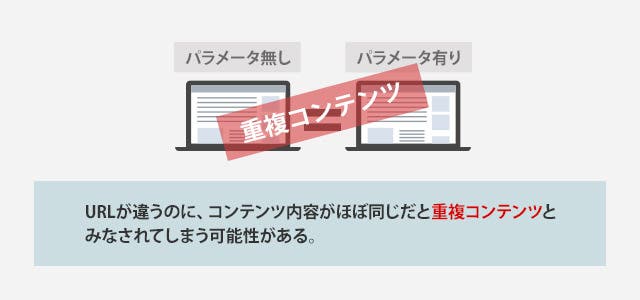
While URL parameters are valuable for SEO, they confuse search engines by capturing different variations of the same page, causing duplication and impacting your chances of ranking in Google SERPs.
Learn how to use URL parameters correctly to avoid potential SEO issues.
How to use URL parameters?
URL parameters are used to evaluate pages and track user preferences.
Below is a list of 11 URL parameters .
# 1.Tracking
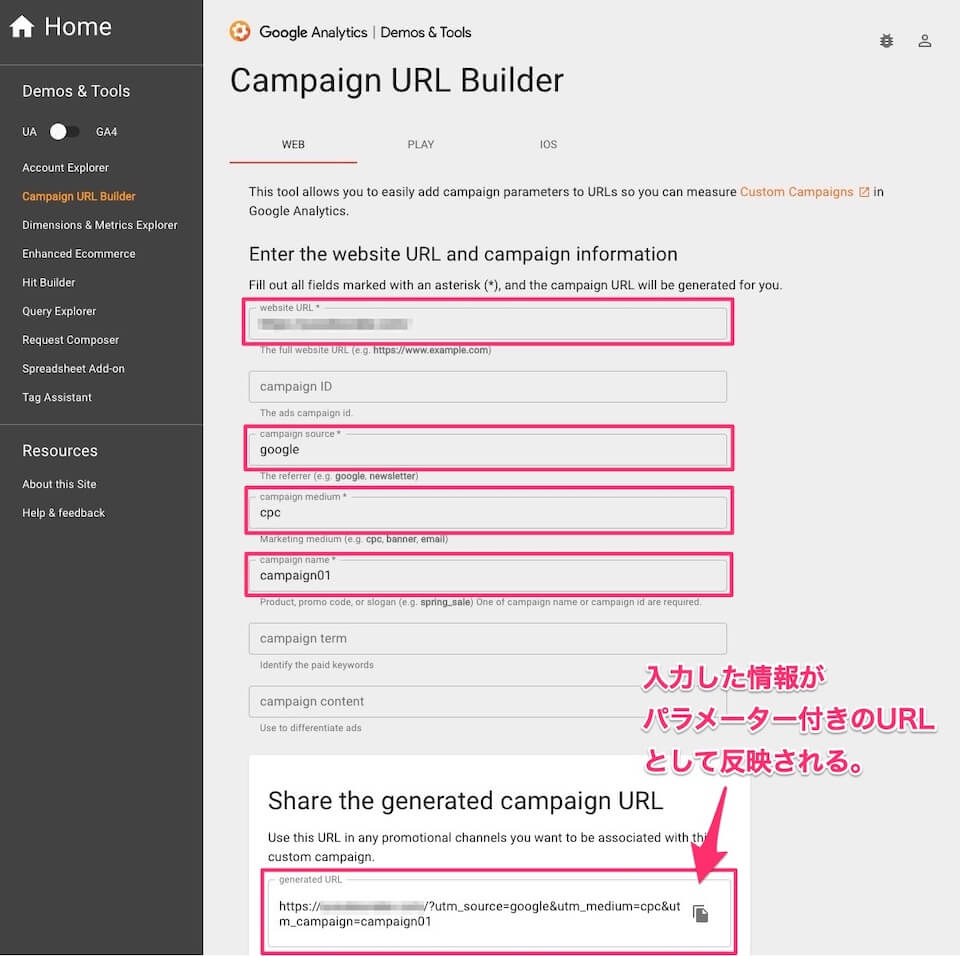
UTM codes are used to track traffic from paid campaigns and ads.
Example: ?utm_medium=video15 or ?sessionid=173
#2.Sort
Order items according to parameters
Example:- ?sort=reviews_highest or ?sort=lowest-price
#3.Translating
The URL string must end with the name of the selected language.
Example: -?lang=en or ?lang=de
#4.Searching
To find results on the website,
For example: – ?q=search term or ?search=dropdown option
#5.Filtering
Filter based on individual fields such as type, event, or region.
Example:- ?type=shirt, color=black or ?price-range = 10-20
#6.Pagination
To segment the content of your online store pages
Example: ?page=3 or ?pageindex=3
#7. identify
Organize your gallery pages by size, category, and more.
Example:- ?product=white shirt, ?category=formal, ?product ID=123
#8.Affiliate ID
Unique identifier used to track affiliate links
Example:- ?id=12345
#9.Advertising tag
Track ad campaign performance
Example:- ?utm_source=emailcampaign
#10. Session ID
To track user behavior within the website. Commonly used on e-commerce websites to check a buyer’s purchase history.
?Session ID=4321
#11.Video timestamp
To jump to a specific timestamp in a video
?t=60
Now let’s look at the problems caused by parameterized URLs.
Key SEO issues caused by URL parameters

A well-structured URL helps users understand the hierarchy of your site. However, using too many parameters can also cause SEO issues.
Let’s examine the most common problems caused by URL parameters.
#1. Waste of crawl budget
If your website has multiple parameter-based URLs, Google will crawl different versions of the same page. Eventually, the crawler will end up using more bandwidth or stop altogether and flag it as low-quality content.
#2. Duplicate content
Using parameters causes search engine bots to crawl different versions of the same web page, indexing multiple URLs with different parameters and causing content duplication.
However, if your website offers users the option to sort content by price or feature, these options only narrow the results rather than changing the content of the page.
Let’s understand this with an example.
http://www.yoursite.com/footwear/shoes
http://www.abc.com/footwear/shoes?Category=Sneakers&Color=White
http://www.abc.com/footwear/shoes?Category=Sneakers&Type=Men&Color=White
Here, all three URLs are different versions of the same web page and are considered different URLs by search engine bots. They crawl and index all versions of a web page, leading to content duplication issues.
#3. Keyword cannibalism
When multiple pages target the same keyword, the process is known as “keyword cannibalization.” Having your website pages compete with each other will negatively impact your SEO.
Keyword cannibalization results in lower CTR, lower authority, and lower conversion rates than a single consolidated page.
In this scenario, search engines can have a hard time deciding which pages to rank for a search query. This can result in “wrong” or “undesirable” page rankings for that term, and ultimately lower rankings based on user signals.
#4. Reduced clickability
URLs with parameters can look ugly. It’s hard to read them. URLs that are not transparent are not considered trustworthy. Therefore, it is less likely to be clicked.
for example:
URL 1: http://www.yoursite.com/footwear/shoes
URL 2: http://www.yoursite.com/footwear/shoes ?catID=1256&type=white
Here, URL 2 looks spammier and less reliable than URL 1. Users are less likely to click on this URL, which will lower your CTR, impact your rankings, and further reduce your domain authority.
SEO best practices for URL parameter handling
We’ve seen how URL parameters can negatively impact your SEO. Let’s see how to avoid them by making a small change when creating URL parameters.
Prefer static URL paths over dynamic paths
Both static and dynamic are different URL types with functionality for web pages. Dynamic URLs are harder for search engines to index than static URLs, so they are not considered an ideal option for SEO.
We recommend using server-side rendering to convert parameter URLs to subfolder URLs. However, this is not an ideal situation for all dynamic URLs, as the URLs generated for price filters may not add SEO value. We recommend using dynamic URLs in these cases, as your content may become diluted when indexed.
Dynamic URLs are useful for tracking. In some cases, static URLs may not be the ideal option for tracking all parameters.
Therefore, it is always recommended to use a static URL path if you want to index a particular page, and a dynamic URL if you do not want the page to be indexed. URL parameters that do not need to be indexed can be used as dynamic URLs for tracking, sorting, filtering, pagination, etc., and other parameters can be used as static URLs.
Parameterized URL consistency
Parameter URLs must be properly placed to avoid SEO issues such as empty values in the parameter URL, unnecessary parameters in the URL, and repeated keys.
URLs must be in a certain order to avoid issues such as wasting crawl budget and splitting ranking signals.
for example:
https://yoursite.com/product/facewash/rose?key2=value2&key1=value1
https://yoursite.com/product/facewash/rose?key1=value1&key2=value2
In the above sequence, the parameters have been rearranged. Search engine bots receive these URLs separately and crawl them twice.
For consistent order:
https://yoursite.com/product/facewash/rose?key1=value1&key2=value2
https://yoursite.com/product/facewash/rose?key1=value1&key2=value2
Developers should be given proper instructions to place parameter URLs in a certain order to avoid SEO issues.
Implement canonical tags
Canonical tags can be implemented to avoid duplication. The canonical tag on the parameter page must point to the main page you want to index. Adding a canonical tag to a parameterized URL will project the main page as canonical. Therefore, crawlers index only priority pages.
Disallow the use of Robot.txt
Robot.txt allows you to control your crawler. This helps tell search engines which pages you want to crawl and which pages you want to ignore.
Block pages with URL parameters that cause duplication by using ” Disallow: /*?* ” in your robot.txt file. Make sure you properly normalize your query string to your primary page.
Consistency with internal links
Suppose your website has many parameter-based URLs. Some pages are indexed with dofollow, while others are not. Therefore, by interlinking with non-parameterized URLs. By following this method consistently, you can tell crawlers which pages to index and which pages to not index.
Internal links also benefit SEO, content, and traffic.
pagination
If you have an e-commerce website with multiple categories of products and content, pagination can help you split them into multi-page listings. Paginating your website URL improves the user experience of your website. Create a show all page and place all paginated URLs on this page
To avoid duplication, place the tag “rel=canonical” in the first section of each paginated page that references the Show All page. The crawler treats these pages as a paginated series.
You can always choose not to add paginated URLs to your sitemap if you don’t want them to rank. Crawls index all visible pages no matter what. You can also reduce your crawl budget.
Tools to crawl and monitor parameterized URLs
Below are tools that can help you monitor URL parameters and boost your website’s SEO.
#1. Google Search Console
The Google Search Console tool allows you to isolate your website’s URL. You can see all URLs currently receiving impressions in the search results tab. When you apply a page URL filter on a tab, a list of pages is displayed.
From there, set up filters to find URLs that include your parameters.
#2. google analytics
Google treats URLs with different parameters as separate pages, and Google Analytics shows pageviews for all URL parameters separately.
If that’s not what you intended, you can remove the parameter from your report using Admin > View Settings > Exclude URL Query Parameters to combine pageviews into primary URL numbers. can.
#3. Bing Webmaster Tools
To exclude URL parameters, add the parameter name in My Site Configuration > Ignore URL parameters. However, Bing Webmaster doesn’t have advanced options to check if a parameter can change its content.
#4. Screaming Frog SEO Spider Crawl Tool
Crawl up to 500 URLs and monitor their parameters for free. The paid version allows you to monitor unlimited URL parameters.
Screaming Frog’s “Remove Parameters” feature allows you to remove parameters from a URL.
#5. Ahrefs site audit tool

The Ahrefs tool also has a “Remove URL Parameters” feature that ignores parameters when crawling your site. You can also ignore parameters with matching patterns.
But at the end of the day, the Ahrefs site audit tool only crawls canonical versions of pages.
#6. Rumar
Powerful cloud crawling software suitable for large e-commerce sites. You can remove the parameters you want to block by adding them to the “Remove Parameters” field. Lumar also supports URL rewriting, URL appending, domain replacement, and forced slash training.
conclusion
URL parameters are often ignored when it comes to website SEO. By keeping parameterized URLs consistent, you can monitor your SEO hygiene.
To resolve URL parameter issues, your SEO team should work with your web development team and give them clear instructions on updating parameters. Parameterized URLs should not be ignored, as they can affect ranking signals and cause other SEO issues as well.
Now that you understand how URL parameters can level up your website’s SEO, web crawlers can finally understand how pages on your website are used and evaluated.
Also see how to make Javascript SEO friendly.


![How to set up a Raspberry Pi web server in 2021 [Guide]](https://i0.wp.com/pcmanabu.com/wp-content/uploads/2019/10/web-server-02-309x198.png?w=1200&resize=1200,0&ssl=1)


