In the past, computing power was the job of on-premises hardware infrastructure. Nowadays, if a software solution resides in the cloud, it is becoming the job of an Elastic Compute Cloud (EC2) web service.
EC2 brings resizable computing power to the cloud. Users can rent virtual computers with instances that run applications. Instances can have different configurations, different operating systems, computing power, and storage capacity.
EC2 is a core component of Amazon Web Services (AWS). Therefore, it is widely used for almost all project implementations in the cloud. Unless, of course, you’re pursuing a serverless architecture, in which case EC2 is out of the picture.
Main components of EC2

Any AWS EC2 you decide to use for your project must be configured with other AWS components. These define the exact parameters of the configuration.
#1. instance
An EC2 instance is basically the cloud’s interpretation of a virtual machine. Instances can be prepared and launched in various configurations. You also need to define the specific operating system for your instance and the strength of your instance (amount of CPU, RAM, etc.).
Finally, you can specify the amount of storage capacity that you want to permanently attach to your EC2 instance.
#2. Amazon Machine Image (AMI)
An AMI is a preconfigured template that contains all the information needed to successfully launch an instance. This is where you actually specify the operating system your application will run on, what your application server will look like, and the exact applications you want to install.
#3. Elastic Block Store (EBS)
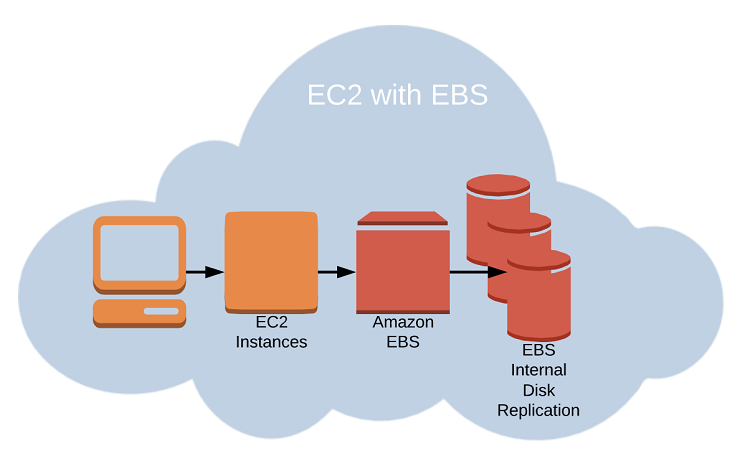
This is a storage service that provides persistent storage volumes for use with EC2 instances. When an application on an EC2 instance is used, all application data and customer data is stored here.
#4. security group
Controlled security access is required for all EC2 instances. This applies not only to communications from the outside world to your EC2 instances (outbound traffic), but also to communications between AWS services within your cloud infrastructure (inbound traffic).
#5. key pair
For added security, you must generate a public/private key pair that you use to securely connect to your EC2 instance.
#6. Elastic IP address
To make your new EC2 instance accessible from the external Internet or referenced within your infrastructure on the cloud, you must assign it a static IP address. From now on, you will be able to access virtual machines with EC2 instances.
#7. placement group
You can use these to create logical groupings of instances. They are designed to provide low-latency, high-bandwidth network connectivity. This is useful for both organizational and performance reasons.
#8. autoscaling
This is a very unique service among different cloud providers that automatically adjusts the number of EC2 instances in a group based on your workload needs. In other words, enabling autoscaling allows you to double or hardware upscale your EC2 instances as your demand increases.
Alternatively, if demand is significantly lower than normal, you can reduce or scale down. The main reason behind this is to avoid slowing down during peak loads. But you can also save money when you don’t have anything special to do.
#9. load balancer
At a high level, this is a service that distributes incoming traffic across multiple EC2 instances to improve availability and scalability.
#10. Virtual private cloud (VPC)
A VPC is a logically isolated virtual network that provides a secure, isolated environment for your EC2 instances. You can organize different EC2 instances into the same or different VPCs and define rules for inbound and outbound traffic between VPCs, that is, between different EC2 instances in your cloud infrastructure.
Typically, some EC2 instances should be kept private and accessible only to application code. At the same time, make other EC2s available on the Internet. VPC is the perfect solution.
Main features of EC2
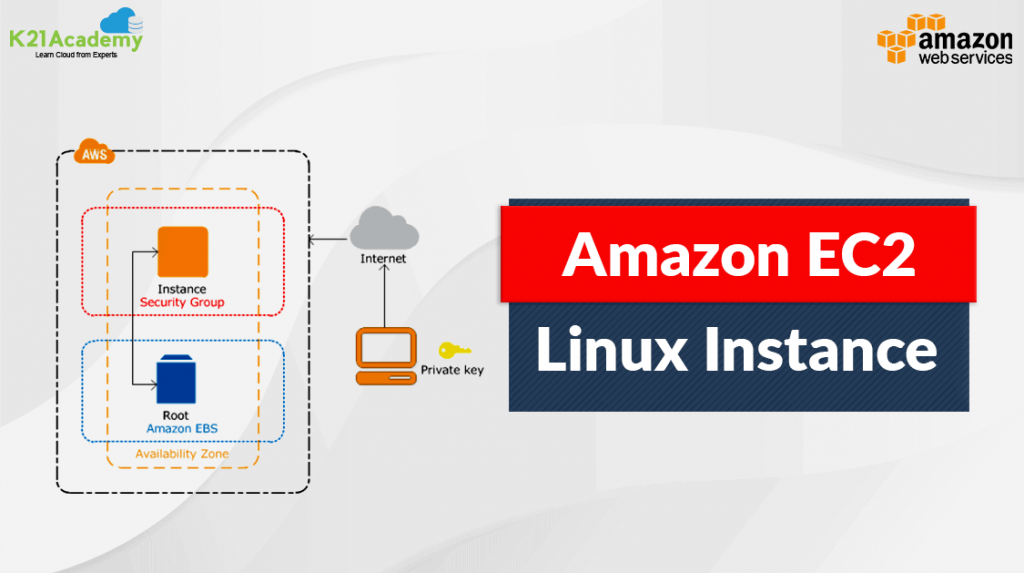
EC2 instances provide scalable computing power in the AWS Cloud. Businesses can quickly spin up virtual machines with the computing power and storage capacity they need without investing in physical hardware. This is the real benefit of cloud infrastructure, and EC2 plays a key role.
The typical purpose of EC2 instances is to host various applications and websites in the cloud. These can be used to meet workloads such as batch nature, real-time processing requirements, and web or mobile applications.
The nature of the work you can do with EC2 is virtually limitless. Data processing, machine learning, and gaming can require massive power. Additional development or test environments may be required for your infrastructure. This ensures that you can take advantage of all the benefits of EC2 instances.
Best of all, you can destroy and recreate them whenever you want. In that case, you save money for times when you don’t need development and testing infrastructure. Of course, on-demand termination and recreation has many other uses for businesses.
Fundamentals of cloud computing

We’ve already talked about EC2, so it might be helpful to step back a bit to explain a little bit about what exactly cloud computing is.
It can be viewed as a model for delivering computing resources over the Internet, built as a service on demand. It is a mechanism for how to access computing power with all your infrastructure and applications without investing in physical hardware or infrastructure. Cloud computing is based on a set of fundamental principles:
- On-demand self-service is always available to users. Servers and storage are available without going through a lengthy procurement process.
- Access your tablet cloud resources from anywhere, from anything (laptop, desktop, tablet, mobile, etc.).
- Computing resources or the entire infrastructure can be shared and dynamically allocated to meet changing environments and requirements.
- You can quickly scale up or down your resources based on current demand.
- Real-time cloud computing inherently means a pay-as-you-go pricing model, where users only pay for the resources they actually use. You can also track your usage in real time.
Cloud computing service model
Cloud computing has three main service models:
- Infrastructure as a Service (IaaS). It provides virtualized computing resources such as servers, storage, and networking as a service. It’s up to you to create a workable solution above.
- Platform as a Service (PaaS) goes a step further. Get an entire platform to develop, deploy, and manage applications as a service. You don’t have to worry about infrastructure details at all.
- Software as a Service (SaaS) is the highest grade in which complete software applications such as email, CRM, and productivity tools are available as a service. In this case, just use what’s already available.
Cloud computing deployment models
Cloud computing also depends on how resources are deployed and accessed.
- Public cloud means that cloud resources are provided by third-party providers such as AWS, Microsoft Azure, or Google Cloud and are accessible over the Internet.
- A private cloud is one in which an organization builds its own data center and whose infrastructure is accessible only within the organization’s network.
- A hybrid cloud is a combination of public and private cloud resources that are integrated to provide a common interconnected infrastructure.
- Multicloud is a strategy when an organization leverages multiple cloud providers to meet specific business needs. For example, you can combine Amazon Cloud and SAP Datawarehouse Cloud to build a solution consisting of regulated transactional data from SAP and a data lake built on AWS.
EC2 elasticity

Elasticity is an important characteristic of cloud computing. This refers to the ability of cloud infrastructure to dynamically allocate and deallocate computing resources according to ever-changing needs. Elasticity allows you to scale your infrastructure up or down as needed. There’s no need to invest in physical hardware or infrastructure.
With this comes another characteristic of the cloud: scalability. This is the ability of a system to handle increasing amounts of load or traffic without suffering performance degradation.
For example, let’s say your homepage suddenly receives an unusual increase in traffic due to the release of a long-awaited new product. This is the time when scalability is introduced and all resources and power are increased to withstand this high load.
Scalability is achieved through the use of flexible resources such as virtual machines, storage, and networking that can be scaled up or down quickly and easily.
Autoscaling is an over-the-top feature that leverages scaling capabilities and automates based on predefined load forecasts. The number of computing resources used is automatically adjusted based on demand. This also means you don’t have to monitor or manually adjust your resources. You can scale up or down resources based on various metrics such as CPU usage, network traffic, and application response time.
Finally, resources are allocated dynamically and in real time. This allows you to optimize your infrastructure usage. Allocate resources only when needed and release them when they are no longer needed.
Dynamic resource allocation is a key feature of cloud computing, as it enables high levels of utilization and efficiency while minimizing costs.
Advantages of EC2
Some of the main benefits of EC2 are already apparent. However, to be explicit, the following points are most important to note:
flexibility
EC2 allows you to easily scale your computing resources up or down to match your current load levels. Launch or destroy your instance now as needed. You can pause and restart your instances whenever it’s most convenient for you. Always keep a backup in case something goes wrong.
cost efficiency
A direct result of flexibility is greater opportunity to save money on infrastructure provisioning. If configured correctly, your EC2 instances will launch and terminate in a timely manner. As a result, costs associated with unreasonable resource provisioning costs can be avoided.
High availability
With EC2, you get a highly available infrastructure designed to minimize downtime and ensure that your applications and services are always accessible.
reliability
EC2 provides a reliable infrastructure that is intended to run virtually uninterrupted, ensuring that your applications and services are always available and performing well.
accessibility
Access it from anywhere using your desktop, laptop, tablet, or smartphone. Similarly, you are completely free to apply restrictions on the access you need.
Global expansion
EC2 is available in multiple regions around the world, allowing you to deploy applications and services closer to your customers and comply with local data privacy regulations.
agile
You get a truly agile infrastructure that provides options to quickly respond to changing market conditions and innovate faster.
data security
EC2 provides a secure infrastructure designed to protect your data and applications from unauthorized access and cyber threats.
compliance
EC2 complies with a wide range of industry standards and regulations, including HIPAA, PCI DSS, and GDPR.
collaboration
EC2 provides a collaborative environment where teams can collaborate on projects and share resources and data.
EC2 challenges
Admittedly, there are some challenges to be aware of when using EC2.
#1. Manage costs
The whole nature of the AWS cost model is to make it as complex as possible, and EC2 pricing is no exception. You need to carefully manage your usage to avoid unexpected costs and have reliable tools in place for continuous monitoring. You can use cost optimization tools such as AWS Cost Explorer and AWS Trusted Advisor.
#2. safety
Although EC2 provides a secure infrastructure, it is still your responsibility to protect your own applications and data. Security best practices should be implemented, such as using strong passwords, encrypting data, and implementing access controls.
#3. compliance
With EC2, you must ensure that your usage complies with industry standards and regulations. Therefore, it is important to regularly review AWS compliance documentation and work with AWS compliance experts to ensure that you meet the compliance requirements requested by your clients.
#4. performance
EC2 performance can be affected by various factors such as network latency, disk I/O, and CPU usage. Systematically monitor infrastructure performance and use performance optimization tools such as AWS CloudWatch and AWS X-Ray to identify and resolve performance issues.
#5. availability
While it’s true that EC2 provides a highly available infrastructure, you still need to ensure that the applications and services you’re provisioning are also designed for high availability. Use AWS services such as Elastic Load Balancing and Auto Scaling to ensure that your applications and services are always available.
#6. data transfer
Be aware of data transfer costs when using EC2, as data transfer between EC2 instances and other AWS services can incur additional charges. This means more than just exchanging data between your infrastructure and the Internet. Use Amazon S3 and Amazon CloudFront to minimize data transfer costs.
#7. vendor lock-in
When using EC2, being aware of the potential for vendor lock-in should be on your priority list. Design your applications and services to be portable across cloud providers and use open standards and APIs to ensure interoperability. In this way, the solution is cloud-agnostic and provides an additional layer of flexibility, which remains a significant advantage in the market.
EC2 and future trends
Are you curious about future trends and innovations that are expected to shape the future of EC2?
serverless
Serverless computing is a new paradigm for cloud computing, even though it has already been implemented by the most progressive development teams for several years. Developers can run code without managing servers or infrastructure. AWS Lambda or AWS Step functions are examples of serverless computing services that can be built on EC2.
machine learning
EC2 is the perfect infrastructure for running machine learning models, predictions, and workloads. You can literally generate an incredibly large data lake of model data predictions in minutes. In addition, AWS offers a variety of ready-to-use machine learning services built on EC2, including Amazon SageMaker and Amazon Rekognition.
edge computing
Edge computing is a new paradigm in cloud computing that refers to data processing closer to the source rather than in a centralized data center. This means that all large data loads are done in the area that generates the data. The data is then transferred to a central data store using various caching services. This effectively eliminates any impact on user interaction processing. AWS offers a variety of edge computing services that can be deployed on EC2, including AWS Greengrass and AWS IoT.
Containerization
Containerization is a strategy for packaging applications and services into containers, making them easier to deploy and manage. If you need to transport services between instances or infrastructure, compatibility is guaranteed. AWS offers a variety of containerization services, including Amazon ECS and Amazon EKS built on EC2.
quantum computing
Quantum computing is an entirely new paradigm that uses quantum mechanical phenomena such as superposition and entanglement to perform computations. AWS offers a variety of quantum computing services, such as Amazon Braket, that you can use on EC2.
last word
EC2 is a foundational part of any serious cloud infrastructure, and it’s not going away anytime soon. Typically, this might be in the top three of the most expensive services to produce, and there’s a reason for all of this.
EC2 is the backbone of your cloud infrastructure and captures all other services on its surface. Therefore, understanding EC2 is important if your goal is to succeed in the world of cloud computing.
Next, review AWS EC2 security best practices.


![How to set up a Raspberry Pi web server in 2021 [Guide]](https://i0.wp.com/pcmanabu.com/wp-content/uploads/2019/10/web-server-02-309x198.png?w=1200&resize=1200,0&ssl=1)


