- counter-reset: Create or reset a counter.
- counter-increment:increment variable;
- content: Insert generated content.
- counter() or counters(): Adds the value of a counter to an element.
Let’s take a look at how counters are used in CSS.
Initialize the counter
This process is called counter initialization. The syntax of the counter-reset attribute is:
counter-reset:none | [<identifier> <integer>]
The parameter descriptions are as follows:
- none: Prevents the counter from being reset.
- <identifier>: Defines the name of the counter.
- <integer>: Defines the starting value of the counter. The default value is 0 and can be negative.
counter increment
After the counter is initialized, you can use the counter-increment attribute to specify when the counter is automatically incremented. The syntax is:
counter-increment: none | [<identifier> <integer>]
The parameter descriptions are as follows:
- none: Prevents the counter from being incremented.
- <identifier>: Defines the name of the counter to increment.
- <integer>: Defines the value by which the counter increases each time. The default value is 1 and can be negative.
display counter
Finally, how to display the counter. To display counters, you can use the counter() or counters() functions. The syntax for these two functions is:
counter(name)
counters(name, string, list-style-type)
The parameter descriptions are as follows:
- name: name of the counter;
- string: String used for splicing when counters are used nested.
- list-style-type: Style displayed by the counter. Can be any list-style-type attribute value allowed by CSS.
Here is a simple example showing how to use counters.
 <!DOCTYPE html>
<html>
<head>
    <style>
        body {
            counter-reset: chapter;
        }
        h5, h6 {
            margin: 5px 0 5px;
        }
        h5 {
            counter-reset: section;
            counter-increment: chapter;
        }
        h6 {
            counter-increment: section;
        }
        h5:before {
            content: "第" counter(chapter) "章 ";
        }
        h6:before {
            content: counter(chapter) "." counter(section) " ";
        }
    </style>
</head>
<body>
    <h5>プログラミング言語</h5>
    <h6>HTML and CSS</h6>
    <h6>JavaScript</h6>
    <h6>PHP</h6>
    <h6>Java</h6>

    <h5>データベース管理システム</h5>
    <h6>MySQL</h6>
    <h6>MariaDB</h6>
    <h6>PostgreSQL</h6>
    <h6>Oracle</h6>
</body>
</html>
The execution result is shown in the figure below.
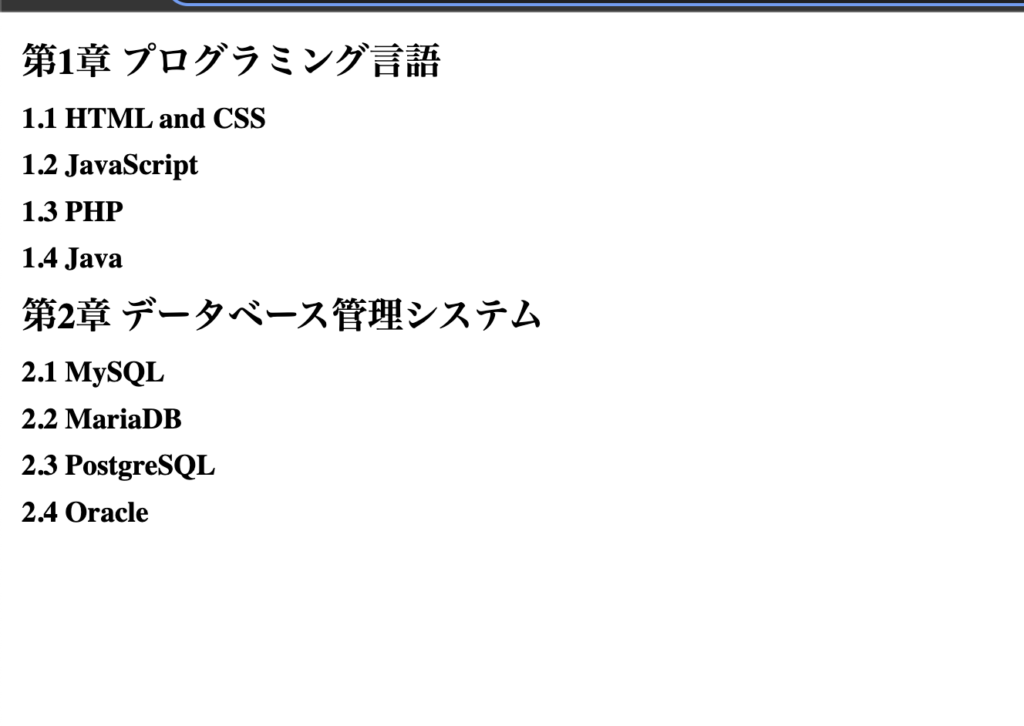
Note: Before using CSS counters, you must create them with counter-reset.

Additionally, counters can be nested, as shown in the following example. You can use the counters() function to insert strings between counters nested at different levels.
 <!DOCTYPE html>
<html>
<head>
    <style>
        ol {
            /* 各ol要素に新しいカウンターインスタンスを作成 */
            counter-reset: ol-list;
            list-style-type: none;
        }
        li:before {
            /* 現在のカウンターインスタンスのみを増やす */
            counter-increment: ol-list;
            /* 全てのカウンターインスタンスに"."で区切られた値を追加 */
            content: counters(ol-list, ".") "、";
        }
    </style>
</head>
<body>
    <ol>
        <li>アイテム</li>
        <li>アイテム
            <ol>
                <li>アイテム</li>
                <li>アイテム</li>
                <li>アイテム
                    <ol>
                        <li>アイテム</li>
                        <li>アイテム</li>
                    </ol>
                </li>
                <li>アイテム
                    <ol>
                        <li>アイテム</li>
                        <li>アイテム</li>
                        <li>アイテム</li>
                    </ol>
                </li>
            </ol>
        </li>
        <li>アイテム</li>
        <li>アイテム</li>
    </ol>
</body>
</html>
The execution result is shown in the figure below.
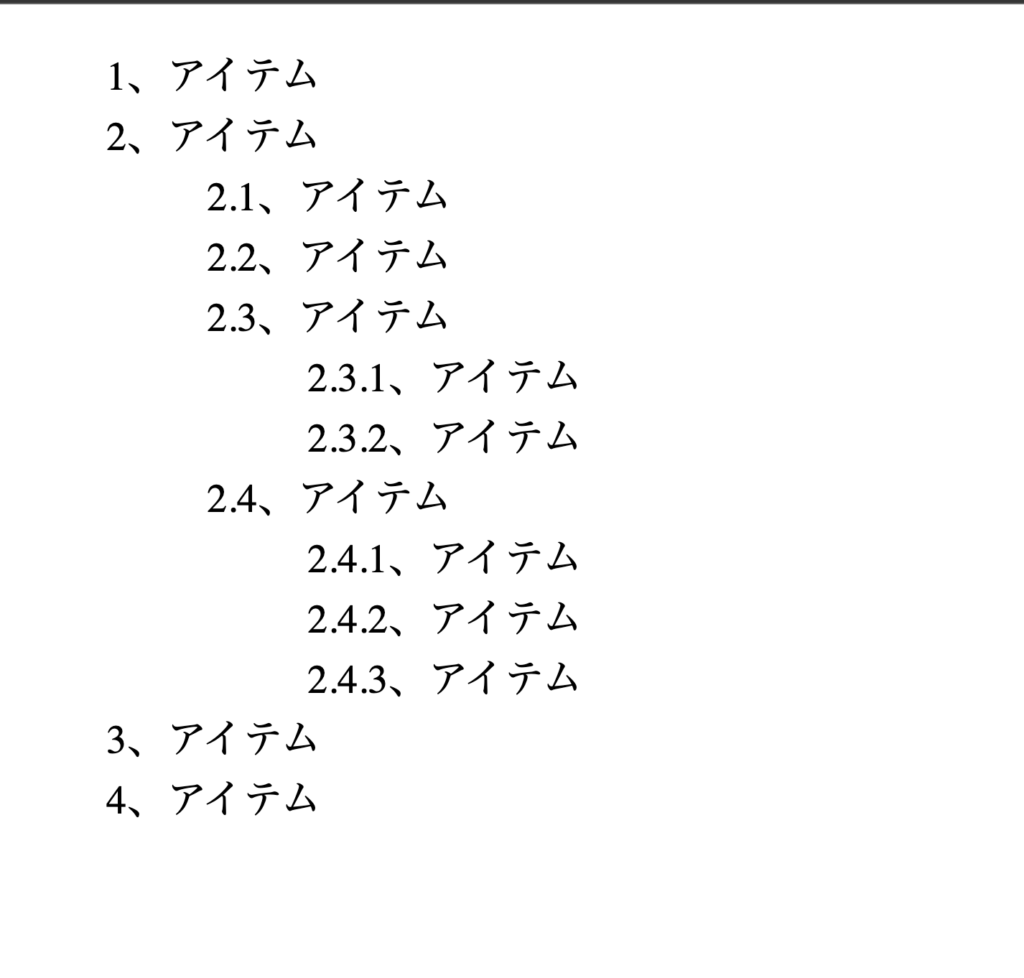
From the above example, it is easy to see how CSS counters can be used to achieve simple counting functionality without using other programming languages (JavaScript, PHP, etc.). This is very suitable if you need to add a serial number to some content. .


![How to set up a Raspberry Pi web server in 2021 [Guide]](https://i0.wp.com/pcmanabu.com/wp-content/uploads/2019/10/web-server-02-309x198.png?w=1200&resize=1200,0&ssl=1)


