Let’s explore cloud encryption, its types, and Google Cloud deployments together.
Cloud computing, a subset of IaaS, is well past the buzzword stage. This is a powerful force for individuals, businesses, and governments to use cloud services to reduce the hassle of on-premises technology stacks.
The cloud represents convenience, economy, and scalability.
Simply put, cloud computing is the borrowing of computing resources such as storage, RAM, and CPU over the Internet without physically hosting anything.
Examples from everyday life include Google Drive and Yahoo Mail. We entrust our data (and in some cases sensitive personal and business-related information) to these companies.
Generally, the average user doesn’t care about cloud computing privacy or security. However, those who are well-informed about the history of surveillance and the current level of sophisticated cyber-attacks should be on high alert, or at least informed about the situation at hand.

What is cloud encryption?
Cloud encryption addresses that feeling of insecurity by encrypting data stored in the cloud to prevent unauthorized access.
Encryption is a technique that uses ciphers (algorithms) to convert standard information into a scrambled version. In that case, the attacker will not be able to understand the details even if they are exposed.
There are different types of encryption based on use case. Therefore, it is important to use high-quality ciphers to encrypt cloud data.
For example, can you understand the following sentences?
Iggmhnctg rtqfwegu jkij-swcnkva vgejpqnqia & hkpcpeg ctvkengu, ocmgu vqqnu, cpf CRKu vq jgnr dwukpguugu cpf rgqrng itqy.
no!
It may be a puzzle to the human brain, but with the Caesar decoder you can crack it in seconds.
Even those familiar with the Caesar cipher can see that every letter in the ciphertext is two letters ahead of the letter in the plaintext.
Therefore, the key is to use strong ciphers like AES-256.
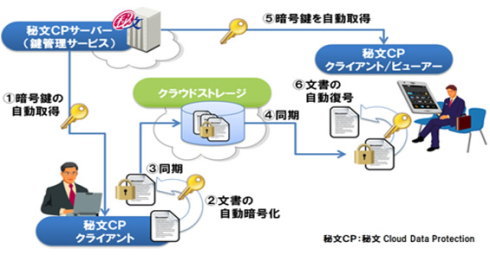
How does cloud encryption work?
The last few lines of the previous section may have given you the impression of choosing a cipher to encrypt your data.
Technically it could work that way. However, cloud service providers typically enable native encryption or leverage third-party encryption as a service.
So let’s break this down into two categories and look at the implementation.
#1. Encryption on cloud platform
This is the simplest way that reputable cloud service providers handle encryption.
Ideally, this would be the case:
Saved data
This is when data is stored in encrypted form before or after being transferred to a storage container.
Cloud encryption is a new approach, so there is no predefined method. There are many research publications that have tested different methods, but it is the practical application that is important.
So how do leading cloud infrastructure companies like Google Cloud protect your data at rest?
According to Google’s records , Google divides data into small groups of several gigabytes and spreads them across storage containers on different machines. A particular container may contain data for the same user or different users.
Additionally, each packet is encrypted individually, even if it resides within the same container and belongs to a single user. This means that even if the encryption key associated with one packet is compromised, other files remain safe.
Additionally, the encryption key changes every time data is updated.
Data at this storage level is encrypted with AES-256, except for some persistent disks created before 2015 with AES-128 bit encryption.
Therefore, this is the first layer of encryption at the individual packet level.
The hard disk drive (HDD) or solid state drive (SSD) hosting these data chunks is then encrypted with another layer of AES-256 bit encryption. Some legacy HHDs still use AES-128. Note that device-level encryption keys are different from storage-level encryption keys.
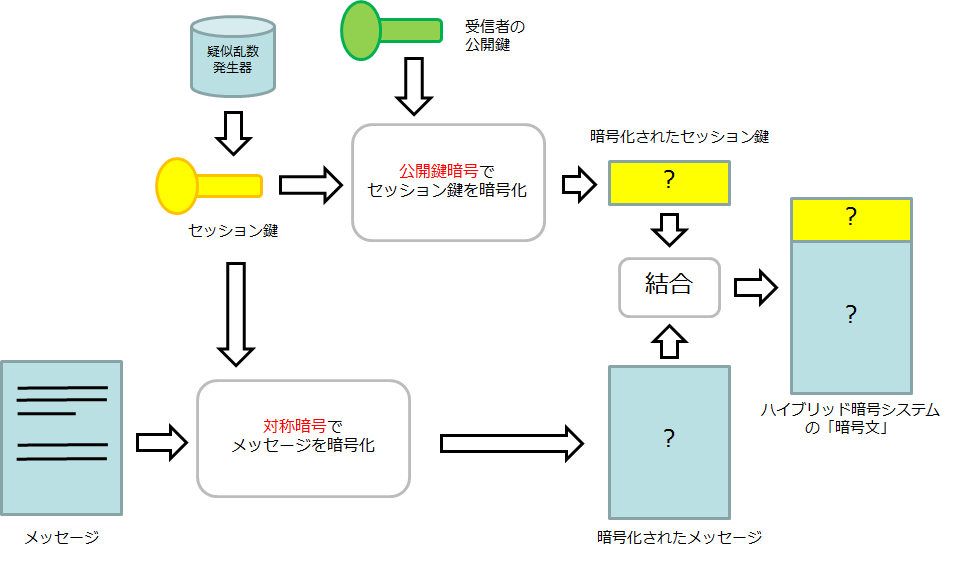
All these data encryption keys (DEKs) are now further encrypted with key encryption keys (KEKs) and centrally managed by Google’s Key Management Service (KMS). Specifically, all KEKs use AES-256/AES-128 bit encryption, and at least one KEK is associated with each Google cloud service.
These KEKs are rotated at least every 90 days using Google’s common cryptographic library.
Each KEK is backed up, tracked every time someone uses it, and only authorized personnel can access it.
All KEKs are then encrypted again with AES-256 bit encryption to generate a KMS master key, which is stored in a separate key management facility called the root KMS. This feature stores several such keys.
This root KMS is managed on a dedicated machine in each Google Cloud datacenter.
This root KMS is now encrypted with AES-256 to create a single root KMS master key that is stored on the peer-to-peer infrastructure.
One root KMS instance runs on every root KMS master key distributor that maintains the keys in random access memory.
To avoid fraud, all new instances of the root KMS master key distributor are authorized by an instance that is already running.
Additionally, the root KMS master key is also backed up to only two physical locations to handle situations where all distributor instances need to be launched at the same time.
And finally, fewer than 20 Google employees have access to these top-secret locations.
This is how Google practices cloud encryption of data at rest.
However, if you want to take matters into your own hands, you can also manage the keys yourself. Alternatively, you can add another layer of encryption to this and self-manage the keys. However, be aware that losing these keys also means you are locked out of your web project.
However, you shouldn’t expect this level of detail from all other cloud providers. Google charges a premium price for its services, so you may benefit from using another provider that fits your specific threat model but has a lower cost.
Data in transit
This is where your data moves within the cloud provider’s data center or outside of its boundaries (for example, when you upload data from your own machine).
Again, there is no foolproof way to protect data in transit, so we’ll look at the Google Cloud implementation.
In this regard, our white paper , Encryption in Transit , describes three measures to protect transient data: authentication, encryption, and integrity checking.
Within our data centers, Google protects your data in transit with endpoint authentication and optional encryption integrity checks.
While users may choose to take additional measures, Google ensures that it has the best security within its company by closely monitoring the access granted to a small number of employees. .
Outside of physical limitations, Google enforces delta policies for its own cloud services (such as Google Drive) and customer applications hosted on the cloud (such as websites running on its compute engines). We are hiring.
In the first case, all traffic first goes to a checkpoint known as the Google Front End (GFE) using Transport Layer Security (TLS). The traffic is then subjected to DDoS mitigation, load balanced across servers, and finally directed to the desired Google Cloud service.
In the second case, unless you are using another Google service for data transfer (such as Cloud VPN), the responsibility for ensuring the security of data in transit lies primarily with the infrastructure owner.
TLS is commonly employed to ensure that data has not been tampered with along the way. This is the same protocol used by default when connecting to a website using HTTPS, and is represented by a padlock icon in the URL bar.
It is commonly used by all web browsers, but can also be applied to other applications such as email, audio/video calls, and instant messaging.
However, for the ultimate encryption standard, there are virtual private networks that use advanced encryption ciphers such as AES-256 to provide multiple layers of security.
However, cloud encryption is difficult to implement on your own. Therefore, the following may occur:
#2. Encryption as a Service
This occurs when the cloud platform’s default security protocols are weak or non-existent for a particular use case.
Obviously one of the best solutions is to oversee everything yourself and ensure enterprise-grade data security. But that’s easier said than done, and you’ll lose the hassle-free approach when choosing cloud computing.
Therefore, you should use Encryption-as-a-service (EAAS) such as CloudHesive. Similar to using cloud computing, this time we’re “borrowing” encryption rather than CPU, RAM, storage, etc.
Data encryption at rest and in transit is available based on your EAAS provider.
Advantages and disadvantages of cloud encryption
The most notable benefit is security. Practicing cloud encryption ensures that your data is kept away from cybercriminals.
Cloud encryption won’t stop all hacks, but it’s important to do what you can and properly justify when something goes wrong.
As for the disadvantages, the first is the cost and time required to upgrade your existing security framework. Furthermore, if you lose access to your encryption keys during self-management, there is little you can do to help.
Also, since this is a nascent technology, finding a proven EAAS is not easy.
Ultimately, your best bet is to use a reputable cloud service provider and utilize native encryption mechanisms.
summary
I hope this article has helped you understand cloud encryption a little better. In summary, it’s about the security of your data as it relates to the cloud, including when it travels externally.
Most of the most respected cloud infrastructure companies, including Google Cloud and Amazon Web Services, have adequate security for your biggest use cases. Still, it doesn’t hurt to understand the terminology before hosting mission-critical applications.
PS: Check out cloud cost optimization solutions like AWS, Google Cloud, and Azure.


![How to set up a Raspberry Pi web server in 2021 [Guide]](https://i0.wp.com/pcmanabu.com/wp-content/uploads/2019/10/web-server-02-309x198.png?w=1200&resize=1200,0&ssl=1)


