Communicate with relational databases and create SQL views using SQL or structured query language.
So what are SQL views? These are virtual tables that combine and store data from real database tables that you create. The result is secure and simplified access to datasets while hiding the underlying table structure and implementation.
So how does this work? You probably already know that SQL queries are used to create SQL views. When a SQL view is created, the underlying SQL query is saved. When you use SQL queries to retrieve data from multiple tables, the queries are executed and help fetch data from the corresponding database tables. Similarly, when you query the created SQL view, the saved query is first fetched and then executed.
How can creating SQL views help?

SQL views are backed by stored SQL queries, which help ensure database safety. Other benefits include simplifying complex queries and improving query performance. Let’s take a look at how creating SQL views can benefit your database and applications.
#1. Provides database security
SQL views act as virtual tables and hide the structure of the actual database tables. So you can’t tell how many tables there are or what the various columns in the tables are by just looking at the view. Additionally, you can add access control restrictions to your database so that users can only query views and not actual tables.
#2. Simplify complex queries
SQL queries often span multiple tables with complex join conditions. If you frequently use complex queries like this, you can take advantage of the ability to create SQL views. You can save complex queries to SQL views. This allows you to just query the view without having to run the entire complex query.
#3. Mitigation for schema changes
Views are unaffected by changes to the underlying table structure, such as adding or dropping columns. If you rely on SQL views for all your queries, you don’t need to worry about schema changes. Because it’s a virtual table, any SQL views you create will continue to work seamlessly.
#4. Improve query performance
When you create a SQL view, the database engine optimizes the underlying query before saving it. Stored queries run faster than running the same query directly. Therefore, querying data using SQL views provides better performance and faster results.
How do I create a SQL view?
To create a SQL view, you can use the CREATE VIEW command. A view contains a SELECT statement. This will give you a query that will be saved in a view. The syntax is:
 CREATE VIEW view_name AS
SELECT
  column_1,
  column_2,
  column_3...
FROM
  table_name_1, table_name_2
WHERE
  condition_clause
Let’s understand this using an example. Suppose you have created two tables: department and employee . department Holds the name of the department and its ID. Therefore, employee table contains the employee’s name and ID and the ID of the department to which the employee belongs. Create a SQL view using these two tables.
Create a database table
| Department ID | Department name |
|---|---|
| 1 | finance |
| 2 | technology |
| 3 | work |
If you are using MySQL , you can create this table using the following query:
 CREATE TABLE `department` (
  `department_id` int,
  `department_name` varchar(255),
  PRIMARY KEY (`department_id`)
);
Insert data into the table you created using the SQL below.
 INSERT INTO department VALUES (1, 'Finance');
INSERT INTO department VALUES (2, 'Technology');
INSERT INTO department VALUES (3, 'Business'); | Employee ID | Employee name | Department ID |
|---|---|---|
| 100 | john | 3 |
| 101 | mary | 1 |
| 102 | Natalia | 3 |
| 103 | blues | 2 |
Once department table is ready and populated, create the employee table using the MySQL query below.
 CREATE TABLE `employee` (
  `employee_id` INT,
  `employee_name` VARCHAR(255),
  `department_id` INT,
  FOREIGN KEY (`department_id`) REFERENCES department(department_id)
);
Next, insert the employee record into the table. Note that the department ID column has a foreign key reference to the department table, so you cannot insert a department ID that does not exist in any other table.
 INSERT INTO employee VALUES (100, 'John', 3);
INSERT INTO employee VALUES (101, 'Mary', 1);
INSERT INTO employee VALUES (102, 'Natalya', 3);
INSERT INTO employee VALUES (103, 'Bruce', 1);
Query a database table
Let’s use the table in a database query. Let’s say you need to query the employee_id , employee_name , and Department_name of all employees. In this case, you need to use both tables and join them using a common column (Department_id) . So the query looks like this:
 SELECT
  employee_id,
  employee_name,
  department_name
FROM
  employee,
  department
WHERE
employee.department_id = department.department_id; 
Create a SQL view
Now, you may find yourself searching for or referencing this data frequently. In addition to this, as the number of records in the table increases over time, the query time also starts to increase. In such a scenario, you can create a SQL view that corresponds to this query.
Create a view named employee_info using the following query:
 CREATE VIEW employee_info AS
SELECT
  employee_id,
  employee_name,
  department_name
FROM
  employee,
  department
WHERE
employee.department_id = department.department_id; 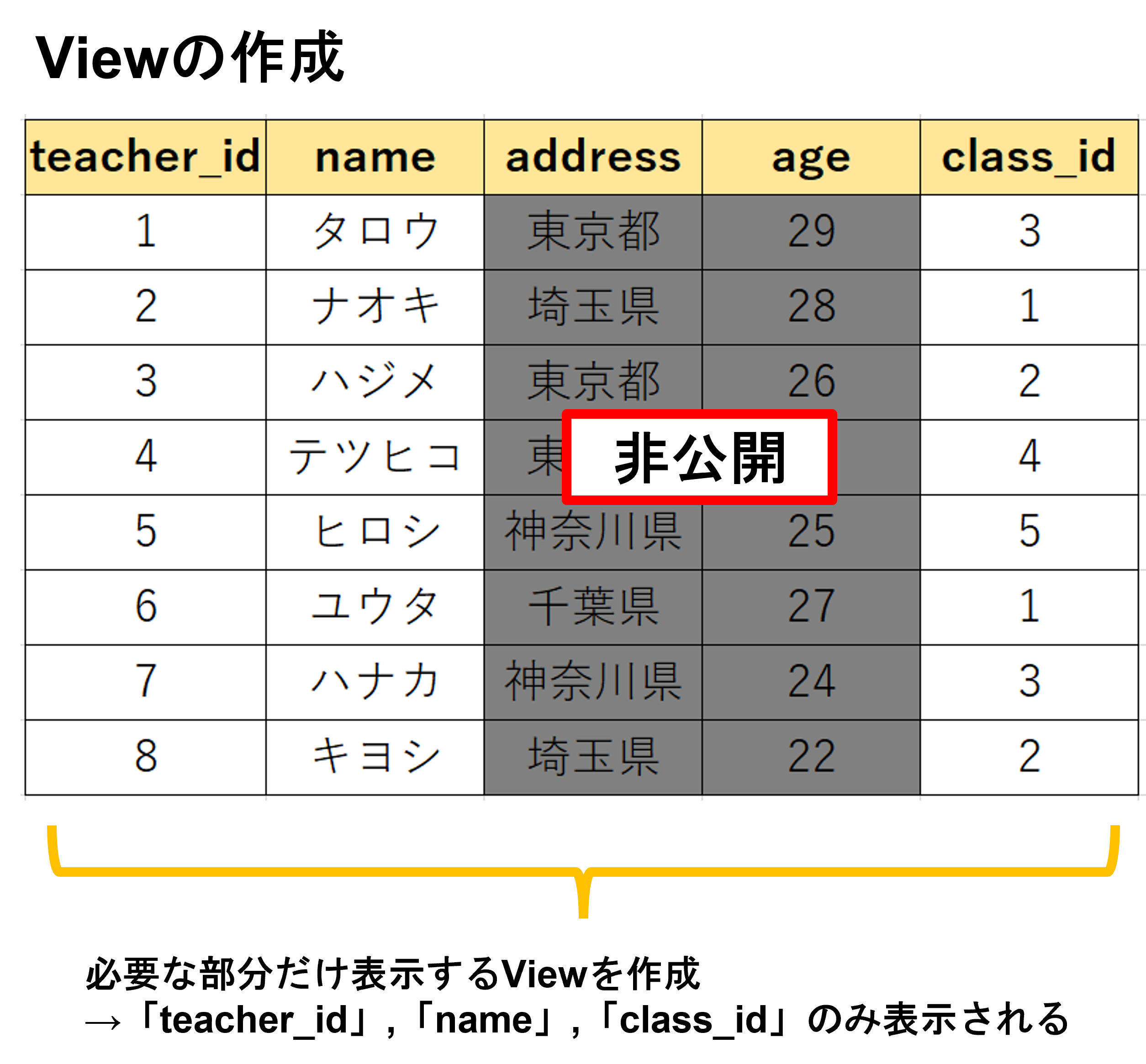
With this view in place, you can query the same directly. So the query simplifies to:
 SELECT
  *
FROM
  employee_info;
Querying the SQL view will give you the same output as running the original query. However, the queries are now easier to maintain. This view hides query complexity without compromising results or performance.
How do I replace a SQL view?
If you have a view with a specific name and want to modify or replace it, use CREATE OR REPLACE VIEW command. This allows you to modify the SELECT statement used to create the view. Therefore, the output of the view is replaced while the view name remains the same. Additionally, it creates a new SQL view if it does not exist.
You can replace the SQL view using the following syntax:
 CREATE OR REPLACE VIEW view_name AS
SELECT
  new_column_1,
  new_column_2,
  new_column_3 ...
FROM
  new_table_name_1,
  new_table_name_2 ...
WHERE
  new_condition_clause
You can understand this better by looking at an example. Consider department and employee tables. From these, the employee_info SQL view is created. This view includes employee_id, employee_name, and Department_name columns.
Considering security concerns, we recommend removing employee_id from this view. Additionally, you can rename the columns to hide the actual database columns. You can make these changes to existing views using the following SQL queries.
 CREATE OR REPLACE VIEW employee_info AS
SELECT
  employee_name as name,
  department_name as department
FROM
  employee,
  department
WHERE
employee.department_id = department.department_id; 
If you replace the view, you will get different results using the same query you were using before. For example, the query results show that one of the columns has been deleted. In addition to this, the column names have been changed from employee_name and Department_name to name and Department respectively.
Leverage the ability to create SQL views
Creating SQL views not only simplifies queries and speeds data retrieval, but also provides security and protection against schema changes. Creating SQL views is very easy. You can take an existing query and convert it to a SQL view.
Use the step-by-step guide above to create SQL views and enjoy their benefits. SQL views can improve performance while making database applications simple and secure.
If you want to manage your own SQL servers, consider SQL Server Management Studio (SSMS).


![How to set up a Raspberry Pi web server in 2021 [Guide]](https://i0.wp.com/pcmanabu.com/wp-content/uploads/2019/10/web-server-02-309x198.png?w=1200&resize=1200,0&ssl=1)


