Why spend time and money printing, scanning, and faxing documents when you can just use digital signatures?
As the nature of work becomes more remote than ever, digital signatures have become a critical facilitator for companies doing business across borders. Secure and legally binding digital signatures allow businesses to quickly and virtually sign new contracts.
Before the introduction of electronic signatures, businesses around the world spent significant amounts of time and money processing paperwork. But physical documentation is not the only problem. Physical documents also lack security. These can easily be lost, damaged, counterfeited, or tampered with.
Additionally, business needs in the digital age continue to evolve. Replacing paperwork with efficient and streamlined digital solutions appears to be the only way forward from here.
What is an electronic signature?

Electronic signatures are a digital alternative to handwritten signatures. In today’s fast-paced world, time-saving may be one of the biggest benefits of e-signatures, but it’s not the only one.
They are convenient, safe, and legally binding. In fact, it provides greater security than traditional signatures, minimizing risks and protecting personal and corporate interests.
How digital signatures work
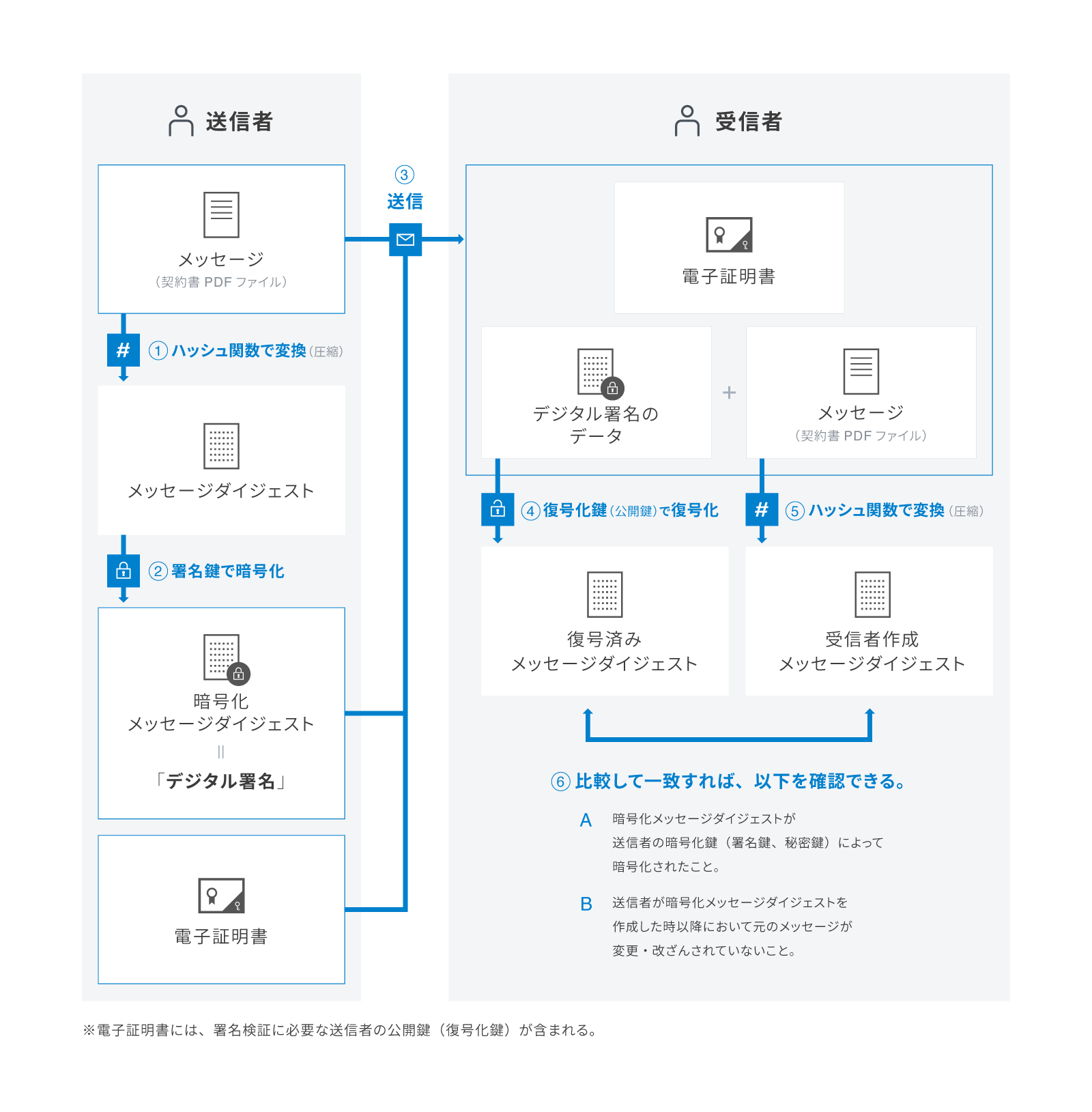
When you use a digital signature solution provider to sign a document, the provider uses a mathematical algorithm based on the PKI (Public Key Infrastructure) protocol to generate two keys: a private key and a public key.

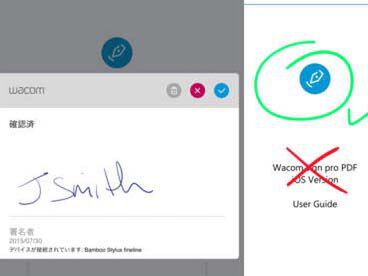
When you type or draw to sign a document, your private key is used to create a digital signature. How is the private key created?
A mathematical algorithm works to take the data and create something called a hash. Data is encrypted and the resulting product is a private key, which is essentially a digital signature.
When the recipient receives your document, they receive a copy of your public key. But how do you verify that the signature is yours or is valid? The public key is used to verify the authenticity of the digital signature by matching the hash value and decrypting that data. Helpful. If the values do not match, it means the digital signature is invalid.
Digital signatures are backed by electronic certificates that include personal information such as your name, email address, and location, confirming and backing up the electronic signature as actually yours.
How are digital signatures legally compliant?
Electronic signature solution providers use PKI protocols and data encryption to ensure privacy. To maintain legal compliance, ensure compliance with electronic signature laws as set forth by the Electronic Signatures in Global and National Commercial Transactions Act.
Additionally, we comply with several industry standards, including the General Data Protection Regulation (GDPR), the International Standard for Information Security (ISO 27001), and Systems and Organizational Controls (SOC) under AICPE.
These rules and regulations allow digital signatures to be legally binding. However, please note that regulatory requirements vary by country.
Examples of using electronic signatures

Digital signatures use multiple layers of encryption technology to minimize data loss and eliminate the possibility of documents being lost, altered, or forged. With these benefits in mind, here are some use cases for your team where e-signatures can help increase productivity.
| team | Purpose |
| Human resources department | Onboarding, performance evaluation, NDA, etc. |
| sales and marketing | Tax forms, purchase agreements, contractor/delegation agreements, etc. |
| legal | NDAs, contracts, compliance, waivers, etc. |
| accounting | Tax forms, purchase agreements, contractor/power of attorney agreements, etc. |
| that | Approvals for invoices, expense reports, policy management, etc. |
| finance | Contracts, proposals, orders, quotes, special deals, release forms, PR sign-offs, etc. |
| procurement | Asset transfers, approval sign-offs, system change requests, etc. |
While digital signatures work in all industries and businesses of all sizes and types, let’s take a quick look at some industry-based e-signature use cases.
- insurance
- real estate
- manufacturing industry
- health care
- higher education
- non-profit
- retail
- IT/Technology
- advertisement
- government agency
All of the above industries can leverage e-signatures to assist with onboarding, employee and policy management, supply chain distribution, invoices, quotes, proposals, NDAs, and contracts.
Digital signature using PandaDoc
There are many e-signature providers on the market, but how do you choose one? Especially if you don’t choose one that is compliant with the law, you could expose yourself and your business to legal trouble. there is.
Consider PandaDoc, one of the top digital signature providers trusted by over 50,000 users. AICPE’s SOC, GDPR, and PKI compliance ensures your signatures are secure and legally binding.
Moreover, unlike other basic tools, its advanced features can assist in all processes of document management, from digital signatures to contract lifecycle management (CLM).
All-in-one document automation software helps you save time and money while building meaningful relationships with your customers.
PandaDoc: Core features
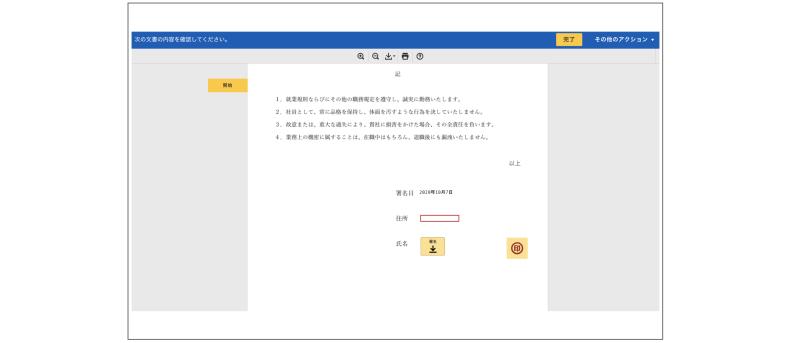
In addition to its intuitive interface, great customer support, and wide range of integrations, PandaDoc is well-known for:
Offers unlimited free signatures
PandaDoc lets you electronically sign documents on the go. Complete important transactions in just a few clicks while keeping your data safe. We also have a mobile application that allows you to stay on top of your contract lifecycle management process.
However, PandaDoc claims to be the only e-signature platform that allows you to upload and sign an unlimited number of documents with its free plan.
Prioritize privacy and ensure legal compliance
PandaDoc is UETA, ESIGN, and HIPAA compliant. This means that documents signed by PandaDoc not only meet the legal requirements enforced in your country. But it also protects an individual’s right to privacy.
Additionally, PandaDoc is AICPA SOC 2 Type II certified. Compliance with service standards set forth by the American Institute of Certified Public Accountants (AICPA) is implied. Why is that important?
When companies handle large amounts of confidential or personally identifiable information, they must meet certain standards to maintain the confidentiality, integrity, and security of their clients’ data.
However, that’s not all.
Guaranteed high security
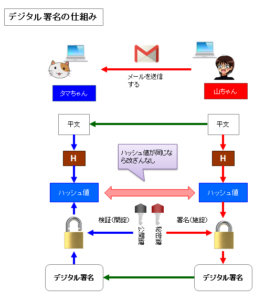
When you sign a document using PandaDoc, you are provided with a digital certificate to verify the document’s authenticity. Digital certificates help you access the recipient’s name, signature, verified email address, and IP address. Additionally, it includes a date and time stamp of the signed document.
For PDFs, PandaDoc ensures increased security by providing a private encryption key to verify the authenticity of the document.
Supports various file types
You can waste a lot of time if you have to choose a different platform for each type of file you need to sign. That’s also a waste!
PandaDoc lets you sign PDF, JPG, or DOCX and streamline them into a single integrated workflow. PandaDoc supports Word, Excel, PowerPoint, PDF, JPG, and PNG content types.
Helps automatically track electronic signatures
PandaDoc prioritizes data security, which is why we have automatic e-signature tracking. Every signed document has an embedded audit trail that helps you see who viewed, accessed, or signed the document and when.
This is especially useful when processing signatures for multiple documents at the same time. Auto-tracking allows you to stay in control and get a 360-degree view of everything that’s happening.
PandaDoc’s version history feature allows you to switch between different versions of your document. Always know who made changes and where.
Main features of PandaDoc
For businesses looking to streamline document workflows, reduce closing time, and improve ROI, PandaDoc is more than just an e-signing platform. Here’s why:
#1. Sign and track
- Enable signature order: This is very useful if your contract or proposal requires multiple signatures. You can select recipients, assign roles (sender, client, signer), arrange them in the correct order, and automate the entire distribution. PandaDoc will send you an email notification when it’s someone’s turn to sign. Also, you don’t have to miss this process manually.
- Submit a signature request: Need a signature from someone in your company or a client? PandaDoc lets you submit a request, and you can even automate it with just a few clicks.
- Document Tracking: Want to know if someone signed a document? Get a notification when that happens. Additionally, an audit trail helps you track who viewed or signed the documents you sent.
#2. automated content
- Add smart content placeholders: Use smart content to minimize errors and save time creating documents. Set placeholder fields to remind yourself or your team of what to include. Also select pre-selected items for teammates to add to specific documents/suggestions.
- Personalize your content: Choose conditional content to take your workflow to the next level. Here, you’ll create a template with rules that will help senders generate content tailored to their client’s needs.
- Set rules to improve data collection: You can also set conditional fields to help recipients navigate through your document and easily find what they’re looking for. This significantly improves the quality of data collection and customer personalization.
#3. advanced citation
- Tailor quotes to your clients: Use the quote builder to let your team create personalized quotes for your clients without missing any important information.
- Specific pricing: You can choose fixed, recurring, or volume-based pricing strategies and receive payments via the ACH network.
- Embed a product catalog: Create a product catalog and embed it in your quote whenever you need it.
- Group products into bundles: You can also create product bundles to streamline sales and make sharing easier.
You can also use PandaDoc to create workspaces to distribute work among teams and manage team members and the permissions they have. Additionally, you can view document version history to better track documents and search for documents using specific filters.
All of these PandaDoc features are available with Business or Enterprise plans. These can help transform business operations and eliminate labor-intensive and outdated practices.
Prices and plans
PandaDoc comes with a free plan that allows you to upload and e-sign an unlimited number of documents.
However, advanced features such as smart content and advanced quote builder are only available as part of the premium plan. Take a look at the pricing plans offered by PandaDoc.
- Essentials: Billed annually at $19 per user per month and includes great features like a drag-and-drop editor, audit trail, 750+ templates, and 24/7 support.
- Business: Billed at ₹49 per user/month on an annual basis, it includes CRM and Zapier integration, approval workflows, content library, and custom branding.
- Enterprise: Customized pricing with updates, locks, unlimited workspace, custom roles, and access to QES, the most secure form of e-signature.
Smart Content or Advanced Quote Builder is available as a paid add-on to your plan.
Is PandaDoc easy to use?
Start your 14-day free trial to see if PandaDoc is right for your business needs. When you sign up, you’ll be asked if you want to try our e-signature service or automate your workflow.
The first method, as the name suggests, allows you to upload and sign files (PNG, JPG, DOCX, etc.). Second, it helps with contract lifecycle management, documentation, invoices, quotes, and more.

Find everything you need right away
PandaDoc has a very easy-to-use interface, with a navigation menu on the left to further simplify your work. Here you’ll find everything you need to see: documents, templates, forms, content libraries, contacts, add-ons, reports, and more.
Under Documents, see which renewals are coming up, which contracts are about to expire, or create a new document.

Next up is the template gallery. It contains over 750 templates in various categories, from forms to invoices to proposals. No matter what type of industry your business falls into, PandaDoc’s template gallery is sure to have a specific template you can build on.
There are a variety of shapes available, so you can choose the type that suits you, such as casual, modern, or simple! Creating a form is as easy, fast, and creative as creating a document using PandaDoc’s drag-and-drop editor.
Below the form, you’ll see your inbox, add-on store, and contacts, as well as your content library, catalog, and reports. The content library has content blocks that help you create your own templates to help you quickly create documents.
When it comes to catalogs, you can create a product catalog in a few simple steps. You can also keep your documents up to date with PandaDoc’s advanced reporting tools, including version history and audit trail.
Send the perfect proposal in minutes

On the home screen, you can also see updates about your activities and the activities happening in your workspace. Want to easily send proposals, documents, contracts, and invoices? Choose a template, customize it, add recipients, and you’re ready to go. That’s how easy PandaDoc is to use.
You can add other content blocks (as shown on the right), such as text, tables, and rich media. You can also see a summary of fillable fields directly below the recipient. If you want to understand how to get the most out of this, you can also request a demo from the PandaDoc team.
conclusion
With its all-in-one approach, easy interface, and live chat support, PandaDoc has some great points on its own. The drag-and-drop editor is a creative advantage, and when combined with specialized signature ordering and customization tools, PandaDoc reduces closing time by 28%.
If you’re still skeptical, we recommend you try our free forever e-signature feature, which is perfect for startups, small businesses, and individuals. If you like what you use, you can always take advantage of the 14-day trial to switch to a plan that suits you better.
Next, you can also consider some top e-signature solutions for everything from personal documents to business documents.


![How to set up a Raspberry Pi web server in 2021 [Guide]](https://i0.wp.com/pcmanabu.com/wp-content/uploads/2019/10/web-server-02-309x198.png?w=1200&resize=1200,0&ssl=1)


