Personalizing your posts is the best way to stand out from the crowd on social media platforms like Instagram. Whether you’re a content creator or just starting out, it’s useful to know how to change the background color of your Instagram Stories. Therefore, in this guide we will list some different creative ways to do so. 
Change the background color of Instagram stories to a solid color
If you want to place an image on top of a solid color background in your Instagram Stories, follow these steps:
1. Click on a random photo in the Story panel.
2. Next, tap the three horizontal dots icon in the top right corner and select Draw .
3. Next, you will see different colors in the bottom panel. You can select someone from this list, or long press on any color to see the entire color palette.
4. Once you have selected the solid color you want, simply press and hold the center of the story to change to that color. Then tap Done in the top right corner.
5. Now that you have a solid background color, choose the image you want to share in your story. To do this, tap the sticker icon in the top right corner.
6. Tap the “Image Upload” sticker from the pop-up panel.
7. Now select the image you want to upload and use the two-finger gesture to resize it as required. You can also tap the uploaded image to see more frame options. Then decorate your story with text and additional stickers. Now you’re ready to share your story. 
Change the background color of Instagram stories to gradient
Some people prefer gradients over solid colors. If you’re one of them, learn how to set a gradient as the background for your Instagram Stories.
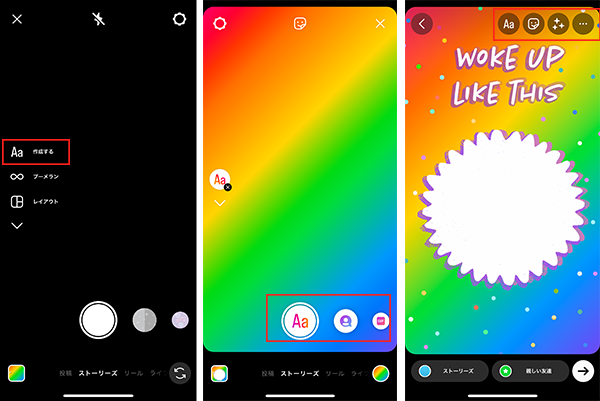
1. For a gradient background, tap the Create (Aa) icon in the left panel of the Instagram Story creation section.
2. A gradient background will immediately pop up on your screen. Tap the small colored circle in the bottom right corner to shuffle through the different gradient templates.
3. Once you’ve found the gradient you want to use as your background, tap the sticker icon at the top and select the “Upload Image” sticker again.
4. Next, select the image you want to upload, just like you did when you selected the solid background color. Once you’ve finished resizing and positioning, you’ll be able to share your Instagram Story. 
Use a photo from your camera roll as a background in your Instagram story
Whether you want to add multiple photos to your Instagram Story or want to do something different with your Story, you can also use an image from your camera roll as a background. Here’s how:
1. First, tap on the small square icon in the bottom left corner of the Instagram Story creation screen.
2. Next, choose an image to use as the background of your story.
3. Next, tap the sticker icon at the top, select Image Upload Sticker , and select the photo you want to add above the background of your story. that’s it. 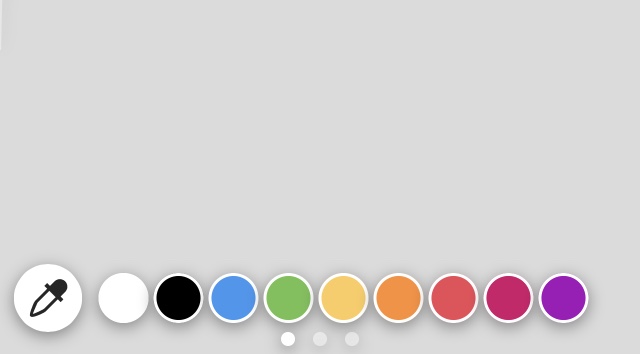
Get creative with Instagram Story backgrounds
There are several things you can do to bring out the creative side in you. To do this, use the eraser tool in the Instagram Story editing options. Let’s explain how:
1. First, select the image you want to share in your story.
2. Next, use the Draw tool shown in the first section to place a solid color background over the image. If possible, place a background that matches well with the color scheme of the image.
3. Next, tap on the eraser icon at the top and start swiping your finger across the screen to view the image below.
Well, now that you’ve seen some of my newbies trying to do some creative things with their Instagram Story backgrounds, you’ve got an idea of how you can improve the way your content is displayed. You can add music to your Instagram stories to make them even more beautiful and much more. If you need help, you can also check out our guide to saving Instagram Stories with music. Let us know in the comments if you found this guide helpful.


![How to set up a Raspberry Pi web server in 2021 [Guide]](https://i0.wp.com/pcmanabu.com/wp-content/uploads/2019/10/web-server-02-309x198.png?w=1200&resize=1200,0&ssl=1)


