Adobe Firefly leverages a generative and creative AI engine to help you generate new images, scenes, styles, textures, lighting, shapes, and more.
Visuals can often convey your message more accurately than plain words.
As a result, many individuals and businesses are looking for high-quality, relevant images to represent their offerings and messages to their target audience.
However, creating high-quality images requires time, creativity, and expertise, which not everyone has.
Enter Adobe Firefly. This tool has the potential to revolutionize the modern art production, artist, and content creation industry.
Although there are many AI art generation software, Adobe Firefly is becoming famous among enterprises due to its unique and easy-to-use interface.
Regardless of your creative skills, Adobe Firefly allows you to create or generate innovative images.
This article explains what Adobe Firefly is, what it does, how it can help your organization achieve its goals, and what makes it different from other AI art generation tools.
Let’s go!
What is Adobe Firefly? Overview
Adobe Firefly is a creative and generative AI system designed by Adobe to help businesses and individuals design and create amazing images, illustrations, scenes, and styles.
Organizations can easily integrate their business with Adobe’s Creative Cloud solutions. It’s currently in beta, so it’s only available to Adobe Creative Cloud subscribers who request access.

There are currently two ways to access Firefly:
- First, use your browser to visit the Firefly website.
- The second is within the beta version of Adobe Photoshop.
Currently, there are limited tools, including text-to-image conversion, text effects, and generative fills. However, other tools are also available, such as sketch to image, text to vector, text to pattern, and 3D to image.
According to Adobe, Adobe’s art generators are trained in stock photography, public domain content, and openly licensed content. This is a unique step taken by Adobe to help users create high-quality generated images compared to other AI art tools such as Stability AI and Midjourney.
Adobe Firefly empowers creators by allowing them to create text prompts and get the content they want. This includes audio, video, images, and vectors easily and quickly with color gradients, brushes, video transformations, and more.

Other AI art generators are useful, but Firefly’s integration with Adobe services and tools makes it even more special. This allows users to harness the power of generative AI within their workflows.
Firefly integration takes Adobe Photoshop even further than before. This allows users to generate or create images using words using ‘Generative Fill’. You can add or remove content or replace some of the images. You can also extend the edges of your image using new generated layers.
If you want to access Adobe Firefly, please visit the official Firefly website and try out various generation features from the website. Additionally, the Photoshop Beta application allows you to modify existing images using the generative fill feature.
Adobe Firefly: Features
Firefly offers users many valuable advanced features that you can explore to produce great images. Features include:
#1. text to image
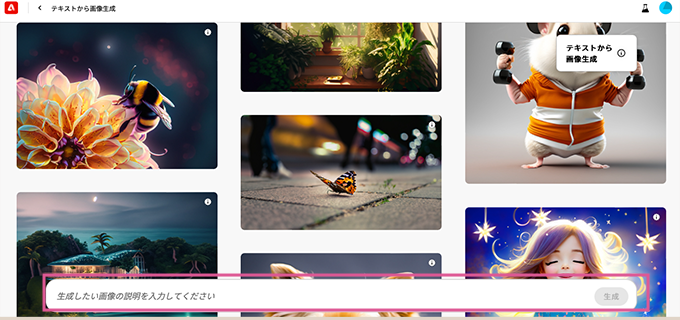
Text-to-image is an easy option for users who want to generate images by writing their requirements and choosing a style. The user interface is simple. Simply write your prompt in the prompt bar at the bottom of the screen.
For example, let’s say you create a prompt called “Adorable Cat Catching Mouse.” When you click Generate, Firefly retrieves training data from Adobe’s stock library and displays it on screen. When you first click on this option, Firefly will show you a lot of inspiration explaining the possibilities of using prompts for image generation.
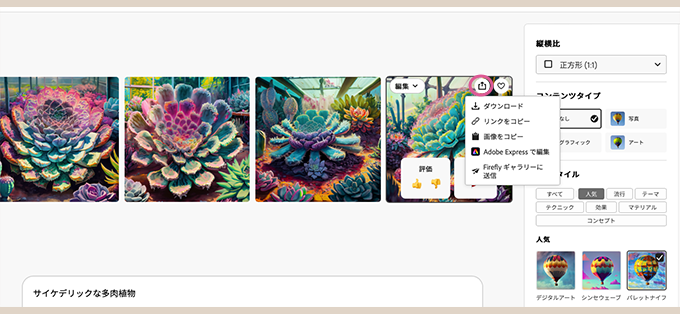
Get visual inspiration to understand what you need to write. If you already know it, type it directly at the prompt. To get an accurate image, you can choose from various options such as style, composition, color, aspect ratio, etc.
These are technical parameters that help reshape the image. Therefore, Firefly has a low learning curve and efficient workflow.
#2. generative fill

The “Generative Fill” option is available on the Adobe Firefly website in beta stage. Also available to Photoshop Beta users. In Photoshop, you can use this feature to highlight a specific area and replace it with something else to get a beautiful output.
For example, let’s say you have an image of a ninja warrior in a jungle. If you want to change the lighting, add lighting effects, or change the color of the sky, generative fill is the option you need.
The first attempt may not give you the desired result, but once you know the secret behind it, you will get the result. Once you’ve highlighted a large area of your image, let Firefly do its creative magic from your description.
In simple words. Generative Fill allows you to overlay new scenes and objects onto your photo.
setting:
- Insert: In this mode; you can add elements to the image.
- Delete: In this mode; elements can be moved.
- Pan: Allows you to move the image.
- Add: You can erase part of the image and add something in its place.
- Delete: This option helps you to delete aspects of the image.
- Background: This option allows you to remove the background around the image.
#3. text effect

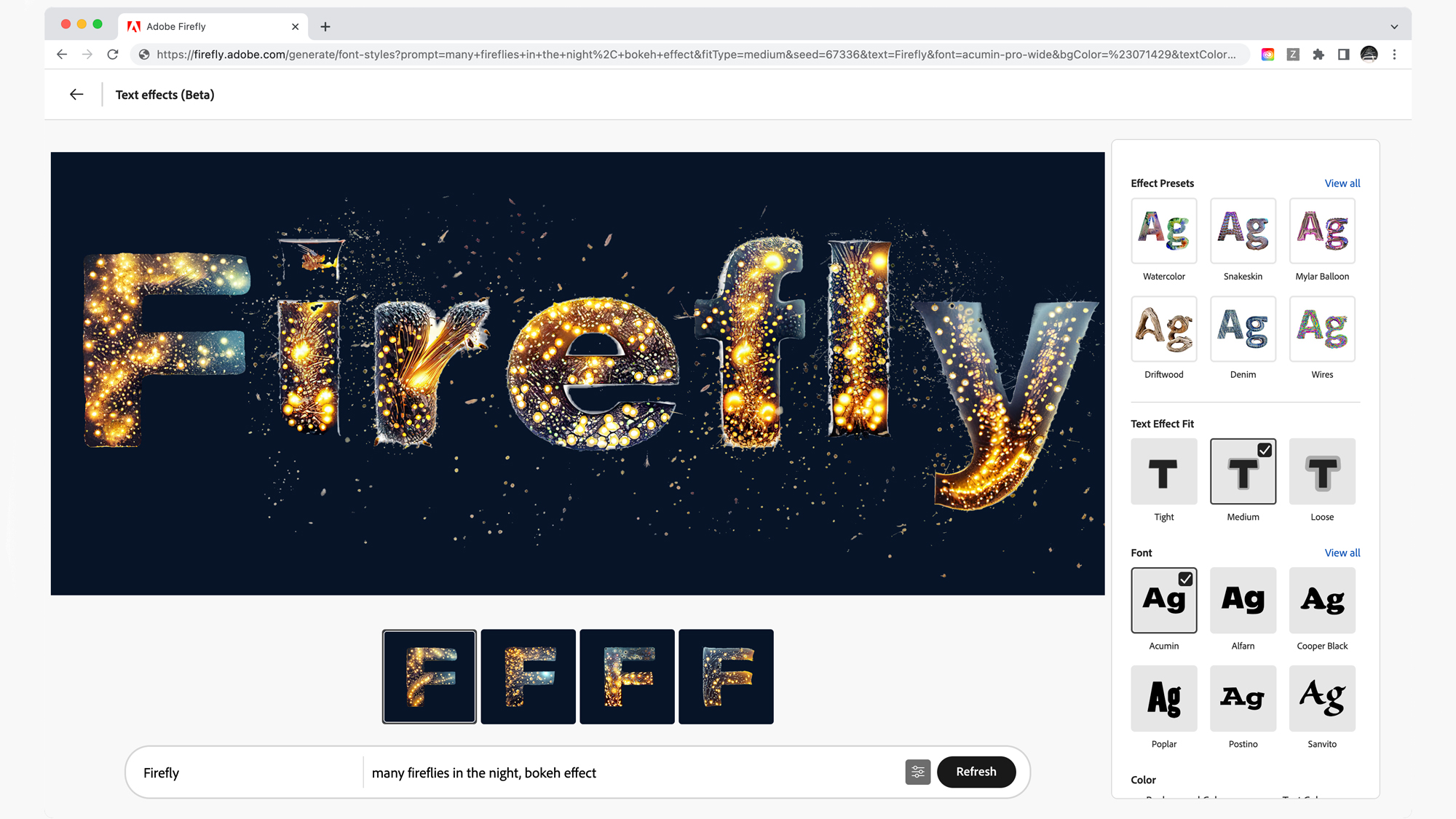
All of the features in Firefly’s beta version help meet the needs of designers. Text effects are a feature that every designer would like to use to enhance their artwork. This feature allows you to turn simple text into stunning artwork.
Artists and designers can use this feature to quickly add textures without spending much time. Currently, Firefly only supports a small number of fonts and text length is limited to 20 characters.
Here you can write any text and generate styles for it. To use it, you need to know a few settings.
- Samples: Choose from options such as flowers, snakes, driftwood, nature, materials and textures, food and drink styles.
- Text effect fit: Choose from three options for text: tight, medium, and loose.
- Color: Change the background and text color from various color options.
#4. generative recolor

Vector Recolor is a customized feature for designers that allows them to deploy vector files at high resolution without losing quality. Therefore, designers use this feature for commercial print work. This feature is extremely important for assets such as signs, vehicle wraps, and billboards.
If you’ve ever used Adobe Illustrator, you may have manually entered colors into vector images. But with this unique feature, you can experience a wide range of color combinations and apply them automatically according to specific prompts.
To use this feature, you need to upload an SVG file and choose the one you want from various options. Some options you should know about:
- Sample prompts: Choose from sample prompts such as Salmon Sushi, Lavender Storm, Sandy Beach, and Dark Blue Midnight.
- Harmony: Options include Default, Complementary, Analog, Triad, Square, and Split Complementary.
- Style: You can also change the appearance of the image by selecting or deselecting the Preserve Black and White option.
#5. Natural language processing (NLP)

Adobe Firefly uses the power of NLP to understand text descriptions to create visual content that matches your specifications. This allows you to create attractive, high-quality images more efficiently.
#6. Image enhancement
Firefly lets you improve your images with an easy process of applying composition and style. Easily add texture and style to objects and text, making your images look more polished and professional.
#7. Other features
Firefly offers some other great features and benefits. Let’s explain them one by one.
- Smart Interface: Firefly’s UI is intuitive, smart, and user-friendly. All options are easy to find. Even beginners can use Firefly without any experience. Easily create images and designs with options. Plus, you can use the examples to get started right away. Just customize the design and you’re ready to go.
- Innovative editing features: Firefly includes a variety of innovative features for editing and creating designs in the pipeline, including 3D-to-image conversion, image enhancement, and generation-to-refill. This allows both beginners and professional designers to easily unlock the potential of creating their own designs.
- Metacontent: Firefly images include metacontent that indicates that the image was generated using Firefly AI. This means images can be used with complete confidence, promoting trust and transparency.
- Inspiring Examples: Firefly provides several examples to inspire you to create high-quality content. This feature is easy to use for beginners who are just starting their journey into the world of AI art.
- Integration: Many of Firefly’s features are built into Adobe applications including Illustrator, Photoshop, Express, AEM, and more. This integration allows designers to use any tool within their workflow to streamline the design process.
Upcoming features
Adobe Firefly optimizes your workflow and makes it easier to ideate, create, and communicate visuals. Currently it offers text effects and image generation, but more features will be available in the near future. You can expect the following:
- 3D to Image: Generate 2D images from 3D elements.
- Stretch image: This feature helps to expand the size. For example, you can convert a 1:1 image to a 16:9 image.
- Personalized results: Train Firefly with your own images to add more variations to your designs.
- Text to Vector: Create vector images using a variety of text prompts.
- From text to patterns: Generate some patterns using simple text prompts.
- Text to brushes: Create brushes using text prompts in Adobe tools like Illustrator and Photoshop.
- Sketch to image: Convert your sketches and drawings into colorful images.
- Text to template: Generate editable templates using text prompts.
- Add elements to your illustration
- Change the atmosphere of the video
- Add textures to 3D models
Additionally, Adobe Firefly is currently generally available in beta. Now, anyone can leverage cutting-edge tools from their own systems to create amazing content by simply describing the desired artwork using natural language.
How to use Adobe Firefly

Step-by-step instructions on how to use Adobe Firefly.
- Step 1: Visit the official Adobe Firefly website, sign in, and explore Firefly. Select the options you want to try and click Generate. For example, select the Text to Image option. You can generate high-quality images in just a few steps in text format.
- Step 2: The next step is to fill in the prompt or upload an image in the box below. Once done, click “Generate” to get the image according to your requirements. For example, let’s say you want to create the letter “G” inspired by car design. Write your text in the box and you’ll see four images of the letter G inspired by car designs.
- Step 3: Edit or enhance your image by choosing from the various options that appear on the screen. For example, you can create stunning designs using options such as generative fills, text effects, and generative recoloring.
- Step 4: Once you see what you want on the screen, save it.
How is Firefly different from other AI art generators?
Firefly has many competitors, including OpenAI’s Dall-E and Midjourney. These AI art generators include much the same functionality, except that they use ML models to display the final image.

Firefly is at the forefront with features like integration with Adobe tools like Photoshop, Illustrator, and more. These tools can also be used for post-generation editing. Additionally, it generates different style images on top of the words. You can easily adjust it by changing, deleting, or adding text from the actual text.
However, with other art generators, if you want to add or remove words from the text, you have to rewrite the entire text to generate the image.
Midjourney is trained on text and image datasets by many designers and artists. This means that the images produced are likely to be imaginative and aesthetically appealing. Furthermore, MIdjourney datasets are taken from the internet without the consent of the copyright holders. As a result, many artists filed lawsuits for copyright infringement.
Firefly, on the other hand, aims to avoid such scenarios. Trained on publicly available text and image datasets. This means that Firefly’s imagery is likely to be realistic, rather than just innovative and imaginative like Midjourney. Therefore, Adobe Firefly is more secure for businesses.
Adobe Firefly is in open beta and available for free from our website. Midjourney, on the other hand, is currently only accessible by invitation using a Discord server with a clunky user interface.
Additionally, Firefly’s compositional style is better than DALL E2 and comparable to Stable Diffusion and Midjourney. DALL E2’s output is not very photorealistic, but Stable Diffusion does require a bit of a learning curve.
So, among these, Adobe Firefly might be a better option.
conclusion
Adobe Firefly is a newcomer to the world of AI art generators. Adobe has deep industry expertise, so adoption rates for this tool are likely to be high. Although in beta, designers can use Firefly to generate the images they need.
This tool provides many advanced features to enhance your image generation. The best part is that you can download images with a transparent background. Also, the image resolution is higher compared to other AI art generators.
Adobe uses AI ethically by watermarking and embedding metadata in all images. This ensures that the images captured are identifiable and used responsibly. If you want to try this out, sign in to the beta stage and start creating realistic images.
You can also consider some AI design tools to make your art more efficient.


![How to set up a Raspberry Pi web server in 2021 [Guide]](https://i0.wp.com/pcmanabu.com/wp-content/uploads/2019/10/web-server-02-309x198.png?w=1200&resize=1200,0&ssl=1)


