In this tutorial, you will learn how to emulate a do-while loop in Python .
In any programming language, loops are useful for repeatedly performing certain actions depending on loop conditions. Python supports while and for loop constructs, but does not natively support do-while loops.
However, you can emulate do-while loops by using Python’s existing loops and loop control statements and by understanding how do-while loops work.
You will learn how to do this in the next few minutes. Let’s get started!
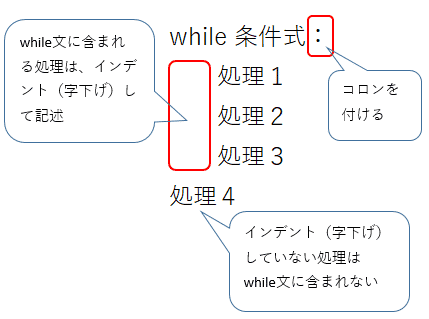
What is a do-while loop structure?
If you’ve ever programmed in a language like C or C++ , you’ve probably encountered the do-while loop construct.
In a do-while loop, the sequence of statements within the loop body (within a block delimited by curly braces) is first executed, and then the loop condition is checked.
The online C compiler allows you to run the following C samples directly from your browser.
Consider the following code snippet.
 //do_while_example1

#include <stdio.h>

int main() {
    int count = 1;
    printf("Do-While loop: \n");

    do{
        printf("Loop runs...");
        }while(count<0);

    return 0;
}
This is the output.
 Output

Do-While loop:
Loop runs...
In the example above:
- The value of
countis 1 and the loop condition iscount < 0. However, even if the loop condition is initiallyFalse, the loop executes once. - This is in contrast to a while loop, which only executes if the loop condition is
Truein the first place.
 //while_example1

#include <stdio.h>

int main() {
    int count = 1;
    printf("While loop: \n");

    while(count<0){
        printf("Loop runs...");
        }

    return 0;
}
As mentioned earlier, the loop condition count < 0 is False and initially count variable is initialized to 1. So, when you compile and run the above code, you will notice that the statements in the body of the while loop are not executed.
 Output

While loop:
//loop body does not run!
While vs. Do-while: Summary of the differences
Let’s take a closer look at the difference between a while loop and a do-while loop.
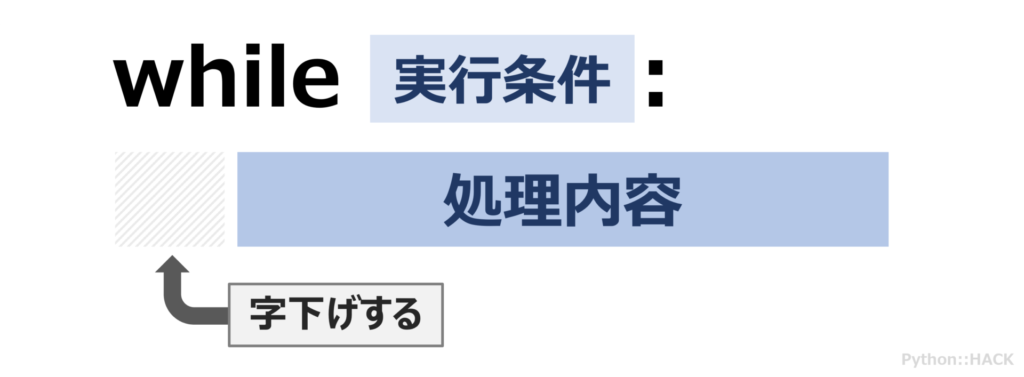
Consider the following example.
 //do_while_example2

#include <stdio.h>

int main() {
    int count = 1;
    printf("Do-while loop: \n");

    do{
       printf("%d\n",count);
       count++;
    }while(count<5);

    return 0;
}
In the above code cell:
-
countvariable is initialized to 1. - Use a do-while loop.
-
countvariable is incremented by 1 each time through the loop, and the loop condition is set tocount < 5.
Here’s a visual explanation of how the execution happens. Describes how do-while loops work and check the loop condition four times.

 Output

Do-while loop:
1
2
3
4
Using a while loop instead:
 //while_example2

#include <stdio.h>

int main() {
    int count = 1;
    printf("While loop: \n");

    while(count<5){
       printf("%d\n",count);
       count++;
    };

    return 0;
}
The diagram below illustrates the execution of a while loop. In this example, the while loop checks the loop condition five times.

 Output

While loop:
1
2
3
4
The while and do-while loops above have the same output, but there are some subtle differences.
In a while loop, the condition is checked first, followed by the loop body. So if you want to execute a loop K times, there must be exactly K executions where the loop condition is True . At iteration number K+1 , the condition becomes False and control exits the loop.
On the other hand, when using a do-while loop, the Kth loop condition is checked only after K has passed through the loop .
So why is this slight improvement helpful? 🤔
Suppose the loop condition is computationally expensive. Examples include recursive function calls and complex mathematical operations.
In such cases, if you want to repeat the loop body K times, it is beneficial to use a do-while loop instead.
Summary of While and Do-while
Let’s summarize the main differences we learned in a table. 👩🏫
| While loop | Do-while loop |
| Checking loop conditions: before executing the loop body | Checking loop conditions: after execution of loop body |
If the condition is False initially, the loop body will not execute. | If the condition is False initially, the loop body is executed only once . |
| The loop condition is checked K times for K passes through the loop. | The loop condition is checked K-1 times for every K passes through the loop. |
| When to use a while loop? – The loop should run as long as the condition is True – For inlet control loops – If the loop condition is not computationally expensive | When to use do-while loops? – The loop must execute at least once for the first False loop condition – For exit control loops – If the calculation cost of the loop condition is high |
Emulating Do While Loop Behavior in Python
From the previous section, there are two conditions to emulate a do-while loop:
- Statements within the loop body must execute at least once , regardless of whether the loop condition is
TrueorFalse. - The condition must be checked after executing the statements within the loop body. If the condition is
False, the control should break out of the loop: exit the control.
Infinite While Loop and Break Statement in Python
You can define an infinite while loop in Python as shown below.
 while True:
    pass

# Instead of True, you can have any condition that is always True

while always-True-condition:
   pass
The break statement allows you to break out of the loop body and transfer control to the first statement outside the loop body.
 while <condition>:
    if <some-condition>:
        break
In the first do-while loop example in C, the condition for continuing the loop is count < 0 . Therefore, the condition for breaking out of the loop is that the count value is 0 or greater than zero ( count >= 0 ).
Below is an emulation of a do-while loop in Python.
 count = 1
while True:
    print("Loop runs...")
    if(count >= 0):
        break
Python Do-while loop example
Returning to the example from the previous section, emulate the do while loop and rewrite it in Python.
#1 . Let’s look again at the example of printing the value of count variable if count is less than 5.
We know how to define an infinite loop so that the loop body executes at least once.
The loop should continue as long as the count is less than 5. So when the count reaches 5, we need to break out of the loop. So count == 5 termination control condition.
To summarize, it looks like this:
 count = 1
while True:
  print(f"Count is {count}")
  count += 1
  if count==5:
    break
Output
Count is 1
Count is 2
Count is 3
Count is 4#2 . You can also rewrite the number guessing game as a Python do-while construct.
Number guessing games validate the user’s guess against a predefined secret number. The user must guess the secret number within the maximum number of attempts allowed (e.g. max_guesses ).
The code should prompt the user for input, regardless of whether the user’s guess is correct or incorrect. This can be done using an infinite while loop.
So when do you need to break out of the loop?
The control must break out of the loop if any of the following occur:
- when the user guesses the number
- If the user has not guessed a number yet, but has exhausted the number of available guesses. Number of incorrect guesses by the user =
max_guesses.
The code cell below shows how to do that.
 import random

low, high = 5,50

secret_number = random.choice(range(low,high))

max_guesses = 10

num_guesses = 0

while True:
    guess = int(input("\nGuess a number:"))
    num_guesses += 1

    conditions = [num_guesses==max_guesses,guess==secret_number]

    if any(conditions):
        break
Instead of breaking out of the loop, you can add an explanatory print() statement to break out of the loop when each of the above conditions occurs.
 import random

low, high = 5,50

secret_number = random.choice(range(low,high))

print(secret_number)

max_guesses = 10

num_guesses = 0

while True:
    guess = int(input("\nGuess a number:"))
    num_guesses += 1

    if guess==secret_number:
        print("Congrats, you guessed it right!")
        break
    if num_guesses==max_guesses:
        print("Sorry, you have no more guesses left!")
        break
Two example outputs are shown below.
In this sample output, the break statement exits the loop when the user correctly guesses the secret number.
 # Sample output when secret_number = 43 and user gets it right!

Guess a number:4

Guess a number:3

Guess a number:43
Congrats, you guessed it right!
Here is another example output when the user reaches the maximum number of guesses available, but fails to guess the secret number correctly.
 # Sample output when secret_number = 33 and user fails to guess it right!

Guess a number:3

Guess a number:15

Guess a number:21

Guess a number:50

Guess a number:17

Guess a number:6

Guess a number:18

Guess a number:5

Guess a number:12

Guess a number:43
Sorry, you have no more guesses left!
conclusion
I hope this tutorial helped you understand how to emulate do-while loops in Python.
The key points are:
- Use an infinite loop to ensure that the loop body executes at least once. It can be a simple infinite loop such as while True, or it can be a while <condition> where the condition is always True.
- Check the exit condition inside the loop and use the break statement to break out of the loop on a specific condition.
Next, learn how to use for loops and the enumerate() function in Python.


![How to set up a Raspberry Pi web server in 2021 [Guide]](https://i0.wp.com/pcmanabu.com/wp-content/uploads/2019/10/web-server-02-309x198.png?w=1200&resize=1200,0&ssl=1)


