If you have trouble falling asleep, listening to your favorite songs or podcasts on Spotify can be very helpful. However, you’re more likely to fall asleep with your music streaming service playing all night. Of course, your phone’s battery backup will take some damage. That’s exactly where Spotify’s sleep timer comes in handy. This feature allows you to choose to pause music playback after a certain amount of time. So, if you want to learn how to use this feature on Spotify, here is a detailed guide. 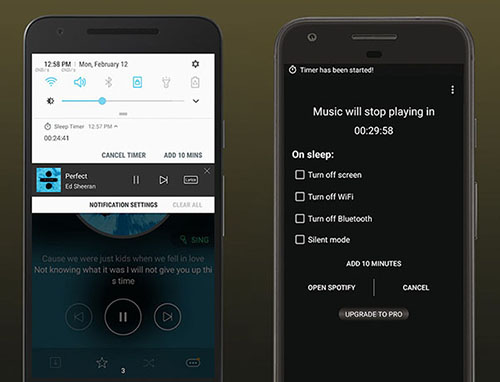
Use sleep timers with the Spotify Android and iOS apps
The sleep timer feature only works with the Spotify Android and iOS mobile apps. It doesn’t work in web or desktop apps. However, you can schedule the sleep time of your Mac or Windows PC’s native display to behave like this feature.
So, for those of you who use your phone to listen to music before bed, we’ve outlined the steps to set a sleep timer in the Spotify app. This demo uses an Android app, but the steps are the same for iPhone.
- Go to the Spotify app and play the song you want to listen to.
- Then, on the Now Playing screen, tap the three-dot menu in the top-right corner.
- In the pop-up menu that opens, scroll down to find the Sleep Timer option. Tap on it.
- Then select the desired sleep timer time. You can select a duration from 5 minutes to 1 hour . You can also choose to pause playback at “end of track” as shown below.
- Once you select a time period, you will see a small confirmation message that the sleep timer has been set.
Now you can learn how to set a sleep timer and save battery power while sleeping. Additionally, if it takes you a long time to fall asleep, you can repeat the same steps to extend the timer or even turn it off.
Spotify recently removed a number of free features for Indian users, but fortunately sleep timer was not one of them. This feature is very useful, but it would be great to have the option to set a custom period. This allows people who can’t fall asleep within an hour to have more control over the timer without having to constantly extend it.
If you found this guide helpful, please let us know in the comments below. On the other hand, if the Spotify web player is not working and does not work, please follow the linked guide. Additionally, if you want to show off your music taste to others, create Spotify n-gen Art.
FAQ
Q. How long has Spotify had a sleep timer?
Spotify introduced a sleep timer feature in 2019. Android users first took advantage of this feature, and later it became available to iOS users as well.
Q. Will Spotify’s sleep timer turn off my phone?
No, the Spotify sleep timer only stops the music, so your phone won’t keep playing music all night long.
Q. Does Spotify’s sleep timer stop the music?
Yes, the sleep timer feature is what stops the music after a certain amount of time. You can choose to stop the music after 5, 10, 15, 30, 45, or 1 hour. Additionally, you can also choose to stop the music after a specific track ends.


![How to set up a Raspberry Pi web server in 2021 [Guide]](https://i0.wp.com/pcmanabu.com/wp-content/uploads/2019/10/web-server-02-309x198.png?w=1200&resize=1200,0&ssl=1)


