We all love Pinterest for personal projects and inspirational tasks. It’s a great place for businesses to find footing to increase conversions, sales, brand awareness, and more.
But we often overlook the difference Pinterest can make for your business. 46% of Pinners use Pinterest to discover new brands. This means Pinterest is a great place for people to find their next purchase.
However, if you are a business, you will need a Pinterest Business account. Engage with new audiences, find new customers, see what strategies are working with your analytics dashboard, and discover what’s trending in your business hub.
A Pinterest Business account with unique tools and resources will help you stay ahead of the curve. This article explains the features and benefits of a Pinterest business account, steps to set up and optimize your business account, and a useful scheduler tool to enhance your social media scheduling.
Pinterest Business Account: Features

Pinterest business accounts are different from regular personal accounts. Learn about the unique features available with Pinterest Business accounts.
Pinterest Business Hub
Gain access to exclusive tools, tips, and insights to learn more about your audience, performance, and upcoming trends. You’ll also get small business resources to join the community and win the fight together.
Advertising on Pinterest
Discover a variety of Pinterest ad formats to fit your unique business goals. Set up audience targeting to reach the right audience. Create ads on mobile, work with approved partners for better results, and get an overview of Ads Manager.
Pinterest Analytics
Get insights about your account to amplify your posts and ads, see how people are interacting with your posts, and see engagement on all the Pins you post. You can also view your most popular Pins and build your media strategy with confidence.
Created by Pinterest
With a business account, you can create rich Pins tailored to specific business outcomes like conversions, offline sales, and awareness. Currently, three formats are known: articles, recipes, and products. Product Pins make it easy to display prices.
Pinterest Business Account: Benefits

A Pinterest business account is free, but it comes with a set of powerful features that make a big difference. Gain access to analytics that help you visualize and monitor performance and business direction.
More business for your business
Pinterest is the only social media platform where users can discover inspiration, new brands, and products. Therefore, utilizing this platform, which is a unique visual search engine, is highly beneficial for your business at any stage.
Understand your users
Pinterest is good at understanding customer preferences. Through our annual reports and curation of feeds, we offer businesses and brands a unique opportunity to position themselves in an engaging way.
Additionally, Pinterest’s Insights Hub gives you direct, actionable insights about your audience. Find out what strategies are working, what demographics they’re attracting, and what’s failing. You can also see who your overall audience is, what’s trending, and what the predictions are for the near future.
Improving website traffic
Want to get traffic to your website organically? Try Pinterest to get more links to your website. It has far more features than any other social media platform.
If you have a Pinterest Business account, you’ll be able to post a wealth of Pins. So, what’s so special about Rich Pins? Information from your site will be automatically synced. Therefore, all metadata related to rich pins is displayed on the pin itself. You need to set these. Once configured, you’ll be able to use more data to drive customers to your website.
You can also use product pins to display prices and ease your shopping experience.
Set up a Pinterest business account
If you don’t have a Pinterest profile or want to create a new business account from scratch, follow these steps.
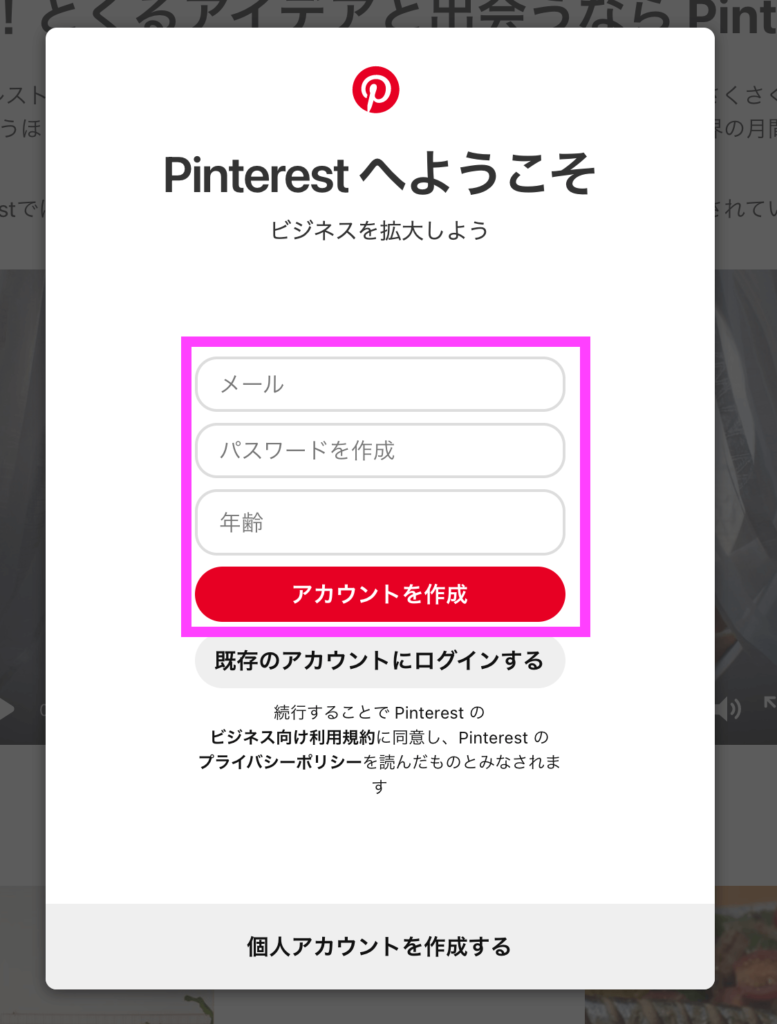
- Access your Pinterest business account
- Enter your details such as email address, date of birth, and password
- Click “Create Account”
- You can then set your profile photo, write a detailed description, and start your trip
If you already have a Pinterest account, you can upgrade to a professional account. Perform the following steps:
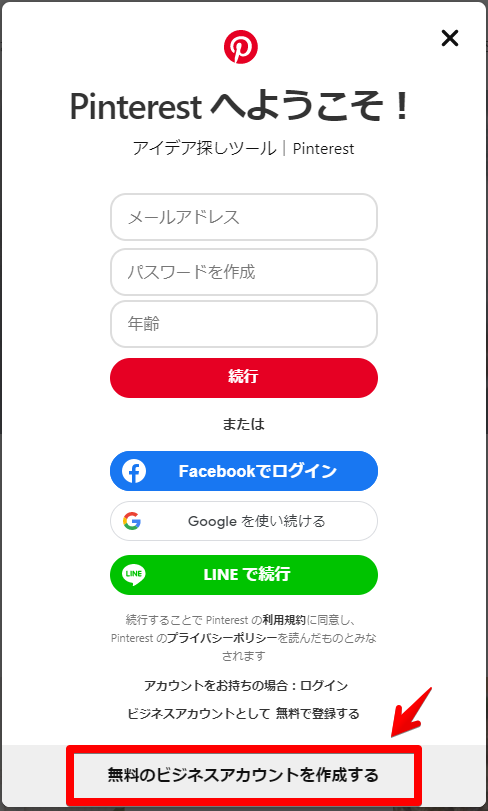
- Go to your personal Pinterest account
- Then go to Settings > Account Management .
- Scroll down to Change account > Convert to business account .
- Find out what benefits a business account has. Click “Upgrade” at the bottom
- Add your brand name and website link and click Next
- Choose a focus category for your brand (think genre) and select three goals
- Describe your business – blogger, contractor, local store, online marketplace, etc.
- Then start by sharing your ideas and introducing your brand.
- Get your Pinterest business account up and running in no time
Optimize your Pinterest business account
Creating a profile that builds trust and increases your chances of being discovered is critical to the success of your business. What good is a Pinterest business account if it doesn’t drive business?
So, once you’ve set up your profile, follow these steps to optimize it for Pinterest SEO.
- Start by adding a profile picture, preferably a close-up image, or your brand logo
- Next, add a cover image. Are you running out of ideas? Introduce your business tagline
- What follows is a rich explanation. This should be optimized with Pinterest-specific keywords.

- Add the username you want to search for
- Please also add pronouns.
- You can claim your own website and link to your blog/website.
- Optionally, you can also add your address, contact details (email and phone), and retail location
How to get the most out of your Pinterest account
The last step is to make sure you’re ready, but this step is all about giving it your all. What best practices and strategies should I follow to ensure my Pins are visible? Check out the tips below.
- Creating a board is also a big step. Choose a name that is easy to search and that conveys the intent of your post.
- State your purpose and add an SEO-optimized board description.
- Add an easily searchable pin title
- Don’t miss out on pin descriptions and alt text. Both should contain a few keywords with a reasonable amount
- When choosing images, don’t underestimate good lighting, high-resolution assets, and good framing.
- Please select an image with an aspect ratio of 2:3
- You can use your logo in your images, but please keep it sparing
- You can include a CTA to encourage your audience to take a specific action.
- With videos, don’t expect your audience to understand everything from the video. Also has subtitles
You can also review Pinterest best practices and recommended specs for pinning for best results.
Pinterest scheduler tool
#1. buffer
Schedule eye-catching Pins on Pinterest with Buffer , Pinterest’s official partner. Get all the edge you need to measure performance, schedule posts at the end of months, and make changes right away.
Buffer helps your business stay ahead of the curve by offering direct pin scheduling and pin performance tracking. It also has Canva built-in so you can generate all the marketing visuals you need to blow up your Pinterest business account.
In fact, Buffer also comes with a browser extension that lets you pin posts anywhere on the web. Buffer also lets you repurpose content from other social media channels like Facebook, Instagram, and LinkedIn and turn it into Pins.
#2. social pilot
As a Pinterest scheduler tool, SocialPilot lets you optimize your pinning efforts by setting schedules on different boards. Perfect for Pinterest virtual assistants and social media managers, SocialPilot helps you visualize your pinning strategy with powerful features.
It has built-in editing tools to help you edit the images you pin. You can also add website links, emojis, image alt text, GIFs, custom fields, and your own watermarks to personalize and customize your content. Plus, get ready to harness the power of AI to enhance your Pin creation.
You can also create enviable mood boards with a content calendar, keep a tally of your most popular pins, and save hashtag clusters that you can insert.
Additionally, SocialPilot expands collaboration opportunities. Convene your entire team, delegate tasks, and get approvals to better achieve your social media goals.
#3. Tailwind
If you’re looking for a Pinterest scheduler tool that lets you schedule pins for 7 days in under 20 minutes, Tailwind is the way to go. Visually plan and schedule your pins using the smart scheduler. This means engaging your audience when they are most active.
Additionally, you can utilize interval pinning to schedule pinning at preset healthy intervals. You can also rearrange all your destinations using the drag-and-drop calendar. It’s a marketing partner of Pinterest, so it’s 100% safe to use.
In fact, you can use its multi-functional browser extension to pin posts to multiple boards, create custom lists, and plan multiple boards. You can also actively monitor the performance of your pins using the best practices recommended by Tailwind.
Another notable feature of Tailwind is its sparkling community. Be part of a community serving over 20,000 niches and reaching new audiences. In fact, you can team up with new influencers by meeting them online.
Don’t forget to use the Pin Inspector to find your best performing posts so you can more easily reproduce what’s working. Even better, use the top pins report to see what’s working and what needs tweaking.
#4. Futweet
Pinterest is all about inspiration, and for businesses looking to make the most of it, Hootsuite can help. Beautify your boards and manage multiple accounts with a single dashboard. There are others too!
You can create private and public boards directly from Hootsuite. In fact, you can manage Pinterest as a team. Manage multiple accounts without compromising the power of a single, secure, unified workflow. You can also measure your business performance and understand how to connect the dots between website conversions and Pinterest activity.
The 30-day free trial is a good basis to see if this very business-friendly scheduler tool will work for your particular business. Additionally, Hootsuite is a good platform to easily get reports and advertising content.
Hootsuite is more powerful than other scheduler tools. OwlyWriter, your AI writing partner, helps you overcome writer’s block and create memorable content. Plus, stay up to date with your Pinterest game with a wide range of resource sources including blogs, resource libraries, webinars, and free tools.
Pinterest Business Account – Future Direction
Whether you’re a small business, a mid-sized company, or a large company looking to expand, a Pinterest Business account is the first step to success. Visually powerful and mobile-first features give your business and brand the power they need.
It’s important to post every day. If you don’t have time to set up your Pins every other day, you can use the Pinterest scheduler tool I mentioned earlier to schedule your Pins over several months.
Track your performance from a single dashboard, discover inspiration with built-in image and content generation tools, and share it with your audience. These tools give you all the support you need without having to hire a good social media manager.
Plus, a Pinterest Business account gives you a comprehensive view of analytics, ads, and upcoming trends, so you’re always prepared for what’s next. Make your Pinterest business account even more powerful with a scheduler tool that lets you launch months’ worth of content in minutes.
You can also explore the best Pinterest scheduler tools to maximize your pinning potential.


![How to set up a Raspberry Pi web server in 2021 [Guide]](https://i0.wp.com/pcmanabu.com/wp-content/uploads/2019/10/web-server-02-309x198.png?w=1200&resize=1200,0&ssl=1)


