Use language identifiers to understand the language used in text written in an unknown language.
You may have come across a text where you cannot determine the language used. Even if you can’t speak more than one language, you might want to learn about linguistics.
What is a language identifier?
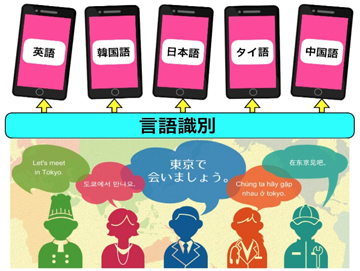
Language identifiers are tools that help you determine which language is used in a particular text. These tools perfectly assist in detecting texts written in unknown languages. Some tools support detection of multiple languages used in a single document.
Language identifiers are obtained from mobile apps, desktop software, and web-based tools.
How to use language identification tools
The usage of these language identification tools is very simple. Most tools usually come with an easy-to-use interface. You must enter text and it will match it against a database of language samples. All language identifiers are based on language identifier algorithms that allow language detection.
Some language identifiers also help identify the language of audio text and images. In these cases, you can upload image or audio files and let those files handle the rest of the identification work.
Let’s take a look at some of the great language identification tools you can use.
translated lab
Translated Labs is an automatic language identification tool that works online. This consists of a large text box in which you must enter your subject text. Identify the language of text in just seconds.
This tool allows you to determine the topic of texts written in unknown languages. Translate Labs is more than just a text language identifier. It also makes it easier to identify spoken words. It also helps detect the language of spoken text.
language identification app
If you are looking for a language identification app, Language Identifier is the best option. Just type your text in the space provided in this app and it will identify the language of your text. Identify natural language in text using probabilistic models.
It can detect some languages that most apps don’t support. For ambiguous text, a confidence score is also displayed. This application also works offline. However, at this time this app only works for text. Currently, it is not possible to transcribe images or spoken words.

Below are some of the languages that can be identified. There are many more languages than those listed.
- Afrikaans
- Chinese
- Danish
- Dutch
- English
- hindi
- Indonesian
- Irish
- italian
- Japanese
- maltese
- Mongolian
- Nepali
- persian
- polishing
- portuguese
- punjabi
- Russia
- Sindhi
- swedish
- Tajik
- tamil
- telugu
- Thai
- turkish
- Urdu
lexicool
Lexicool is another web-based language identification tool that helps you identify the language of your text. The reliability of the results depends on the length of the text you enter. The longer the text, the more reliable the results. Just paste the text into the input box.
Alphabets, symbols, and expressions used in texts are used for language identification. If the text you enter matches multiple languages, up to three languages will be suggested.
Tomedes
Tomedes is a language identifier that works in web-based scenarios. Enter text in the text box to generate results. The language detected for the text you enter is immediately displayed. Can be used with a set of text to detect multiple languages.

The languages that can be identified are:
- arabic
- Chinese
- Dutch
- French
- german
- italian
- Japanese
- Korean
- polishing
- portuguese
- Russia
- turkish
- spanish
- Vietnamese etc.
Cortical.io
Cortical.io is an effective language identification online tool that can identify and recognize over 50 languages. You can enter the text or URL of the web page you want to detect.
If the text input is Chinese, Arabic, Danish, English, German, French, Spanish, or Russian, the text is encoded numerically. This encoding then appears as a semantic fingerprint. These are displayed graphically as a grid.
Calcon
CalConT is a text analyzer and language identification tool that utilizes natural language processing algorithms. Based on this algorithm, it identifies the language of the input text.
Just type your text in the space provided and your language will immediately appear in the Detected languages box. You can also convert texts in unknown languages to English.
conclusion
If you also need help identifying the language of a particular text, you can try one of these tools. These do not take much time and you will see results within seconds.
You can also explore the best audiobook apps for Android and iPhone.


![How to set up a Raspberry Pi web server in 2021 [Guide]](https://i0.wp.com/pcmanabu.com/wp-content/uploads/2019/10/web-server-02-309x198.png?w=1200&resize=1200,0&ssl=1)


