ONLYOFFICE is one of the few Office suites that is open source and highly regarded in the document processing industry. The open source company has now released ONLYOFFICE DocSpace, a dedicated platform for collaborating on documents online. It’s a great solution for teams and businesses to collaborate with customers, clients, business partners, users, and contractors. It’s feature-rich, including advanced collaboration, granular permission controls, top-notch security, and unlimited compatibility. If you want to know more about ONLYOFFICE DocSpace, keep reading. 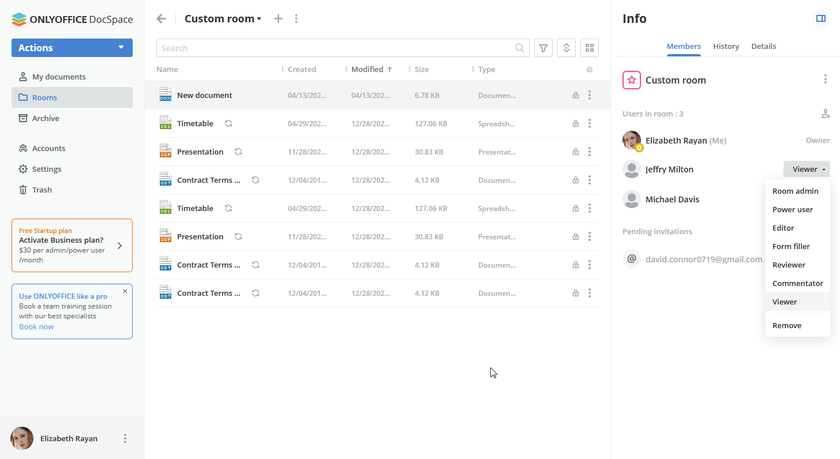
Easy in-room collaboration
As the company has made clear, the very intention behind the ONLYOFFICE DocSpace development is to make collaboration easier for teams and businesses. It’s a hub where users can connect, collaborate, work on documents , and get work done effortlessly. Basically, it’s a platform that connects people, whether it’s customers, partners, or employees on your team, and allows them to work on documents at the same time. All of this is based on the simple concept of a room.
ONLYOFFICE DocSpace has two types of rooms : collaboration rooms and custom rooms . Collaboration rooms, as the name suggests, are suitable for teams where members can collaborate on multiple documents in real time. Basically, collaboration rooms help you collaborate on documents, spreadsheets, presentations, and PDF files.
The best part is that you don’t have to give permissions to all members for each document. Just share a room invitation link with your team and everything in that room will be shared without having to manage permissions individually. With real-time co-authoring, you can lock paragraphs, track changes, communicate using the chat feature, and even make audio and video calls.
Custom rooms, on the other hand, give you the flexibility to predefine permissions for viewers, editors, form fillers, reviewers, and more, and apply those settings universally . Again, you don’t have to fiddle with documents and folders or manage permissions for each member in the room.
Custom rooms are suitable for businesses where administrators only want users to view content and request comments. Additionally, if you’re looking for more privacy, ONLYOFFICE is also working on a “Private Room” feature that allows you to handle sensitive and sensitive documents using strong encryption. 
maximum file compatibility
ONLYOFFICE DocSpace allows you to view and edit multiple document file formats within a room, along with advanced collaboration features. View, edit, and collaborate on multimedia files such as text, Word documents , spreadsheets , presentations , digital forms, PDFs, eBooks, and even video and audio.
View and edit document formats such as DOC, DOCX, ODT, TXT, HTML, XPS, XSV, XLSX, XLS, CSV, ODS, PPT, PPTX, PPSX, ODP. Simply put, ONLYOFFICE does a great job of maintaining compatibility with both old and new document formats. 
Introducing advanced security
One of the highlight features of the new ONLYOFFICE DocSpace tool is that it is completely open source, allowing users to audit the code and maintain transparency and trust. Not only that, but it’s also GDPR and HIPAA compliant . This means that all your personal data is stored safely and the highest security standards are applied for a safe environment. Uses AES 256-bit encryption to protect data on the server.
During data transfer, ONLYOFFICE employs the HTTPS protocol and TLS encryption algorithms to protect your data. Additionally, it has secure access and monitoring support, allowing you to flexibly define permissions and control access to documents. Additionally, activity tracking and audit reports improve traceability of all documents. Finally, definitions such as password strength, two-factor authentication, single sign-on, trusted email domains, and IP security are supported.

ONLYOFFICE DocSpace as SaaS
ONLYOFFICE DocSpace is offered as a Software-as-a-Service (SaaS) product, so you no longer need to host, maintain, and keep your online editor up to date. Hosted on Amazon Web Services (AWS) , ensuring reliability, stability, and uptime. The best part is that you can still connect to third-party cloud storage and DMS platforms like Dropbox, Nextcloud, OneDrive, and Google Drive for data backup.
As far as data backup is concerned, this point is resolved. However, if you need flexibility, ONLYOFFICE is also working on a self-hosted version, which will be available soon. 
ONLYOFFICE DocSpace: Plans and pricing
ONLYOFFICE DocSpace has two plans: Startup and Business. The Startup plan is completely free , but only supports one administrator, two power users, and can only have a maximum of 12 rooms. Plus, you get 2 GB of free file storage and no limit to the number of users in each room. However, please note that this is a limited time offer.
Moving to the Business plan costs $15 per administrator or power user . Here, there is no limit to the number of administrators, power users, or rooms in a space. Additionally, each administrator or power user gets 100 GB of cloud storage. Businesses can also apply their own branding and customizations, track user logins, monitor actions, and enable automatic backups.
If you choose a business plan, you will also receive technical support from the ONLYOFFICE team. This subscription plan typically costs $30 per admin/power user, but once again the company is offering a limited time offer for $15 per admin/power user. This is certainly appealing.
Check out ONLYOFFICE DocSpace


![How to set up a Raspberry Pi web server in 2021 [Guide]](https://i0.wp.com/pcmanabu.com/wp-content/uploads/2019/10/web-server-02-309x198.png?w=1200&resize=1200,0&ssl=1)


