SCORM is a great initiative to enable efficient e-learning. This allows you to easily distribute content to different LMSs and manage content from different sources.
Make your content accessible no matter where you or your learners are.
But what if you don’t follow SCORM?
You may need to spend significant time and money on your content to change its configuration, design, and make it compatible with other systems and use cases.
However, if your LMS and content are SCORM compliant, you can avoid these issues.
This article explains what SCORM is and how it can be beneficial.
What is SCORM?
The Shareable Content Object Reference Model (SCORM) refers to a set of specifications and technical standards for e-learning or web-based learning technologies. It is developed and maintained by the Advanced Distributed Learning Initiative (ADL) to standardize e-learning and accessibility.
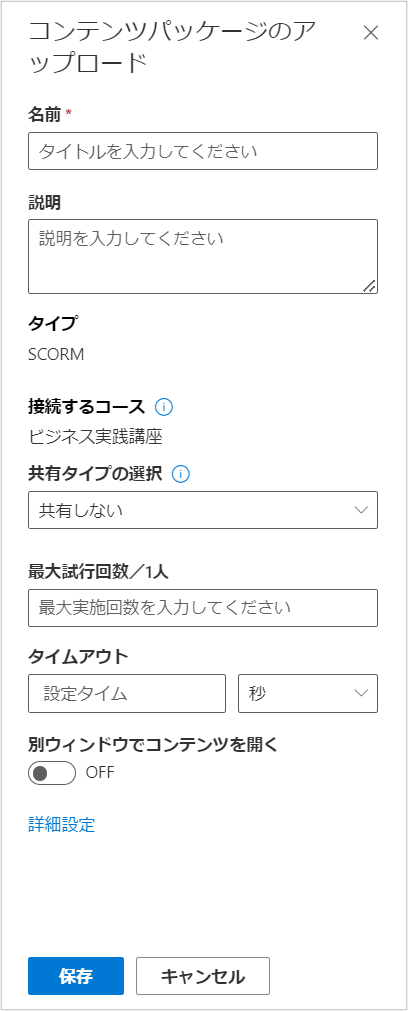
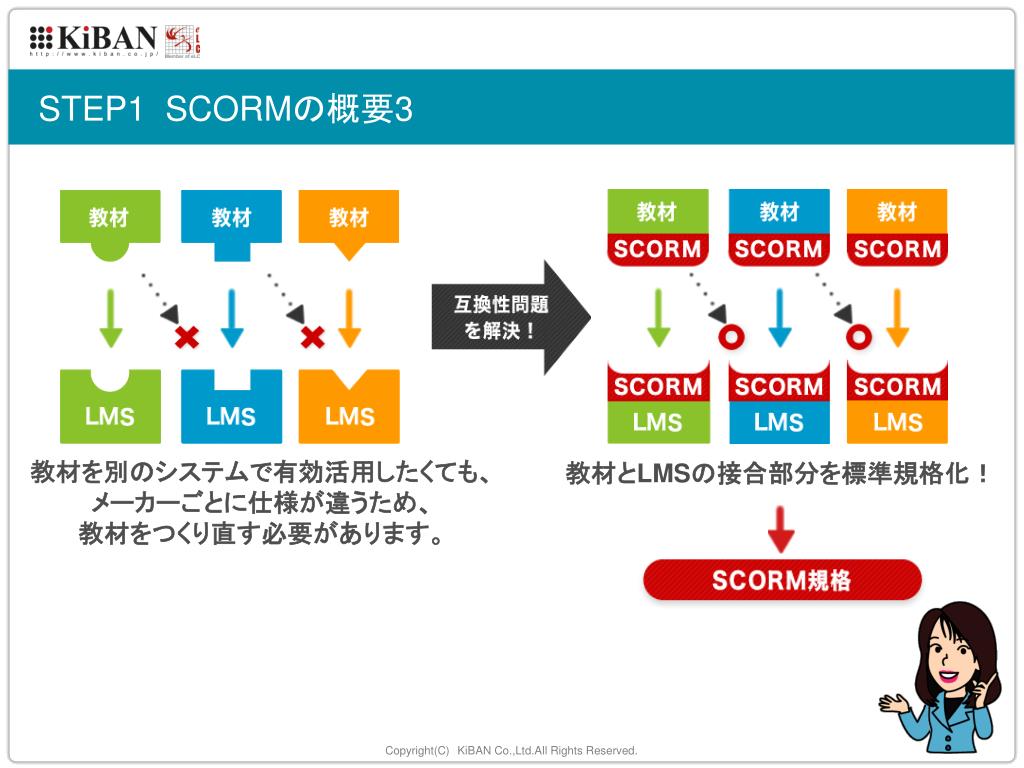
SCORM provides a data model and communication method that allows learning management systems (LMS) and eLearning content to work together. Additionally, it guides programmers to write code that works seamlessly with various e-learning software systems.
For example, if you have a PDF file, you don’t need to make sure it works with all PDF readers. Regular PDF files open in Adobe Acrobat Reader, as well as WPS Office and other PDF readers. This is because all PDF files are created based on certain standards that apply to all of them. Therefore, there is no need to create separate PDF files for other readers.
This is exactly how SCORM helps. This makes it easy for all eLearning LMSs and content to work with each other, just as the PDF standard ensures that all PDF files can be played on all PDF readers. If you use a SCORM-compliant LMS, all SCORM-compliant content will play. The reverse is also true. All SCORM-compliant content will play in all SCORM-compliant LMSs.
This will help you understand the following core terms:
SCORM Compliant : If your LMS is compliant with the SCORM standard, you can easily read and deliver content in SCORM packages. Additionally, there are different levels of SCORM compliance. Some SCORM-compliant LMSs can only read and deliver content, but cannot track learner scores, attendance, or progress.
SCORM Certified: Course content is said to be SCORM certified if it is certified by ADL.
SCORM types

Various SCORM versions have been released since 1999. So, to choose one, you need to understand your content needs and the types of content your chosen LMS will support.
Let’s take a look at the different types of SCORM.
SCORM 1.1: The first SCORM version made it clear that SCORM concepts were implementable. However, it needed to be more robust to accommodate a wider range of applications.
SCORM 1.2: This version is still widely used. Many issues that surfaced in previous versions have been resolved. Major LMSs support SCORM 1.1, and content authors are still creating learning courses that meet the standards of this version.
SCORM 2004: The current SCORM version, released in 2004, resolves many of the issues in SCORM 1.2 and provides new standards for content and API communication in the runtime environment.
In addition, SCORM 2004 allows you to share and utilize data about the progress of various learning objectives within your LMS. This version includes a more robust test suite to ensure better interoperability. It also gives content developers more control over the content of their eLearning courses.
You can use content objects to specify adaptive sequences of activities. Content developers can also use navigation specifications to define how learners move through course content.
SCORM 2004 has been revised over the years to resolve issues with previous releases and provide more functionality. After the first and second editions of SCORM were released in 2004, the next versions were the third and fourth editions with more features.
SCORM 2004 3 RD Edition: Released in 2005 to clarify various conformance needs and interactions between runtime environments and content objects for sequence processing. New conformance requirements have been introduced to enhance interoperability.
SCORM 2004 Fourth Edition : Released in 2009, it provided more stringent requirements for interoperability and flexibility regarding data persistence.
How does SCORM work?
Let’s understand the concept by breaking down the two components of SCORM.
Shareable Content Objects (SCO): SCORM is intended to create e-learning materials that can be easily “shared” on any system. Specifies how to generate SCOs that can be reused in multiple contexts and systems.
Reference Model (RM): SCORM is not actually a standard, but it is a model that references standards that the industry already has and can solve some of the problems. By referencing existing standards, this reference model tells content developers how to use them and provides easy access.
So no matter which SCORM version you use, everything works based on two principles:
Packaging content
Content packaging, also known as content aggregation model (CAM), defines how specific content is delivered.
All eLearning materials for your courses are organized into SCORM packages that contain all the data your LMS needs to launch and import your content. Information such as the name of the file and which file to launch is determined.
The file within the SCORM package is called the “imsmanifest” and tells the LMS how to launch or launch your content. This is actually an XML file that shows the hierarchical structure of the content from both the physical system and the learner’s perspective.
runtime communication
Runtime communication is essentially the data exchange that determines how your content interacts with the LMS when it plays. This is a two-way communication that exchanges data between the LMS and SCORM course content.

It also handles content tracking and distribution. So it has two main components.
- Content must “find” your learning management system
- Once that is done, you will need to communicate with the LMS through various ‘get’ and ‘set’ requests along with the associated vocabulary.
Here you can find answers such as the learner’s name, score, and whether they passed or failed the exam.
Example : A SCORM course can be personalized to request learner names from the LMS. Another example might be if a learner’s pass/fail status or final score needs to be provided to the LMS to reflect progress or course status.
Who uses SCORM and why?
SCORM is a powerful tool for online learners seeking distance learning or computer-based training. This allows creators to create content, organize it once, and continue using it in different systems and contexts without changing anything.
This is like a plug-and-play feature that is useful for both intra- and cross-organizational scenarios. This allows you to quickly reach a larger audience without having to invest time or money in changing various systems. As a result, organizations of all shapes and sizes are turning to SCORM to provide e-learning and online training to train and upskill students and employees.
To understand why using SCORM makes perfect sense, let’s take a look at some of its many benefits.
interoperability

When you create e-learning content, your client may require you to integrate it into their learning management system. Similarly, clients want to import important content into the LMS from multiple sources for LMS authors. If you don’t follow SCORM, this integration process with other providers can be costly and time-consuming.
SCORM solves this problem by allowing you to seamlessly integrate your content into your LMS. Therefore, being SCORM compliant ensures that your content can be played anywhere and in any LMS. Therefore, you can sell your e-learning products faster and reach your goals. It also helps organizations increase productivity and efficiency.
Reusability
SCORM allows you to reuse content across different systems and scenarios. This is extremely beneficial for content creators, as they no longer have to create different content for each system or context and spend time, effort, and money in the process. Instead, one piece of content plays across systems, no matter where your users are or which LMS they’re using.
accessibility
Accessibility is another goal of creating SCORM. SCORM-compliant courses are packaged to be portable across different systems. Deliver SCORM courses from anywhere without complex installation or reconfiguration. Provides technical guidelines to help catalog and discover remote content.
Therefore, by distributing your content to the majority of LMSs, you make your content accessible to a larger audience who can easily access it using an LMS or from anywhere. This way, your audience will think you care about them without feeling left out.
adaptability
SCORM provides adaptability by allowing content creators to create their own courses by manually combining and matching SCOs. Additionally, you can construct sequencing rules to adapt instruction as learners progress through the course based on their proficiency and input. Therefore, you can tailor the instructions to your organization’s and individual’s needs.
Additionally, SCORM can successfully adapt to changing technologies without the need for expensive documentation, redesign, or reconfiguration.
affordable price
SCORM helps reduce integration costs. Without SCORM, you would need to create different content for each LMS and distribute it to audiences using different LMSs. So you need to think about which content corresponds to which LMS and audience each time.
This requires modification and configuration to suit different needs. This is an expensive transaction and takes time. And we know that time equals money.
However, with SCORM, you can save on such expenses. You can integrate your content into any LMS to serve a wider audience. This increases sales and course adoption, increasing ROI.
When (and when not) to use SCORM

Being SCORM compliant is beneficial if:
- Building a large library of e-learning materials
- Integration with multiple vendors
- Manage and deliver eLearning content using an LMS
- Design eLearning courses that allow you to track learner performance and progress
- Creating e-learning content that can be reused in various situations
SCORM may not be suitable in the following cases:
- Designing simple and static web page content with hyperlinks
- Develop non-traditional eLearning courses, including advanced games and simulations.
- I only use one internal system and don’t want to change it
- I want to publish simple and easy-to-understand reference content.
How to create a SCORM package
If you want to easily create a SCORM package from scratch without using an authoring tool, follow these steps.
collect data
The first thing you need to do when creating a SCORM package is collect all the data you need for your course.
Since you’re creating a course for learners, it should answer their questions and help them master skills. Therefore, invest your time in collecting all the data for your course content, including text, video, audio, images, etc.
To do this, you can plan out your course content on paper or in a computer-based text editor. After you research and collect your data, organize it in a meaningful and relevant order. It should be arranged so that learners can understand and easily navigate the content.
Creating an HTML page
All content you create must be uploaded to your LMS and displayed in a web browser for easy access by your learners.
Therefore, before a course can be made into a SCORM package, it must be organized into HTML pages, like a website. Additionally, all media and text within the HTML page is linked so that it can be played on the platform.
However, this step can be difficult to perform if you are not familiar with the technology. In that case, we recommend that you use an authoring tool to create SCORM content.
However, if you know how to create an HTML version of your content, it’s fine to do it manually. For this:
- Create a course and structure it with Google Docs
- Go to File > Download > Web Page (.html, zip format).
Helps you download the HTML version of your content.
Once you run the HTML version in your browser, you can control its SCORM compatibility.
Adding a SCORM file
This step requires you to create multiple text files that describe your content using SCORM terminology and add them to the ZIP file along with your HTML content.
This step allows a SCORM-compliant LMS to easily process courses and record learning statistics after they are made accessible to learners.
Here’s one way to do that.
- You can download a sample SCORM package by visiting the website scorm.com.
- Analyze the file structure and how HTML content and SCORM files that describe the content are stored.
- Copy 5 files to the folder containing your HTML course –
adlcp_rootv1p2.xsd, ims_xml.xsd, imscp_rootv1p1p2.xsd, imsmanifest.xml, imsmd_rootv1p2p1.xsd - Open imsmanifest.xml using a text editor and carefully analyze it. This file contains important data such as the course title, SCORM version definition, and list of resources in the HTML file.
- Edit the title text and course content links. The first resource in this list is the primary HTML file that links to other resources mentioned in the course.
Package the results
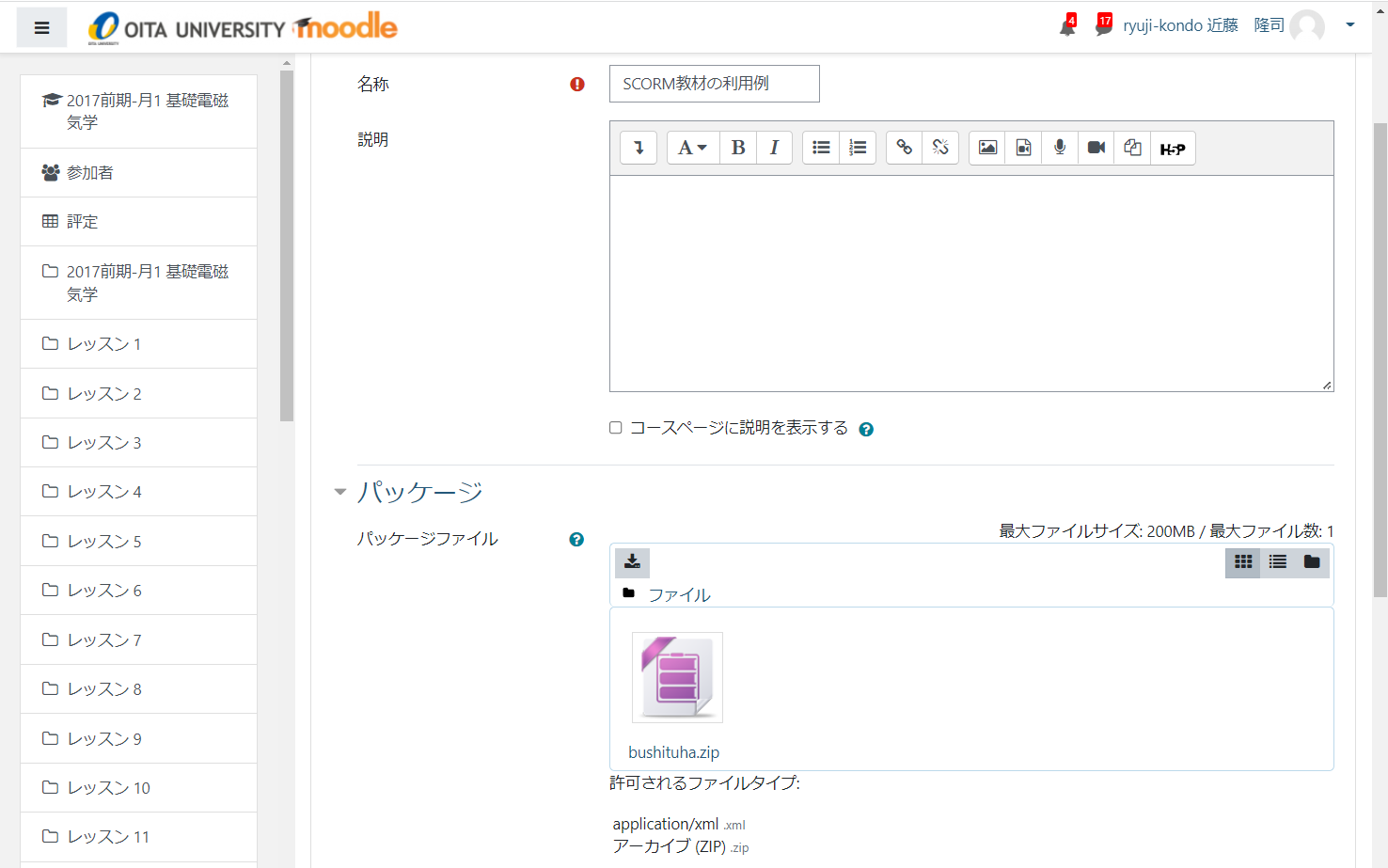
After editing the imsmanifest file, you can package it by adding the SCORM and HTML files to the ZIP file. Next, upload this ZIP file to the platform where you want to view your course and see if it’s processed.

However, if you want to avoid all this technicality, you can use the authoring tools as mentioned above. This method is also suitable if you are creating multiple SCORM courses with a large number of video and audio media files. Authoring tools like Adobe Captivate, iSpring Suite, and Camtasia allow you to convert your courses to SCORM-compliant HTML files and add them directly to your LMS platform.
Steps to play and test the SCORM package
Certain SCORM packages can be played directly from your computer’s web browser. Just unzip the ZIP file and launch it. If you are using an LMS, you can upload the SCORM package to your LMS. Click on the course to play.
We recommend testing your SCORM package before uploading it directly to your LMS or handing it off to clients. Because there may be certain errors in the course that need to be corrected. You can test your SCORM packages using platforms such as SCORM Cloud .
You can test the SCORM package by signing up for a free trial. You can upload and launch the package. Take this course like a learner and check your performance.
conclusion
SCORM is an effective tool for content developers. This helps you create courses and make them accessible to a wide audience.
Therefore, content creators use SCORM-compliant LMSs and content to help learners reap greater benefits while learning and improving their skills.


![How to set up a Raspberry Pi web server in 2021 [Guide]](https://i0.wp.com/pcmanabu.com/wp-content/uploads/2019/10/web-server-02-309x198.png?w=1200&resize=1200,0&ssl=1)


