Companies building modern cloud-native applications don’t rely solely on a single service to meet customer demands.
For example, developing solutions in the Microsoft Azure cloud likely involves multiple Azure services, making it difficult to diagnose and resolve performance issues.
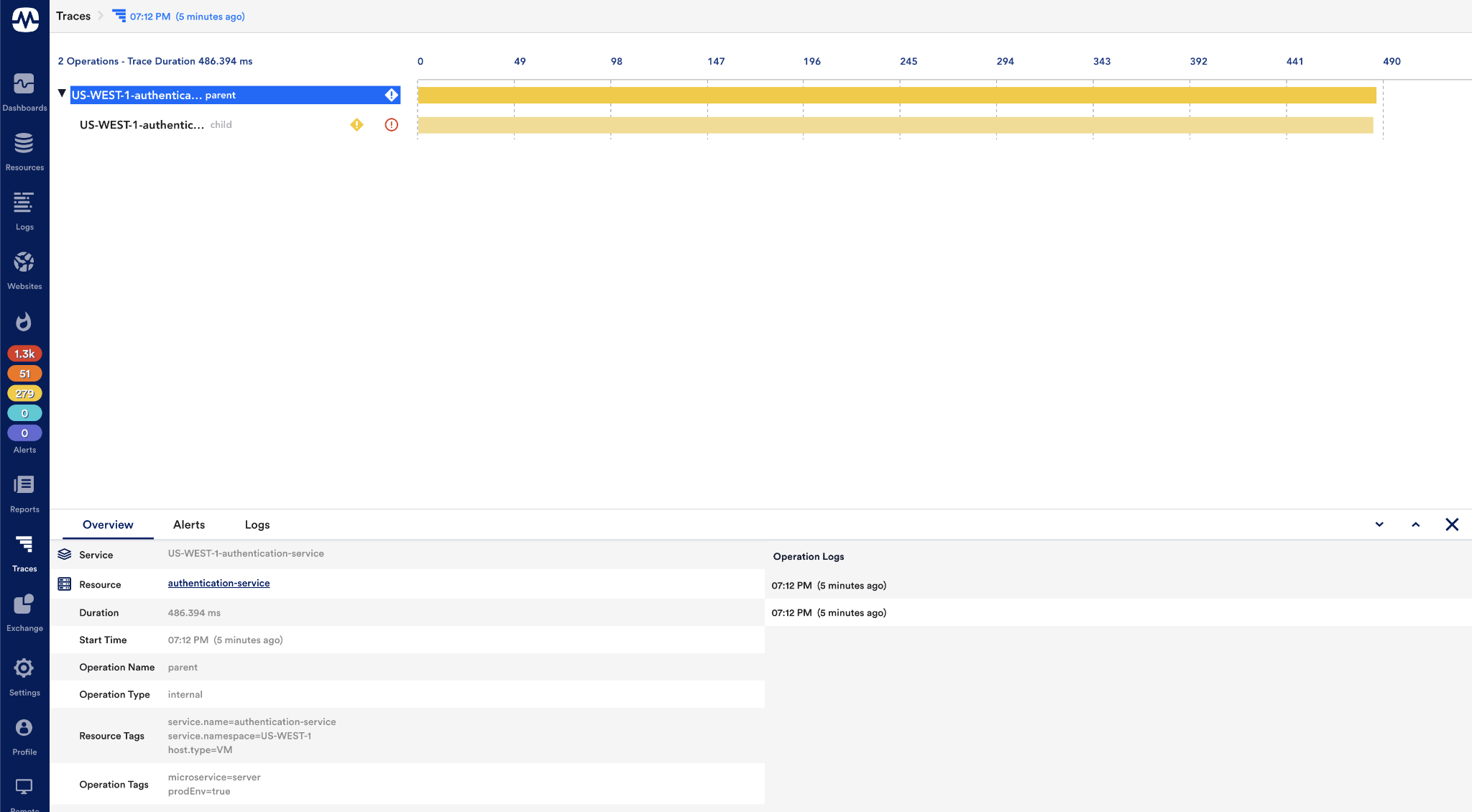
In these situations, distributed tracing becomes a useful option. It’s a way you can track and visualize user requests or messages flowing through distributed Azure services.
Why is it beneficial to use a distributed tracing solution?
Get a centralized view: Distributed tracing traces message requests and shows how services interact, providing a more holistic view of distributed Azure services. All teams can easily understand how applications are built and pinpoint failures.
Fix bottlenecks faster: When your application involves multiple Azure services, it can be nearly impossible to determine which service is the root cause of a problem. In that case, a distributed solution lends itself to the ability to provide end-to-end visibility. helps you identify and fix critical issues within minutes.
Focus on what’s more important: In most cases, organizations build custom tracing solutions, which can be tedious and time-consuming. Therefore, choosing an off-the-shelf solution that can handle monitoring and tracing can save a lot of time and allow developers to innovate and focus on what matters.
However, it is important to choose a distributed tracing tool that perfectly fits your business scenario. Here we list the top five tools to consider when achieving end-to-end tracing for complex Azure solutions.
- Serverless 360 BAM
- Application insights
- Site 24*7
- App dynamics
- new relic
Serverless 360 BAM
Serverless360’s Business Activity Monitoring is intended to provide operations teams with more than basic tracing capabilities for Azure and hybrid solutions. This allows business users to highly track, visualize, and identify failures in message flows across distributed Azure services, all in a sophisticated manner.
It’s also very easy to set up and use Serverless360 to design message transactions and instrument business processes for message tracking.
Features
- Visualize and correlate messages flowing across different Azure services for complex integrations.
- Identify the root cause and easily resolve message transaction failures by tracking all message transactions within your business solution.
- Any failed transactions that require immediate attention are separated into a separate Action Required tab.
- The repair and resubmit feature allows you to change the required values and reprocess for a successful resubmit.
- Quickly retrieve business-critical data from a few message transactions using simple queries.
- Real-time dashboards provide a visual representation of tracked data in graphs and reports.
- Monitor various aspects of transactions and receive instant alerts in case of threshold violations through your preferred notification channel.
- Built-in governance and auditing capabilities improve Serverless360 security
All tracking data and message details are stored in Azure SQL Database and Blob Storage and can be retrieved whenever needed.
Application insights
App Insights is one of the most popular features of Azure Monitors, which provides application performance management (APM) and proactive monitoring of live web apps. It’s also a powerful tool to help diagnose problems and understand your web app’s performance.
Features:
- You will be able to monitor application health and performance in real time.
- You can also drill down into the details of a specific failed request to determine the cause of the exception, making it easier to troubleshoot performance issues.
- The Application Maps feature in App Insights allows you to easily visualize relationships between different Azure services.
- You can associate App Insights with Log Analytics to log monitoring data for individual services related to your Azure applications.
App Insights is a good choice if you want to monitor individual Azure services rather than the entire application. It is impossible to track the entire message flow across distributed services. This has given rise to a number of third-party tools whose functionality is outlined below.

Site is open 24 hours a day, 7 days a week
The site is open 24 hours a day, seven days a week, and by tracking message transactions from one service to another, you can identify the root cause of any problem whenever it occurs. Site 24×7 distributed tracing maps the entire flow of message transactions across many services, rather than inspecting multiple services in an application individually. Overall, it provides all the essential features needed to achieve end-to-end visibility.
Features :
- Provides distributed tracing so you can monitor code flow across application boundaries.
- This tool helps you dig deep into traces to discover performance bottlenecks in your application/service.
- Identify and integrate logs from different services that impact key performance indicators (KPIs).
- Define benchmarks for your KPIs and determine corrective actions if they are violated.
new relic
Among New Relic’s many latest features, distributed tracing is one of the key features that brings together relevant data from different stacks of technology to reveal how the entire system works. It is a fully managed cloud-native application, so you get on-demand scalability without additional infrastructure support.
Features:
- Observe 100% of trace telemetry across distributed systems to reduce operational burden
- For traditional monolith apps and microservices-based apps, New Relic offers two different types of tracing: standard distributed tracing and infinite tracing.
- This allows you to trace telemetry from any source, including open source tools and standards such as OpenTelemetry, OpenCensus, and Istio.
- Spot anomalies quickly with real-time alerts and deep analysis in Slack and other collaboration tools.
App dynamics
App Dynamics is an application performance monitoring (APM) tool that supports a wide range of cloud vendors. When it comes to distributed tracing for microservices architectures, it offers a great deal of functionality to help you detect performance issues before they negatively impact your business.
Features:
- You can fully monitor your application’s dependencies, including databases, message buses, and containers.
- Real-time visibility into message flow for web and mobile applications
- The flow map shows the tiers, nodes, message queues, and databases in your application, and highlights message flows with status represented by different colors: red, yellow, and green.
- Diagnose performance issues and identify root causes at a glance
conclusion
All the tools mentioned above have their pros and cons, so it’s more important to try them out and choose the one that suits your logging and tracing needs. However, if you are specifically looking for a distributed tracing tool with extensive support for solutions built using the Azure cloud, Serverless360 BAM should be your first choice given all of its end-to-end tracing capabilities. .


![How to set up a Raspberry Pi web server in 2021 [Guide]](https://i0.wp.com/pcmanabu.com/wp-content/uploads/2019/10/web-server-02-309x198.png?w=1200&resize=1200,0&ssl=1)


