What is AMD FSR (FidelityFX Super Resolution) and how to use it?
At Computex 2021 earlier this month, AMD announced FidelityFX Super Resolution, a new spatial upscaling technology aimed at delivering high-quality, high-resolution gaming experiences. Touted as a competitor to NVIDIA’s DLSS 2.0, AMD received a lot of attention with this new technology. Well, AMD FSR has finally been released. According to current benchmarks, that’s pretty impressive. But before we get into the details of whether AMD FSR is compatible with DLSS, let’s cover everything you need to know about AMD FSR.
AMD FSR (FidelityFX Super Resolution): Explained!
This article details what AMD FSR is, how FidelityFX Super Resolution works, and how to enable it to improve your experience with supported games. Read the whole thing or use the table below to skip to the section you’re interested in.
What is AMD FSR?
AMD FidelityFX Super Resolution is AMD’s version of image upscaling technology aimed at improving the overall experience for gamers. Released as the latest effect in the AMD Fidelity FX Suite, the company’s open source image quality toolkit for game developers, AMD FSR cleanly stretches the edges of in-game objects to improve rendering when playing at high resolution. Creates the illusion of high resolution. Below.
According to AMD’s official blog , “With FidelityFX Super Resolution, gamers can expect an average of 2.4x performance improvement when running at 4K in ‘FSR Performance’ mode on select titles. ” Additionally, you will be happy to know that AMD FSR is not only available on PC, but also on next-gen consoles such as Xbox Series S/X and PS5.
AMD’s FSR is the company’s direct competitor to NVIDIA DLSS. NVIDIA DLSS is another popular upscaling technology that uses a unique set of methods to achieve similar results. However, although these technologies appear similar, several differences distinguish them from each other (more on this below).
Will AMD FSR improve gameplay?
absolutely. AMD FSR aims to deliver higher-resolution textures and better frame rates without putting too much stress on gamers’ GPUs, so players will see increased performance in FSR-enabled games ( Check the list below). The company tested FSR technology on the Radeon RX 6900 XT with popular games like Godfall, The Riftbreak, and more. You can use the table below to see a performance comparison with AMD FSR turned off and turned on.
FSR Benchmarks
Let’s use an example – let’s say you are playing a game on a 4K monitor with the output resolution set to 4K and FSR turned on. Depending on the mode selected, this technology ensures that the game runs at a lower resolution internally (e.g. 1080p), while FSR reconstructs and upscales the output image to near 4K .
This allows you to get 4K-like gaming output at higher frame rates and doesn’t require your graphics card to work as hard. Similarly, if you’re playing at 1080p resolution, you can get 1440p or higher quality without taxing your GPU.
FSR Modes
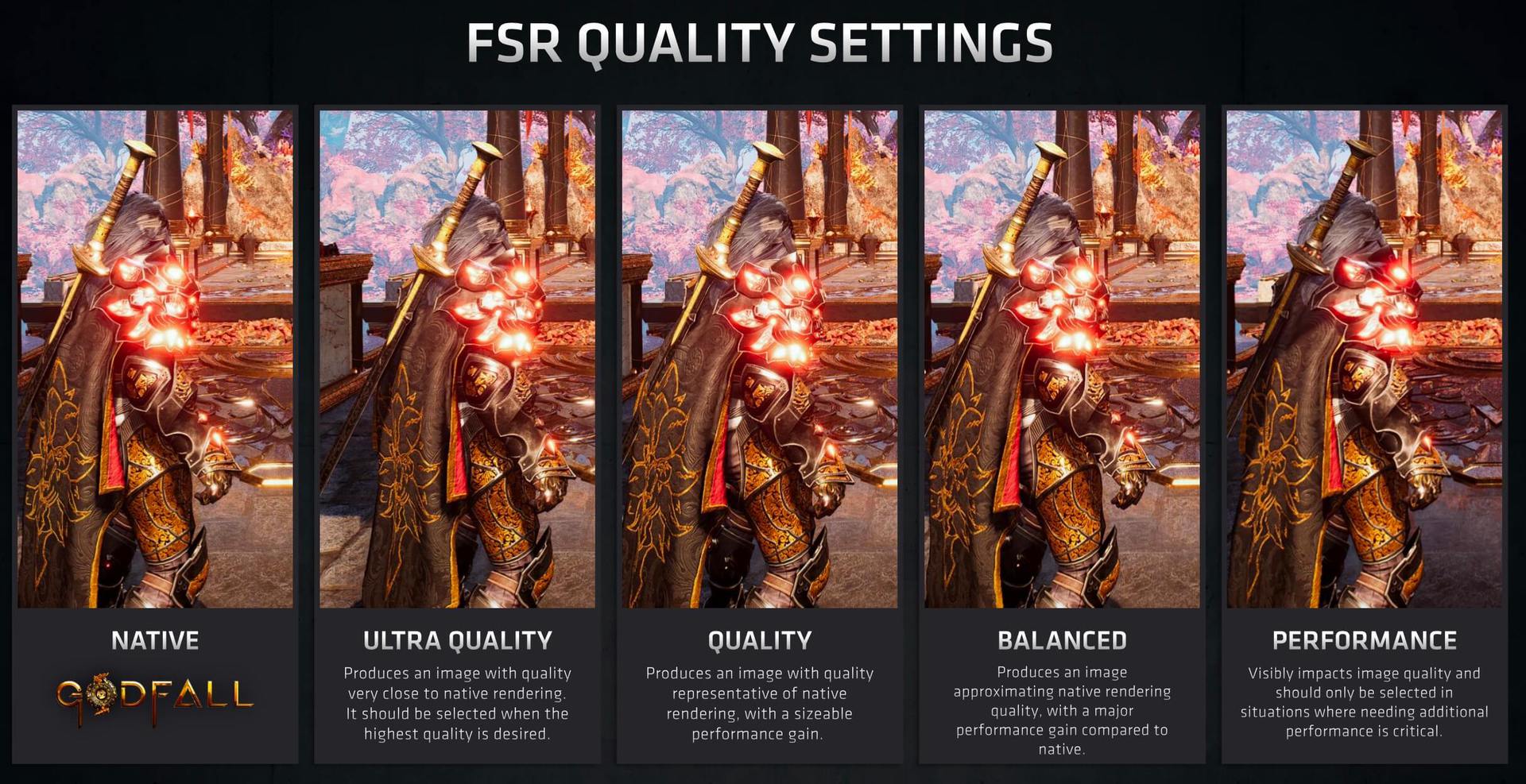
When it comes to customization, AMD FSR allows you to choose from four quality modes depending on your needs. These modes are Ultra Quality, Quality, Balanced, and Performance .
Ultra Quality mode provides resolution and detail closest to native resolution while increasing in-game frame rates. However, the output resolution will be a little lower than the resolution you set. So for a 4K resolution (3840 x 2160), FSR will render at 2954 x 1662 ultra quality.
Scaling Factors
If you select other modes such as Balance or Performance, the resolution will continue to decrease. Since FSR processes less input data , the frame rate will still be higher , but the image quality will be lower. Nevertheless, FSR works well at lower resolutions, which is a boon for users with older GPUs (especially during a global chip shortage).
Now that you have an overview of what AMD FidelityFX Super Resolution is, let’s discuss how it works.
How does AMD FSR work?
AMD FSR employs a “state-of-the-art algorithm” (described below) that runs images rendered at a resolution lower than the native resolution set by the gamer through two passes. This ensures that the output is polished and looks identical to its native resolution.
FSR Working
The first pass is called Edge Adaptive Spatial Upsampling (EASU). EASU is an edge reconstruction algorithm that attempts to recreate the input image and upscale it to a higher resolution.
The second pass, called Robust Contrast Adaptive Sharpening (RCAS), increases sharpness by extracting pixel details in the upscaled image and sharpening them further. Both processes occur simultaneously during the game’s graphics pipeline, so the results are instantaneous.
How is AMD FSR different from NVIDIA DLSS?
One of the biggest differences between NVIDIA DLSS and AMD FSR is compatibility. DLSS uses a method called temporal upscaling that relies on artificial intelligence (AI) and neural networks. DLSS collects data from multiple frames and combines the data together using AI on dedicated Tensor Cores in RTX GPUs. However, these dedicated cores only exist on NVIDIA RTX GPUs, so they are inherently unique. This means that DLSS is limited to NVIDIA RTX 20 and 30 series graphics cards.
AMD FSR, on the other hand, is available on a number of compatible graphics cards, from the old Radeon RX 460 to AMD’s latest Radeon RX 6000 series. But the biggest surprise here is that FSR is also compatible with NVIDIA cards from the 10/16 series to the latest RTX 30 series . So owners of GeForce GTX 1070 graphics cards who were disappointed in the lack of DLSS can now look forward to AMD’s new upscaling technology.
FSR operates at the shader level of the process, allowing compatibility with NVIDIA GPUs. AMD FSR does not collect data from multiple frames or rely on AI, but instead focuses on spatial upscaling . Additionally, this means it will be much easier for developers to implement FSR in their games, as there will be less data entry.
AMD FSR vs NVIDIA DLSS 2.0: Which is better?
AMD FSR improves visual quality and overall performance, but early benchmark scores show it’s not as much of a DLSS killer as advertised , and for good reason. As explained above, NVIDIA DLSS 2.0 is a dramatically different technology and employs a much more sophisticated means of upscaling content.
While FSR uses the received source image to upscale the content, DLSS provides various methods such as motion vectorsandtemporal feedback from previous frames. NVIDIA also has trained AI that uses 16K images to deliver a high-quality experience to gamers. DLSS provides better image resolution that is almost indistinguishable compared to AMD FSR. Additionally, with Nvidia releasing the RTX 3050 and RTX 3050Ti laptop GPUs, more products on the market now support DLSS technology.
Recent benchmarks for games like Godfall and Rift Breaker show that FSR makes the output image sharper and sharper, which is easily noticeable while gaming. When you really push FSR to its performance limits, you can end up with blurriness and softness in your game that isn’t present in DLSS. Please note that FSR was recently announced, so it will be some time before detailed benchmarks are available.
At first glance, AMD FSR is definitely an added bonus to the game’s existing supersampling setup, but it doesn’t pose much of a challenge to competitors like NVIDIA’s DLSS. However, given the open source nature of FSR, it is easy for game developers to implement the technology. Gamers who don’t have DLSS and want to find the perfect balance between smooth running games and better textures should use FSR on their PC.
How do I enable or turn on AMD FSR?
You don’t need to do anything special to enable AMD FSR. There is no need to adjust the settings of the Radeon graphics software on your PC. Be sure to install the latest drivers for your compatible GPU.
Then open a supported game and go to graphics or video settings. Here you’ll find a new “AMD FidelityFX Super Resolution” setting . Choose one of the four modes above and enjoy an ultra-smooth, high-fidelity gaming experience.
List of games that support AMD FSR (current and upcoming)
As of this writing, only seven games currently support AMD FSR (FidelityFX Super Resolution) technology on PC. These games are:
Anno 1800
Godfall
evil genius 2
kings hunt
terminator resistance
lift breaker
22 Racing Series
Upcoming games that support AMD FSR are:
Asterigos
baldur’s gate 3
DOTA2
edge of eternity
Far Cry 6 (check out the gameplay trailer along with other games announced at E3 2021)
Farming Simulator 22
foretold
mist
Necromunda: Hired Gun
Resident Evil Village
swordsman remake
Vampire the Masquerade: Blood Hunt
Additionally, AMD has partnered with over 40 game developers, so expect more games to support FidelityFX Super Resolution soon.
FSR Studio Partners GPUs supported by AMD FSR
Currently, the following graphics cards support AMD’s FidelityFX super-resolution technology. If AMD decides to introduce FSR support to more GPUs or adds new cards to its portfolio, we will update the list below.
Radeon RX 6000/6000M series
Radeon RX 5000/5000M series
Radeon RX Vega series
Radeon RX 500 series
Radeon RX 480/470/460
Ryzen 2000 series CPU with Radeon GPU
Nvidia RTX 30 series
Nvidia RTX 20 series
Nvidia GTX 10/16 series
Apart from Radeon and Nvidia graphics cards, AMD FSR will also be available on next-gen consoles such as:
Bonus: Request your favorite games to support AMD FSR
If you’re excited about AMD FSR but can’t find your favorite game in the list above, don’t worry. AMD has launched a small survey where you can fill out a short form asking for FSR support for up to three games . If enough people submit the same game, AMD will move it to the top of the list and provide FSR earlier than other titles. Fill out this official form and add your favorite games to enhance your gaming experience.
Enhance your gaming experience with AMD FSR today!
We hope this guide helps introduce you to the new AMD FSR technology. AMD is doing great when it comes to hardware. From its new Ryzen 5000 series GPUs to its upcoming Exynos chips powered by AMD GP, the company has captured the attention of gamers everywhere. As time passes, more benchmarks will be published online and we should get a better idea of how AMD FSR competes with DLSS. In the meantime, let us know what you think about FSR or if there’s anything we missed in the comments section below.
Definitely worth watching! Selected as the best video on “What is AMD FSR (FidelityFX Super Resolution) and how to use it”




![How to set up a Raspberry Pi web server in 2021 [Guide]](https://i0.wp.com/pcmanabu.com/wp-content/uploads/2019/10/web-server-02-309x198.png?w=1200&resize=1200,0&ssl=1)


