Perhaps one of the biggest challenges enterprises face when implementing end-to-end cloud solutions is the security of these complex infrastructures. That’s where Azure ExpressRoute comes in.
The future of digital transformation is in the cloud. To get the most out of the cloud within your organization, you need the right network infrastructure to meet your security, performance, and user experience needs.
Azure ExpressRoute is a service that provides a dedicated, private connection between an organization’s on-premises data center and Microsoft’s Azure cloud platform. This allows organizations to bypass the public internet and establish secure, high-bandwidth connections to Azure services.
ExpressRoute was introduced in 2014 to provide more reliable and secure connectivity to Azure for businesses with stringent network requirements. From 2015 to 2019, Azure ExpressRoute added support for additional features such as ExpressRoute Direct and services such as Office 365 and Dynamics 365.
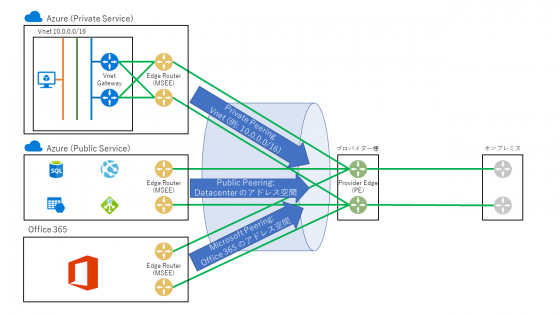
What is Microsoft Azure ExpressRoute?
Azure ExpressRoute is a service provided within Azure that consists of a private network connection that allows businesses to have extended functionality within the cloud in their data centers.
As an Azure service for non-public connectivity, ExpressRoute primarily promises improved security. Additionally, ExpressRoute provides faster speeds and lower latency compared to regular Internet connections. The probability of connection failure is also reduced.

Azure ExpressRoute provides connectivity at up to 100 Gigabits/sec of bandwidth. This service is intended for users who perform regular and high-speed data transfers. Contains business data migration and disaster recovery scenarios. Azure ExpressRoute is an essential building block when it comes to ensuring high availability.
Other applications for high-speed private connectivity using Azure ExpressRoute include applications in the field of high performance computing and sending large amounts of data for VMs between development or test environments and local production environments.
Azure ExpressRoute also provides a private cloud for storage and recovery. It is used to provide a development environment, etc. From here, you can also exchange large amounts of data with your local production environment over a private connection.
Connectivity to Microsoft cloud services includes both Microsoft Azure and Microsoft 365. Microsoft 365 is designed to be accessed securely over the internet. Therefore, the manufacturer recommends using Azure ExpressRoute in certain scenarios.
Azure ExpressRoute allows you to implement a reliable, high-speed connection to Microsoft Azure even when you are away from the public Internet, but it is fundamentally different from traditional VPN connections on the Internet. The most important differences are listed in the table below.
| Azure Express Route | VPN |
| Can only be used from the endpoint of the tunnel you created | Generally available from anywhere on the internet. |
| A private network with dedicated bandwidth | It is a public network where congestion can occur |
| Provides up to 10 Gbps of bandwidth | typically provides significantly lower bandwidth |
| Suitable for performance/latency-related dedicated cloud services for data centers. | Suitable for traditional cloud services for end users without special performance/latency requirements. |
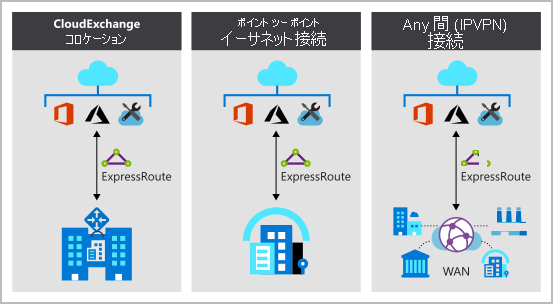
ExpressRoute connectivity options
ExpressRoute provides private peering through four different network connectivity options:

#1.Point -to-point network model
In this model, an organization establishes a dedicated connection between two points, such as between an on-premises data center and an Azure region. This connection can be used to transfer data between two points and is not shared with other organizations.
#2. Any-to-Any network model
In this model, an organization establishes a connection to an exchange point, such as a network switch or an Internet switch, which allows the organization to connect to other networks and services. This model allows organizations to establish connections with multiple partners and providers and exchange data with a wide range of partners.
#3.Virtual cross-connect network model
This model is similar to the any-to-any model. However, it includes virtual interconnects, or logical connections that allow organizations to connect to multiple networks and services without the need for physical cabling.
#4. ExpressRoute Direct Connection
This model includes a dedicated private connection between your organization’s on-premises resources and Azure. This connection is established using a direct link, such as a leased line or leased line, and is not shared with other organizations.
These models provide high-bandwidth, low-latency connectivity, which benefits organizations that need to transfer large amounts of data between on-premises resources and Azure.
Azure ExpressRoute features
Here are some of the key features of Azure ExpressRoute:
Connect to different Azure regions
ExpressRoute supports various Azure regions. These are globally distributed data centers containing storage, computing, and network resources. When Azure creates a specific resource, you select a specific location. The resource location determines the Azure data center or region in which the resource is created.
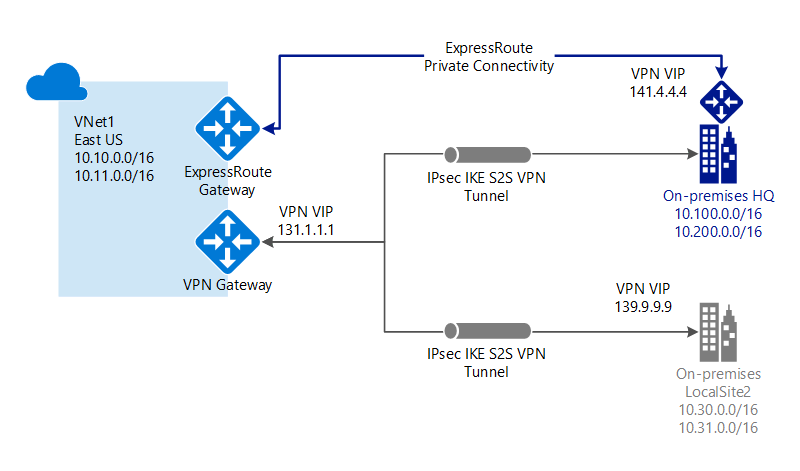
Microsoft uses the standard protocol BGP (Border Gateway Protocol) for ExpressRoute to enable dynamic routing. This allows routes to be exchanged between your local network, its Azure instance, and public Microsoft addresses. You can set up multiple BGP sessions within your network to suit different data traffic profiles.
ExpressRoute Local
When a user activates a local SKU (Stock Keeping Unit, here a unique ID), ExpressRoute enables inexpensive data transfer. Local SKUs allow you to deliver your data to one of the ExpressRoute locations near your target Azure region. As part of ExpressRoute Local, data transmission is already included in port charges.
ExpressRoute’s global reach
You can activate the ExpressRoute Global Reach feature to exchange between different local locations. For example, if a user operates multiple private data centers in different locations. These data centers can be linked through ExpressRoute circuits. As a result, data traffic between data centers flows through the Microsoft network.
physical isolation
ExpressRoute Direct provides physical separation options to meet the challenges of a variety of sensitive industries. This physical separation is particularly suited for exchanging sensitive information in industries such as banks and government agencies. Moreover, power distribution can be precisely controlled and tailored to different business units according to their requirements.
Key benefits of ExpressRoute
ExpressRoute enables private, high-bandwidth, low-latency networks between Azure and on-premises data centers or between Azure regions. There are several advantages over using the public internet to connect to Azure.
Improved security
ExpressRoute provides advanced, multi-layered security controls that keep your resources protected. Additionally, the connection does not go through the public Internet, making it vulnerable to attacks and other security risks.
Reduced latency
ExpressRoute connections have lower latency than connections over the public internet, which is beneficial for applications that require fast response times. Each ExpressRoute connection consists of two connections, each with two MSEEs (Microsoft Enterprise Edge Routers) in one of the ExpressRoute sites.
Users can also choose not to provide redundant connectivity. However, the connectivity provider itself uses redundant devices. This is to ensure a redundant connection to Microsoft.
Increased bandwidth
ExpressRoute connections can support higher bandwidth than is typically available over the public Internet, which is beneficial for applications that require large amounts of data transfer.
Improved compliance and control
ExpressRoute helps organizations meet compliance requirements that are not possible with public internet connections. ExpressRoute gives organizations more control over their network infrastructure and allows it to be customized to meet specific requirements.
Integration with on-premises resources
ExpressRoute allows organizations to seamlessly integrate Azure services and on-premises resources. Existing data center capacity can be expanded or linked via Azure ExpressRoute.
How to set up Azure ExpressRoute
Setting up Azure ExpressRoute requires establishing a corresponding connection with the help of a certified Azure partner and requires a number of steps.
#1.Determine connectivity requirements
The first step in setting up Azure ExpressRoute is determining your connectivity requirements, such as the bandwidth and location you need to connect to. You should also consider compliance requirements and other constraints that affect connectivity options, such as price. You can use the Azure pricing calculator to calculate estimated costs.
#2.Choose a connection provider
ExpressRoute connections can be established through Microsoft-approved connectivity providers such as network service providers (NSPs), Internet service providers (ISPs), or other partners. You must choose a provider that meets your connectivity requirements and is available where you need to connect.
#3. Purchase an ExpressRoute circuit
After you choose a connectivity provider, you need to purchase an ExpressRoute circuit . This circuit is a dedicated connection between your on-premises resources and Azure to transfer data.
#4. Configure ExpressRoute circuit
After you purchase your circuit, you must configure it according to your connectivity requirements. This may include specifying line bandwidth, location, and other options.
#5. Set up a connection to Azure
After configuring your circuit, you need to set up your Azure connection. This involves creating an ExpressRoute resource in Azure and connecting it to your circuit. You must also configure routing and network settings for your connection.
#6.Test and confirm the connection
Once the connection is set up, it must be tested and verified to ensure it works as expected. This may include transferring data between on-premises resources and Azure and verifying that the data was transferred correctly.
last word
You need as much information as possible to make decisions that involve major infrastructure changes. In this case, you need to know the most important elements of your business to decide whether to change your infrastructure.
So when you think about services that can securely support large-scale data transmission and meet the needs of your business, Microsoft Azure ExpressRoute definitely ranks as one of the top services that provides dedicated, secure connectivity.
You can also consider some of the best performance monitoring and troubleshooting tools for Azure.


![How to set up a Raspberry Pi web server in 2021 [Guide]](https://i0.wp.com/pcmanabu.com/wp-content/uploads/2019/10/web-server-02-309x198.png?w=1200&resize=1200,0&ssl=1)


