Did you know that hackers can make bank transfers and online purchases on your behalf without stealing your registration information?
We associate cookies with tracking and unsolicited online advertising, but cookies also store your search queries so you can visit websites without entering your username and password.

However, if someone intercepts your cookies, it can lead to a devastating cyberattack called session hijacking, which could put your sensitive data at risk in the hands of an attacker and help you find out what happened. It can cause a lot of damage beforehand.
Let’s see what it is and how you can prevent it!
What is session hijacking?
In session hijacking, an attacker intercepts and hijacks a session established between a user and a host, such as a web server, Telnet session, or other TCP-based connection. A session begins when you log into a website or application (such as a social networking website).
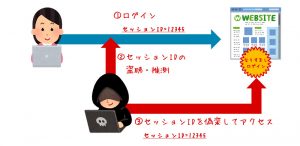
They last while you are in your account, view your profile, or participate in threads, and end when you log out of the system. But how does a web server know that every request a user makes actually comes from the user?
This is where cookies come into play. After logging in, send your credentials to the web server. This verifies who you are and provides a session ID using a cookie that is attached during the session. That’s why you don’t have to log out of the application every time you visit someone’s profile, and why online stores remember what you put in your shopping cart even if you refresh the page.
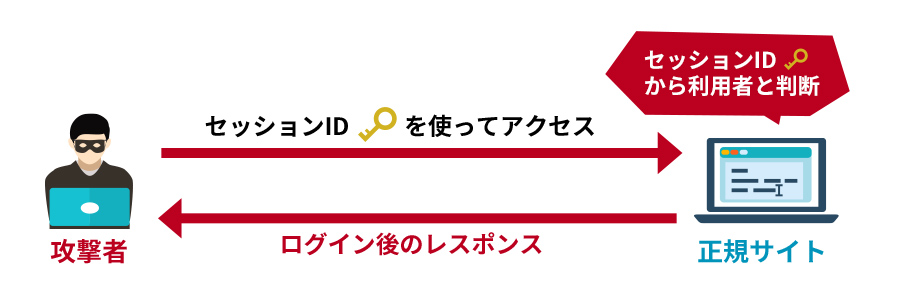
However, if an attacker uses special session management techniques or steals cookies, the session can be hijacked. Therefore, it is possible to trick a web server into believing that the request came from an authorized user.
Although the phenomenon of session hijacking became famous in the early 2000s, it remains one of the most common techniques used by hackers.
A recent example is the Lapsus$ Group , which became part of the FBI’s Most Wanted list this year. InfoStealer Maleware infection is used to hijack sessions.
Similarly, GenesisStore is an invite-only store run by a group of the same name that sells compromised cookie data, and its list includes over 400,000 bots.
Session capture type
Session hijacking can be divided into two main categories, depending on the perpetrator’s goals.
Active: In an active attack, an attacker hijacks a session and deprives a legitimate client of a connection to a resource. Depending on the site in the session, hackers can make purchases online, change passwords, or recover accounts. Common examples of active attacks include brute force attacks, XSS, and even DDoS.

Passive : In a passive attack, the attacker does not hijack or modify the session. Instead, it silently monitors data traffic between your device and its servers and collects all sensitive information. IP spoofing and malware injection are typically used to perform passive injection attacks.
How does session hijacking work?
HTTP is a stateless protocol. That is, the server has no memory of the client’s actions. Each new HTTP request coincides with a new unit of work. So, more simply, the server serves the page to the client without remembering the client’s previous requests.
But as you browse the web, you’ll find that ideally the application knows who the client is (more than enough). Thanks to this “memory” of the server, it is possible to create modern reservation areas for websites, online banks, webmail services, etc.
To do this, an adjunct was born that creates cookies, a stateless protocol like HTTP stateful.
stateful session
When you log in, web applications that use stateful sessions drop a session cookie. This means we rely on this cookie to track our clients. A unique code is stored within the cookie that allows us to recognize the client. For example:
SESSIONID=ACF3D35F216AAEFC
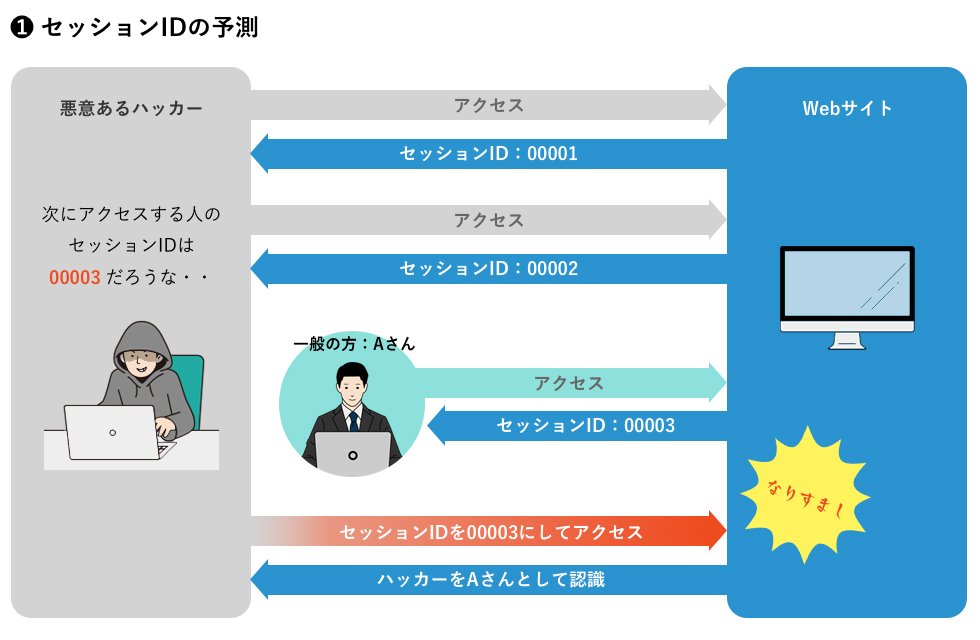
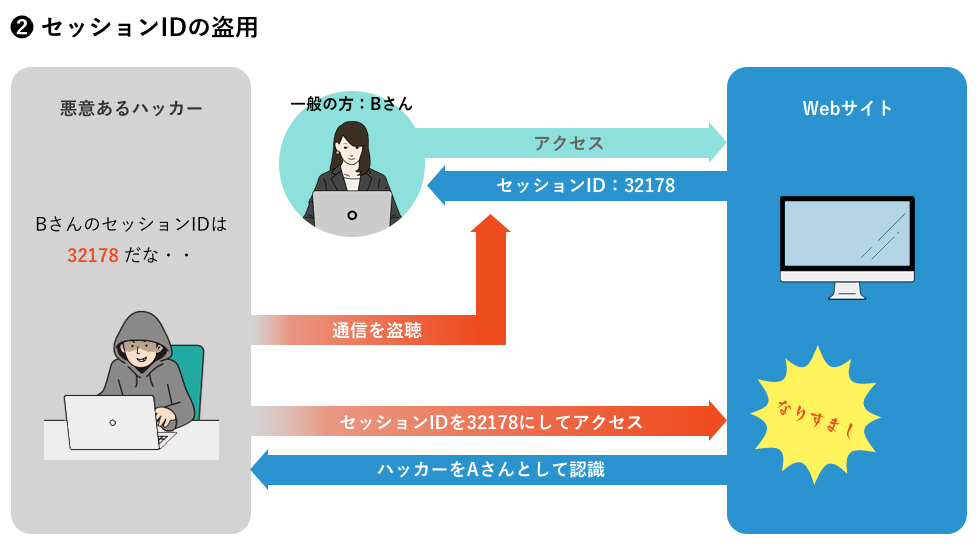
Anyone with the unique session ID or code above becomes an authenticated client of the server. If an attacker is able to obtain this identifier, they can exploit the session that was originally validated against the victim by eavesdropping on a legitimate session or hijacking the session completely, as shown in the diagram below. There is a possibility that This identifier is typically embedded in a URL, hidden form field, or cookie.
stateless session
As the web has evolved, solutions have emerged to manage server “memory” without using session cookies. For web applications where the front end and back end are well separated and only communicate via API, the best solution is a JWT, a signed token that allows the front end to use the API provided by the back end. (JSON web token).
JWTs are typically stored in the browser’s sessionStorage. This is an area of memory that the client keeps active until the tab is closed. Therefore, opening a new tab creates a new session (as opposed to cookies).
Stealing the client’s identity token allows them to steal the user’s session and perform session hijacking attacks. But how can you steal that token?
The techniques most used by hackers today are:
#1.Session side jacking
This method uses an insecure network to find the session ID. Attackers use sniffing (special software) and typically target public Wi-Fi and websites without SSL certificates, which are notoriously insecure.
#2.Session fixation
The victim uses a session ID created by the attacker. This can be done through a phishing attack (via a malicious link) that “fixes” the session ID.
#3.Forcible
This is the most time consuming and inefficient method. Hackers do not steal cookies during this attack. Instead, it tries all possible combinations to guess the session ID.
#4. XSS or cross-site scripting
Hackers exploit vulnerabilities in websites and applications to inject malicious code. When a user visits the site, a script is launched that steals the user’s cookies and sends them to the attacker.
#5.Malware injection
Malicious software can perform unauthorized actions on your device and steal personal information. It is also commonly used to intercept cookies and send information to attackers.
#6. IP spoofing
Cybercriminals change the source IP address of your packets to make it appear as if the packets are coming from you. A fake IP makes the web server think it’s the user and hijacks your session.
How to prevent session hijacking?
The possibility of session hijacking usually stems from the security of the website or application you use. However, there are steps you can take to protect yourself.
- Avoid public Wi-Fi, as free hotspots are a perfect place for cybercriminals. They usually lack security and can be easily spoofed by hackers. Needless to say, your data traffic is always full of potential victims to be compromised.
- Sites that do not use SSL certificates cannot encrypt their traffic and are therefore vulnerable. Check if the site is secure by looking for a small padlock next to the URL.
- Install an anti-malware application to protect your device by detecting malware and rats that can steal your personal information.
- Use official app stores or websites to download apps and avoid downloading malware.
- If you receive a message asking you to click a link that you don’t recognize, don’t click. This could be a phishing attack that can infect your device and steal your personal information.
There is little you can do about session hijacking attacks. But conversely, an application can recognize that another device is connecting with the same session identifier. And based on that, you can design mitigation strategies such as:
- Associates a technical fingerprint or characteristic of the connected device with each session to detect changes in registered parameters. This information must be fully encrypted and stored in a cookie (for stateful sessions) or a JWT (for stateless sessions).
- If the session is cookie-based, remove cookies with the HTTPOnly attribute to prevent access in case of an XSS attack.
- Configure an intrusion detection system (IDS), intrusion prevention system (IPS), or network monitoring solution.
- Some services perform secondary checks on your identity. For example, for each request, a web server can check whether the user’s IP address matches the last IP address used during that session. However, this does not prevent attacks from someone sharing the same IP address and can be frustrating for users whose IP address may change during a browsing session.
- Alternatively, some services change cookie values with each request. This significantly reduces the scope for an attacker to operate and makes it easier to identify if an attack has occurred but there may be other technical issues.
- Use a different multi-factor authentication (MFA) solution for each user session.
- Keep all systems up to date with the latest patches and security updates.
FAQ
Session hijacking involves impersonating a user, while spoofing involves replacing the user. In recent years, some security analysts have begun to characterize the latter as a type of session hijacking.
last word
Session hijacking is a method by which hackers can use session tokens, or cookies, to communicate with a server while impersonating a real user. In recent years, the frequency of session hijacking attacks has increased. Therefore, it is becoming increasingly important to understand such attacks and follow preventive measures. But just as technology develops, so too do attacks. Therefore, it is essential to create proactive mitigation strategies against session hijacking.
You may be wondering how much your data is worth on the dark web.


![How to set up a Raspberry Pi web server in 2021 [Guide]](https://i0.wp.com/pcmanabu.com/wp-content/uploads/2019/10/web-server-02-309x198.png?w=1200&resize=1200,0&ssl=1)


